


本文介绍如何使用方舟接口调用模型,构建 GUI Agent 应用,实现基于界面截图和提示词解析出可执行的动作意图。本文提供两种用法:GUI Agent 输出离散动作、纯 Grounding 单步定位,其中调用使用原生 OpenAI SDK(不传 tools),动作解析使用 ui-tars 官方解析器。
支持模型#
Doubao Seed 系列模型。
任务流程:观察-决策-动作的回环#
任务流程图#
让模型像人一样操作图形界面:看屏幕截图 → 想下一步做什么 → 动手执行 → 再看新的屏幕……如此循环,直到任务完成。

任务结束:输出纯文本且不含
<seed:tool_call>时,视为任务完成并结束回环,该纯文本即为最终答案。
本文给到的两种用法:
- GUI Agent(方式一):会执行上述步骤1-4,其中步骤4会解析成可执行动作,未将动作打到真实设备。
- 纯 Grounding(方式二):只执行上述步骤1-3,输出
click坐标。
关键约定#
不传 tools#
调用 chat.completions.create 时 不要 传 tools 参数。
原理:模型经训练会按 system prompt 里的动作说明,把动作块 直接写进 message.content,形如:
<seed:tool_call><function name="click"><parameter name="point" string="true"><point>900 11</point></parameter></function></seed:tool_call>
思维链在独立字段 message.reasoning_content(content 里没有 <think> 外壳)。若你传了 tools,会走 OpenAI function calling,输出格式完全不同,与本指南不兼容。
坐标转换#
所有点击 / 拖拽类坐标都是 0–1000 的相对坐标,与截图分辨率无关。
原理:模型输出 <point>x y</point>,其中 x、y 都在 [0, 999] 归一化空间内。相对坐标映射回真实像素的公式:
px = round(x / 1000 * width)
py = round(y / 1000 * height)
使用方式及选型#
| 用法 | 步骤 | 是否跑回环 | 要解决的问题 | 示例 |
|---|---|---|---|---|
| GUI Agent 用法 | 观察→决策→动作→再观察,循环推进 | 多轮回环 | 让模型自主一步步操作 GUI 直到完成任务 | 方式一 |
| 纯 Grounding 用法 | 给指令 + 截图,一次输出一个 click 坐标 | 单步,无回环 | 给定意图,只想找到目标元素在屏幕上的坐标 | 方式二 |
快速上手#
代码示例#
下面是本文用到的代码示例,可下载到本地按运行步骤快速体验。
运行步骤#
-
安装依赖
pip install -r requirements.txt -
配置凭证
cp .env.example .env编辑 .env 文件,填写以下信息:
- ARK_API_KEY:获取 API Key
- ARK_MODEL:选择 Doubao Seed 系列模型
-
运行示例
# 方式一:纯 GUI(输出离散动作) python3 examples/pure_gui_desktop_cua.py # 方式二:纯 Grounding 单点定位(在 grounding_samples 目录下) cd examples/data/grounding_samples python3 eval_sspro.py --ark --workers 6 --max-new-tokens 8192 --output-dir res_sspro_ark
方式一:GUI Agent - 纯 GUI#
模型根据 system prompt(任务框架 / 动作定义)、界面截图,对输出信息通过用官方解析器解析出动作。
| 任务 | 输出 |
|---|---|
| Open the Firefox browser and navigate to github.com. Complete the task step by step using the available GUI functions. | 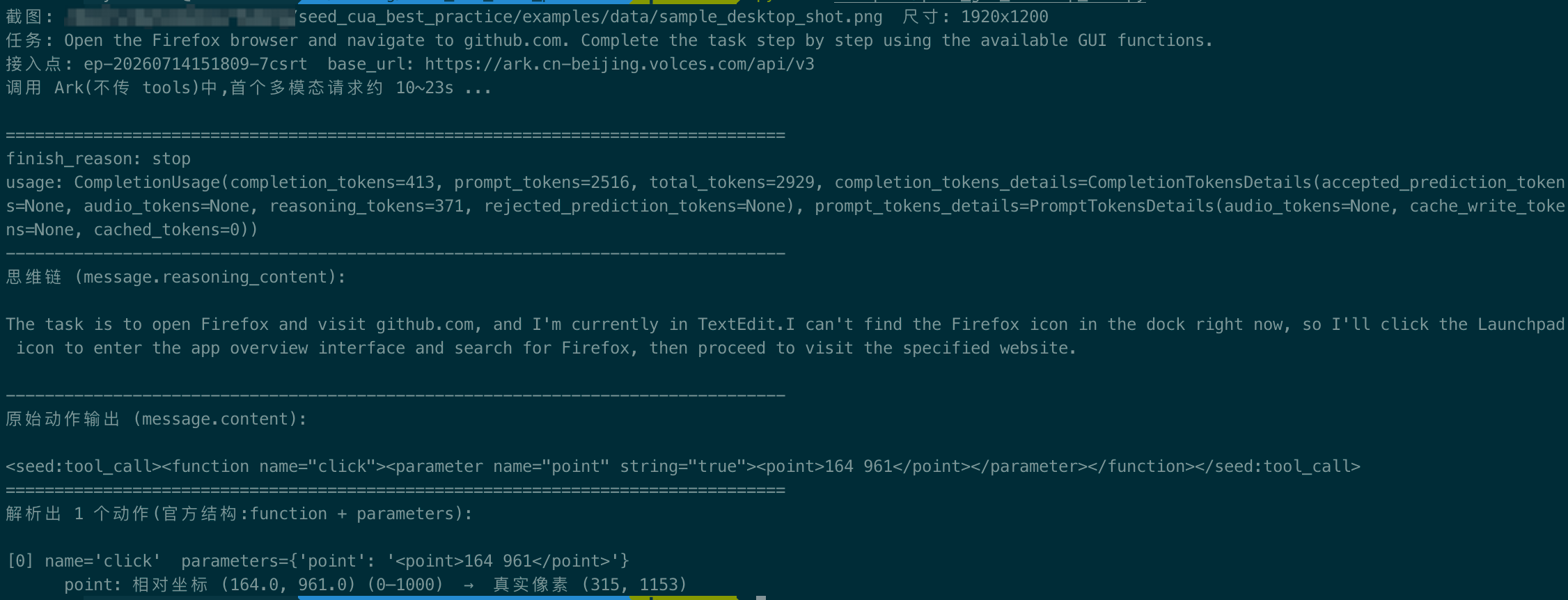 |
1. 图片读取与Base64编码#
读取界面截图,并将其转换为Base64字符串格式,以便通过 API 传输。同时返回图片原始尺寸 size=(img.width, img.height),供后续步骤做像素映射。
def encode_image_to_data_url(path: str | Path) -> tuple[str, tuple[int, int]]:
img = Image.open(path).convert("RGB")
size = (img.width, img.height)
buf = io.BytesIO()
img.save(buf, format="PNG")
b64 = base64.b64encode(buf.getvalue()).decode()
return f"data:image/png;base64,{b64}", size
2. 构造对话信息(系统提示词 + 用户信息)#
- system prompt 如下:
TASK_SP(任务框架):任务描述、历史动作、截图,请输出下一动作。FUNCTION_SP(动作定义):把 8 个离散动作(click / drag / hotkey / left_double / right_single / scroll / type / wait)以 JSON 格式列出,并给出<seed:tool_call>的调用格式。
- 用户信息:构造包含
text、image_url的多模态 user 消息。
需要构造的 message 如下:
messages = build_system_prompt() + [build_user_message(task, data_url)]
# 展开后:
# {"role":"system","content":TASK_SP},
# {"role":"system","content":FUNCTION_SP},
# {"role":"user","content":[{"type":"text",...},{"type":"image_url",...}]}]
核心代码
PURE_GUI_FUNCTIONS = """{"name": "click", "description": "Mouse left single click action.", "parameters": {"type": "object", "properties": {"point": {"type": "string", "description": "Click coordinates. The format is: <point>x y</point>"}}, "required": ["point"]}}
{"name": "drag", "description": "Mouse left button drag action.", "parameters": {"type": "object", "properties": {"start_point": {"type": "string", "description": "Drag start point. The format is: <point>x y</point>"}, "end_point": {"type": "string", "description": "Drag end point. The format is: <point>x y</point>"}}, "required": ["start_point", "end_point"]}}
{"name": "hotkey", "description": "Press hotkey.", "parameters": {"type": "object", "properties": {"key": {"type": "string", "description": "Hotkeys you want to press. Split keys with a space and use lowercase."}}, "required": ["key"]}}
{"name": "left_double", "description": "Mouse left double click action.", "parameters": {"type": "object", "properties": {"point": {"type": "string", "description": "Click coordinates. The format is: <point>x y</point>"}}, "required": ["point"]}}
{"name": "right_single", "description": "Mouse right single click action.", "parameters": {"type": "object", "properties": {"point": {"type": "string", "description": "Click coordinates. The format is: <point>x y</point>"}}, "required": ["point"]}}
{"name": "scroll", "description": "Scroll action.", "parameters": {"type": "object", "properties": {"point": {"type": "string", "description": "Scroll start position. If not specified, default to execute on the current mouse position. The format is: <point>x y</point>"}, "direction": {"type": "string", "description": "Scroll direction.", "enum": ["up", "down", "left", "right"]}}, "required": ["direction", "point"]}}
{"name": "type", "description": "Type content.", "parameters": {"type": "object", "properties": {"content": {"type": "string", "description": "Type content. If you want to submit your input, use \\n at the end of content."}}, "required": ["content"]}}
{"name": "wait", "description": "Wait for a while.", "parameters": {"type": "object", "properties": {"time": {"type": "integer", "description": "Wait time in seconds."}}, "required": []}}"""
# 动作定义解析成 schema 列表,供官方解析器 parse_xml_action_65 做软校验。
PURE_GUI_SCHEMAS = functions_block_to_schemas(PURE_GUI_FUNCTIONS)
# think_token 是一个约定的哨兵串,把思维链和答案分隔开。线上就是这个常量。
THINK_TOKEN = "think_never_used_51bce0c785ca2f68081bfa7d91973934"
TASK_SP = """You are provided with a task description, a history of previous actions, and corresponding screenshots. Your goal is to perform the next action to complete the task. Please note that if performing the same action multiple times results in a static screen with no changes, you should attempt a modified or alternative action."""
FUNCTION_SP = f"""## Function Definition
- You have access to the following functions:
{PURE_GUI_FUNCTIONS}
- To call a function, use the following structure without any suffix:
<{THINK_TOKEN}> reasoning process </{THINK_TOKEN}>
<seed:tool_call><function name="example_function_name"><parameter name="example_parameter_1" string="false|true">value_1</parameter></function></seed:tool_call>
## Important Notes
- All required parameters must be explicitly provided.
- The string attribute within the parameter tag specifies the type of the parameter value. For instance, if the value is an integer, number, or boolean, set string="false". If the value is a string, set string="true". Example:
<parameter name="parameter1" string="false">1</parameter>
<parameter name="parameter1" string="false">1.0</parameter>
<parameter name="parameter2" string="false">true</parameter>
<parameter name="parameter3" string="true">This is a test 1.</parameter>
- For complex parameter types, such as lists or objects, set string="false" and provide the parameter value in JSON format. Example:
<parameter name="parameter4" string="false">{{"key1": "value1", "key2": "value2"}}</parameter>
<parameter name="parameter5" string="false">[1, 2, 3]</parameter>"""
def build_system_prompt() -> list[dict]:
"""纯 GUI 主线的两段式 system prompt(任务框架 + 动作定义)。"""
return [
{"role": "system", "content": TASK_SP},
{"role": "system", "content": FUNCTION_SP},
]
def build_user_message(task: str, data_url: str) -> dict:
"""构造一条多模态 user 消息:文本任务 + 一张截图。"""
return {
"role": "user",
"content": [
{"type": "text", "text": task},
{"type": "image_url", "image_url": {"url": data_url}},
],
}
messages = build_system_prompt() + [build_user_message(task, data_url)]
3. 调用模型推理(不传 tools)#
调用模型(不传 tools):模型会按 system prompt 把动作块写进message.content(如<seed:tool_call>),思维链放在message.reasoning_content。
核心代码:
def call_ark(client, model: str, messages: list, max_tokens: int = 2048,
temperature: float = 0.7) -> ModelReply:
"""调用 Ark 的 chat.completions,**不传 tools**。"""
resp = client.chat.completions.create(
model=model,
messages=messages,
temperature=temperature,
max_tokens=max_tokens,
)
choice = resp.choices[0]
msg = choice.message
return ModelReply(
content=msg.content or "",
reasoning_content=getattr(msg, "reasoning_content", None) or "",
finish_reason=choice.finish_reason,
usage=resp.usage,
)
4. 解析动作#
动作解析#
动作解析直接调 ui-tars 包的官方解析器,返回官方结构 [{"function":..., "parameters":...}],按出现顺序排列,自动兼容多个 <seed:tool_call> 块、单块多 <function>(串行 / 并行 / 多动作预测)。
from ui_tars.action_parser import parse_xml_action_65_with_validate_soft
def parse_actions(content: str, tool_schemas: list[dict]) -> list[dict]:
return parse_xml_action_65_with_validate_soft(content, tool_schemas)
动作坐标映射#
遍历每个动作,逐个打印 name 与 parameters。将模型返回的相对坐标映射回真实像素坐标。
核心代码
def extract_point(value: str) -> tuple[float, float] | None:
"""从 `"<point>x y</point>"` 里取出 (x, y) 的 0–1000 相对坐标;取不到返回 None。"""
if not isinstance(value, str):
return None
inner = value.replace("<point>", "").replace("</point>", "").strip()
parts = inner.split()
if len(parts) == 2:
try:
return float(parts[0]), float(parts[1])
except ValueError:
return None
return None
def rel_point_to_pixel(point: tuple[float, float], image_size: tuple[int, int]) -> tuple[int, int]:
"""把 0–1000 相对坐标映射回真实像素坐标。"""
x, y = point
w, h = image_size
return round(x / 1000.0 * w), round(y / 1000.0 * h)
actions = parse_actions(reply.content, PURE_GUI_SCHEMAS)
if not actions:
# 没有任何 <seed:tool_call> 动作块 = 模型以纯文本收尾,视为交互结束。
print("响应里没有 <seed:tool_call> 动作:模型以纯文本作答,视为交互结束(默认结束方式)。")
print("最终答复文本:\n")
answer = reply.content.split(f"</{THINK_TOKEN}>")[-1].strip()
print(answer or reply.content)
return 0
print(f"解析出 {len(actions)} 个动作(官方结构:function + parameters):\n")
for i, act in enumerate(actions):
name, params = act["function"], act.get("parameters", {})
print(f"[{i}] name={name!r} parameters={params}")
# 坐标类参数(point / start_point / end_point)从 "<point>x y</point>" 取 0–1000 值并映射像素。
for pname, pval in params.items():
rel = extract_point(pval)
if rel is not None:
px, py = rel_point_to_pixel(rel, size)
print(f" {pname}: 相对坐标 {rel} (0–1000) → 真实像素 ({px}, {py})")
return 0
方式二:纯 Grounding (单步定位)#
不跑回环,只做单步定位:一条指令 + 一张截图 → 模型输出一个 <seed:tool_call> 的 click 动作,坐标是 0–1000 相对坐标,按截图宽高换算成像素,即定位到目标元素。示例脚本是批量评测, 用一批带标注的样本跑分做接入对齐校验,单样本处理在 process_item。
与 GUI Agent 的本质区别:Grounding 是单步定位,输入端就给定了截图、输出端只给一个坐标, 没有多轮回环、不判结束、也不真正执行动作。它回答的是给定意图,目标元素在屏幕上的哪个坐标, 而不是自主一步步把任务做完。拿到坐标后要不要点、点了之后怎么办,由用户自己的逻辑决定。
针对方式二的步骤不详细介绍,您可以查看代码示例。下面重点介绍一下构造对话信息。
动作空间只保留 click:
build_click_function_prompt(decimals):system prompt,含click定义 +<seed:tool_call>调用格式 + 坐标精度说明。build_user_prompt_template(decimals):user 模板。
核心代码#
核心代码
def build_click_function_prompt(decimals: int) -> str:
if decimals >= 1:
coord_note = (
"- Coordinates are normalized to the range [0, 1000] and may include one decimal place "
"(e.g. <point>123.4 567.8</point>) to allow finer, sub-pixel grounding granularity.\n"
)
else:
coord_note = "- Coordinates must be integer points normalized to the range [0, 1000].\n"
return (
"## Function Definition\n\n"
"- You have access to the following functions:\n"
f"{CLICK_FUNCTION_SPEC}\n\n"
"- To call a function, use the following structure without any suffix:\n\n"
f"<{THINK_TAG}> reasoning process </{THINK_TAG}>\n"
'<seed:tool_call><function name="click">'
'<parameter name="point" string="true"><point>x y</point></parameter>'
"</function></seed:tool_call>\n"
"## Important Notes\n"
"- All required parameters must be explicitly provided.\n"
f"{coord_note}"
"- The origin is the top-left of the full screenshot.\n"
)
def build_user_prompt_template(decimals: int) -> str:
if decimals >= 1:
coord_line = (
"Coordinates are normalized to [0, 1000] relative to the image and may use one decimal "
"place for finer precision. "
)
else:
coord_line = "Coordinates must be integer normalized coordinates in [0, 1000] relative to the image. "
return (
"You are a GUI click grounding agent. You are given a screenshot and a task. "
"Return exactly one click tool call to match the requested operation. "
+ coord_line
+ "## User Instruction: What element matches the following task: {instruction}"
)
# Defaults (integer coords); overridden in main() when --decimals is set
SYSTEM_CLICK_FUNCTION_PROMPT = build_click_function_prompt(0)
USER_PROMPT_TEMPLATE = build_user_prompt_template(0)
def build_ark_messages(instruction, base64_image):
"""火山 Ark(OpenAI 兼容)标准多模态消息:接入点自带 chat 模板,无需特殊 token。"""
return [
{"role": "system", "content": SYSTEM_CLICK_FUNCTION_PROMPT},
{
"role": "user",
"content": [
{"type": "text", "text": USER_PROMPT_TEMPLATE.format(instruction=instruction)},
{"type": "image_url", "image_url": {"url": f"data:image/png;base64,{base64_image}"}},
],
},
]
参考对齐分数#
用一批带标注 bbox 的 grounding 样本跑分,拿到一个对齐分数做健康校验 —— 分数落在参考区间,即说明你的接入点 / 环境与我们跑分口径一致,可以放心接入。
以下分数使用 doubao-seed-2.1-turbo(火山 Ark 推理接入点)跑出,换用其他模型/版本分数会不同,对齐时请确认接入点对应的是同一模型。
单档 3000×3000 分辨率、temperature=0、整数坐标下的参考分数:
| 数据集 | Accuracy | 命中 / 样本 |
|---|---|---|
| sspro | ~54–56% | 27–28 / 50 |
| osworld-g | ~84–86% | 42–43 / 50 |
| 总体 | ~69–71% | 69–71 / 100 |
如何跑(在 examples/data/grounding_samples/ 目录下):
python3 eval_sspro.py --ark --workers 6 --max-new-tokens 8192 --output-dir res_sspro_ark
python3 eval_osworldg.py --ark --workers 6 --max-new-tokens 8192 \
--target-areas 3000x3000 --output-prefix res_osworldg_ark
使用说明#
-
reasoning_contentvscontent:message.content:动作块(<seed:tool_call>...)就在这里,没有<think>外壳。message.reasoning_content:思维链。
-
手动拼
<think>外壳:如果你的下游解析 / 训练数据期望
<think>思考</think>{动作}这种单字符串格式,手动拼接如下,具体可参考代码示例中ModelReply.content_with_think()。content = f"<think>{reasoning_content}</think>{content}" -
多模态与超时:
- 图片放
content数组的image_url。 - RGBA 图片建议先
convert("RGB")再编码。 - 首个多模态请求约 10~23s,
timeout设置≥ 120。
- 图片放
-
限流与并发:Ark 有并发限制,Grounding 批量评测并发建议 4–8,
--max-retries ≥ 3;首个多模态请求较慢,--timeout默认 300s。