


数分钟内完成您的首次 API 调用。
1 获取并配置 API Key#
- 获取 API Key:在控制台左下角切换到目标项目,在左侧导航中选择 API Key 管理,创建或获取方舟 API Key。
- 配置环境变量:在终端中运行下面命令(替换
your_api_key_here为您的方舟 API Key),配置 API Key 到环境变量。
配置持久化环境变量方法参见 环境变量配置指南。
export ARK_API_KEY="your_api_key_here"
export ARK_API_KEY="your_api_key_here"
setx ARK_API_KEY "your_api_key_here"
$env:ARK_API_KEY = "your_api_key_here"
2 开通模型服务#
访问 开通管理页面 开通模型服务。
3 安装 SDK#
安装方舟官方 SDK 或第三方 SDK。
运行环境中需安装 Python 版本 3.8 或以上。
-
安装方舟官方 SDK:
python -m pip install --upgrade arkruntime -
安装 OpenAI SDK:
pip install openai
环境中安装 Go 版本 1.20 或以上。
运行以下命令安装方舟官方 Go SDK:
go get github.com/volcengine/ark-runtime-go@latest
在代码中引入:
import "github.com/volcengine/ark-runtime-go/arkruntime"
环境中安装 Java 版本 1.8 或以上。
在项目的 pom.xml 文件中添加以下依赖配置。
<dependency>
<groupId>com.volcengine</groupId>
<artifactId>ark-runtime</artifactId>
<version><VERSION></version>
</dependency>
4 发起 API 请求#
以下按输入输出类别列举的典型任务,选择任意示例代码体验如何通过 API 调用及体验大模型及方舟平台能力。
文本生成#
传入文本类信息给模型,进行问答、分析、改写、摘要、编程、翻译等任务,并返回文本结果。
| 输入 | 输出预览 |
|---|---|
| Hello |
|
import os
from arkruntime import Ark
client = Ark(
base_url='https://ark.cn-beijing.volces.com/api/v3',
api_key=os.getenv('ARK_API_KEY'),
)
response = client.responses.create(
model="doubao-seed-2-1-pro-260915",
input="hello"
)
for item in response.output:
if item.type == "message":
for content in item.content:
if content.type == "output_text":
print(content.text)
# Get API Key: https://ark.volcengine.com/region:cn-beijing/apikey
curl https://ark.cn-beijing.volces.com/api/v3/responses \
-H "Authorization: Bearer $ARK_API_KEY" \
-H "Content-Type: application/json" \
-d '{
"model": "doubao-seed-2-1-pro-260915",
"input": "hello"
}'
- 关闭深度思考:配置
"thinking":{"type": "disabled"}。
package main
import (
"context"
"fmt"
"os"
"github.com/volcengine/ark-runtime-go/arkruntime"
"github.com/volcengine/ark-runtime-go/arkruntime/model/responses"
)
func main() {
client := arkruntime.NewClientWithApiKey(
// Get API Key: https://ark.volcengine.com/region:cn-beijing/apikey
os.Getenv("ARK_API_KEY"),
arkruntime.WithBaseUrl("https://ark.cn-beijing.volces.com/api/v3"),
)
ctx := context.Background()
resp, err := client.CreateResponses(ctx, &responses.ResponsesRequest{
Model: "doubao-seed-2-1-pro-260915",
Input: responses.NewStringResponsesInput("hello"),
})
if err != nil {
fmt.Printf("response error: %v\n", err)
return
}
fmt.Println(resp)
}
package com.ark.example;
import com.volcengine.ark.runtime.service.ArkService;
import com.volcengine.ark.runtime.models.responses.*;
public class demo {
public static void main(String[] args) {
String apiKey = System.getenv("ARK_API_KEY");
// The base URL for model invocation
ArkService arkService = ArkService.builder().apiKey(apiKey)
.baseUrl("https://ark.cn-beijing.volces.com/api/v3")
.build();
ResponsesRequest request = ResponsesRequest.builder()
.model("doubao-seed-2-1-pro-260915")
.input(ResponsesInput.ofString("hello"))
.build();
Response resp = arkService.createResponse(request);
System.out.println(resp);
arkService.shutdownExecutor();
}
}
import os
from openai import OpenAI
client = OpenAI(
base_url='https://ark.cn-beijing.volces.com/api/v3',
api_key=os.getenv('ARK_API_KEY'),
)
response = client.responses.create(
model="doubao-seed-2-1-pro-260915",
input="hello"
)
for item in response.output:
if item.type == "message":
for content in item.content:
if content.type == "output_text":
print(content.text)
- 文本生成:文本生成使用指南。
- 深度思考:深度思考能力使用指南。
- 迁移至 Responses API:新用户推荐,更简洁的上下文管理能力、强大的工具调用能力。
- Chat API:存量业务迭代推荐,广泛使用的 API。
多模态理解#
传入图片、视频、PDF 文件给模型,进行分析、内容审核、问答、视觉定位等基于多模态理解相关任务,并返回文本结果。
| 输入 | 输出预览 |
|---|---|
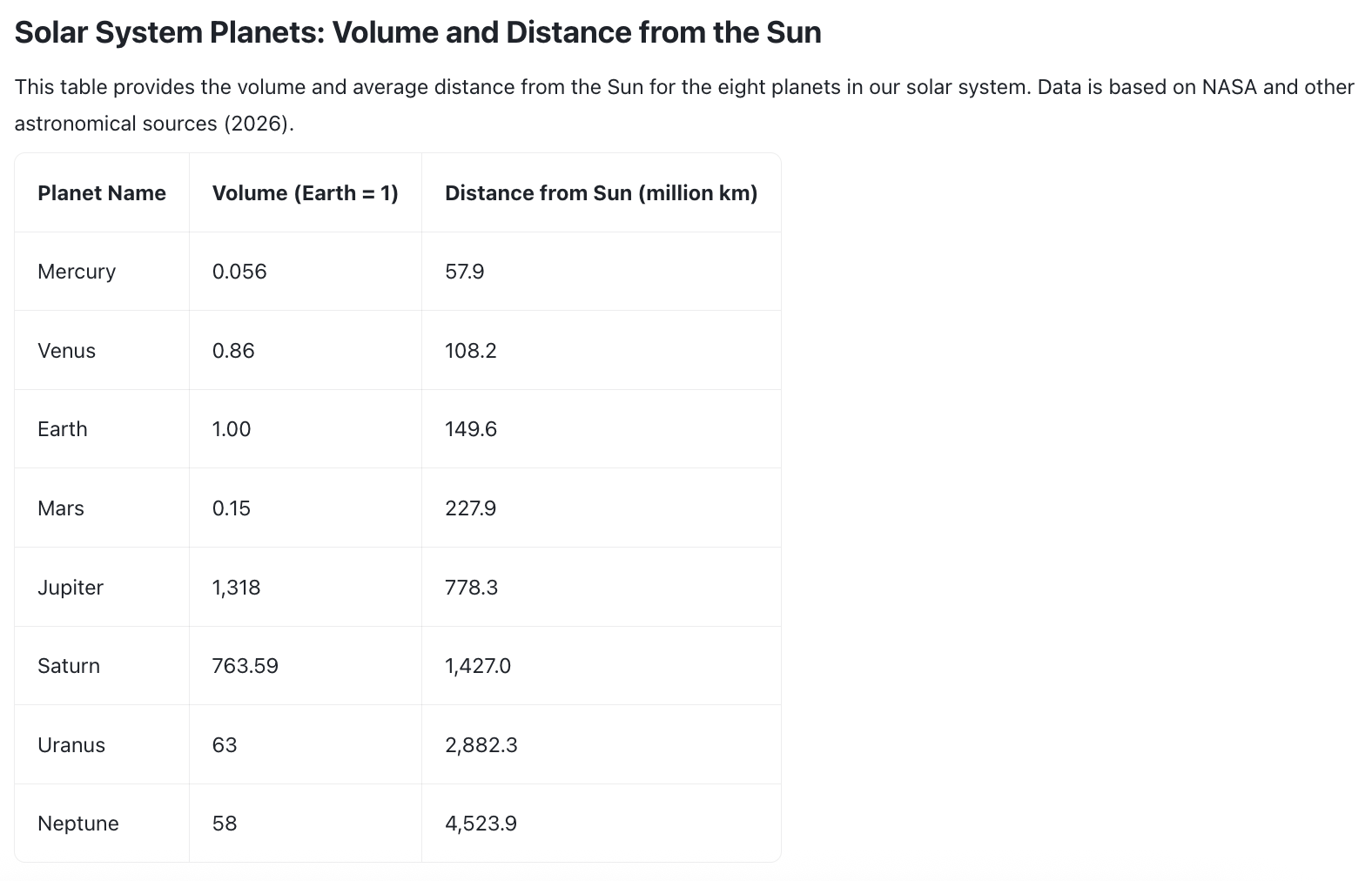 根据图片,表格中列出了多少颗行星,地球位于哪一行? |
|
import os
from arkruntime import Ark
client = Ark(
base_url='https://ark.cn-beijing.volces.com/api/v3',
api_key=os.getenv('ARK_API_KEY'),
)
response = client.responses.create(
model="doubao-seed-2-1-pro-260915",
input=[
{
"role": "user",
"content": [
{
"type": "input_image",
"image_url": "https://arkdocs.tos-cn-beijing.volces.com/images/advanced-usage/planet_comparison.png"
},
{
"type": "input_text",
"text": "根据图片,表格中列出了多少颗行星,地球位于哪一行?"
},
],
}
]
)
for item in response.output:
if item.type == "reasoning":
for summary in item.summary:
if summary.type == "summary_text":
print(f"思考:{summary.text}")
elif item.type == "message":
for content in item.content:
if content.type == "output_text":
print(f"回答:{content.text}")
curl https://ark.cn-beijing.volces.com/api/v3/responses \
-H "Authorization: Bearer $ARK_API_KEY" \
-H "Content-Type: application/json" \
-d '{
"model": "doubao-seed-2-1-pro-260915",
"input": [
{
"role": "user",
"content": [
{
"type": "input_image",
"image_url": "https://arkdocs.tos-cn-beijing.volces.com/images/advanced-usage/planet_comparison.png"
},
{
"type": "input_text",
"text": "根据图片,表格中列出了多少颗行星,地球位于哪一行?"
}
]
}
]
}'
package main
import (
"context"
"fmt"
"os"
"github.com/volcengine/ark-runtime-go/arkruntime"
"github.com/volcengine/ark-runtime-go/arkruntime/model/responses"
)
func main() {
client := arkruntime.NewClientWithApiKey(
// Get API Key:https://ark.volcengine.com/region:cn-beijing/apikey
os.Getenv("ARK_API_KEY"),
arkruntime.WithBaseUrl("https://ark.cn-beijing.volces.com/api/v3"),
)
ctx := context.Background()
inputMessage := responses.InputItem{
OneOf: responses.NewItemEasyMessageInputItemSum(
responses.ItemEasyMessage{
Role: responses.NewOptMessageRole(responses.MessageRoleUser),
Content: responses.NewContentItemArrayMessageContent(
[]responses.ContentItem{
responses.ContentItem{OneOf: responses.NewContentItemImageContentItemSum(responses.ContentItemImage{Type: responses.ContentItemImageTypeInputImage, ImageURL: responses.NewOptString("https://arkdocs.tos-cn-beijing.volces.com/images/advanced-usage/planet_comparison.png")})},
responses.ContentItem{OneOf: responses.NewContentItemTextContentItemSum(responses.ContentItemText{Type: responses.ContentItemTextTypeInputText, Text: "根据图片,表格中列出了多少颗行星,地球位于哪一行?"})},
},
),
},
),
}
resp, err := client.CreateResponses(ctx, &responses.ResponsesRequest{
Model: "doubao-seed-2-1-pro-260915",
Input: responses.NewInputItemArrayResponsesInput([]responses.InputItem{inputMessage}),
})
if err != nil {
fmt.Printf("response error: %v\n", err)
return
}
fmt.Println(resp)
}
package com.ark.sample;
import com.volcengine.ark.runtime.service.ArkService;
import com.volcengine.ark.runtime.models.responses.*;
public class demo {
public static void main(String[] args) {
String apiKey = System.getenv("ARK_API_KEY");
ArkService arkService = ArkService.builder().apiKey(apiKey)
.baseUrl("https://ark.cn-beijing.volces.com/api/v3")
.build();
ResponsesRequest request = ResponsesRequest.builder()
.model("doubao-seed-2-1-pro-260915")
.input(ResponsesInput.ofList(java.util.Arrays.asList(ItemEasyMessage.builder().role(MessageRole.USER).content(
MessageContent.ofList(java.util.Arrays.asList(ContentItemImage.builder()
.imageUrl("https://arkdocs.tos-cn-beijing.volces.com/images/advanced-usage/planet_comparison.png").build(), ContentItemText.builder().text("根据图片,表格中列出了多少颗行星,地球位于哪一行?").build())))
.build())))
.build();
Response resp = arkService.createResponse(request);
System.out.println(resp);
arkService.shutdownExecutor();
}
}
import os
from openai import OpenAI
client = OpenAI(
base_url='https://ark.cn-beijing.volces.com/api/v3',
api_key=os.getenv('ARK_API_KEY'),
)
response = client.responses.create(
model="doubao-seed-2-1-pro-260915",
input=[
{
"role": "user",
"content": [
{
"type": "input_image",
"image_url": "https://arkdocs.tos-cn-beijing.volces.com/images/advanced-usage/planet_comparison.png"
},
{
"type": "input_text",
"text": "根据图片,表格中列出了多少颗行星,地球位于哪一行?"
},
],
}
]
)
for item in response.output:
if item.type == "reasoning":
for summary in item.summary:
if summary.type == "summary_text":
print(f"思考:{summary.text}")
elif item.type == "message":
for content in item.content:
if content.type == "output_text":
print(f"回答:{content.text}")
-
多模态理解:多模态理解详细使用指南。
-
视觉定位 Grounding:图片中找到对应目标并返回坐标任务。
-
文件输入(Files API):传入图片、视频、文档接口。
-
GUI Agent 能力:在计算机/移动设备中完成自动化任务。
图片生成#
传入图片、文字给模型,进行以下场景&任务:
- 广告、海报、组图等图片生成;
- 增改元素、颜色更换等图片编辑;
- 油墨、水墨等风格切换。
| 提示词 | 输出预览 |
|---|---|
| 充满活力的特写编辑肖像,模特眼神犀利,头戴雕塑感帽子,色彩拼接丰富,眼部焦点锐利,景深较浅,具有 Vogue 杂志封面的美学风格,采用中画幅拍摄,工作室灯光效果强烈。 |
import os
# Install SDK: python -m pip install --upgrade arkruntime
from arkruntime import Ark
client = Ark(
# The base URL for model invocation
base_url="https://ark.cn-beijing.volces.com/api/v3",
# Get API Key:https://ark.volcengine.com/region:cn-beijing/apikey
api_key=os.getenv('ARK_API_KEY'),
)
imagesResponse = client.images.generate(
# Replace with Model ID
model="doubao-seedream-5-0-260128",
prompt="充满活力的特写编辑肖像,模特眼神犀利,头戴雕塑感帽子,色彩拼接丰富,眼部焦点锐利,景深较浅,具有Vogue杂志封面的美学风格,采用中画幅拍摄,工作室灯光效果强烈。",
size="2K",
response_format="url",
watermark=True
)
print(imagesResponse.data[0].url)
curl https://ark.cn-beijing.volces.com/api/v3/images/generations \
-H "Content-Type: application/json" \
-H "Authorization: Bearer $ARK_API_KEY" \
-d '{
"model": "doubao-seedream-5-0-260128",
"prompt": "充满活力的特写编辑肖像,模特眼神犀利,头戴雕塑感帽子,色彩拼接丰富,眼部焦点锐利,景深较浅,具有Vogue杂志封面的美学风格,采用中画幅拍摄,工作室灯光效果强烈。",
"size": "2K",
"watermark": true
}'
- 您可按需替换 Model ID。Model ID 查询见 模型列表。
package com.ark.sample;
import com.volcengine.ark.runtime.models.images.*;
import com.volcengine.ark.runtime.service.ArkService;
import okhttp3.ConnectionPool;
import okhttp3.Dispatcher;
import java.util.concurrent.TimeUnit;
public class ImageGenerationsExample {
public static void main(String[] args) {
// Get API Key:https://ark.volcengine.com/region:cn-beijing/apikey
String apiKey = System.getenv("ARK_API_KEY");
ConnectionPool connectionPool = new ConnectionPool(5, 1, TimeUnit.SECONDS);
Dispatcher dispatcher = new Dispatcher();
ArkService service = ArkService.builder()
.baseUrl("https://ark.cn-beijing.volces.com/api/v3")
// The base URL for model invocation
.dispatcher(dispatcher)
.connectionPool(connectionPool)
.apiKey(apiKey)
.build();
CreateImageGenerationRequest generateRequest = CreateImageGenerationRequest.builder()
.model("doubao-seedream-5-0-260128") // Replace with Model ID
.prompt("充满活力的特写编辑肖像,模特眼神犀利,头戴雕塑感帽子,色彩拼接丰富,眼部焦点锐利,景深较浅,具有Vogue杂志封面的美学风格,采用中画幅拍摄,工作室灯光效果强烈。")
.size("2K")
.sequentialImageGeneration(SequentialImageGenerationMode.DISABLED)
.responseFormat(ResponseFormat.URL)
.stream(false)
.watermark(true)
.build();
ImageGenerationResponse imagesResponse = service.generateImages(generateRequest);
System.out.println(imagesResponse.getData().get(0).getUrl());
service.shutdownExecutor();
}
}
package main
import (
"context"
"fmt"
"os"
"github.com/volcengine/ark-runtime-go/arkruntime"
model "github.com/volcengine/ark-runtime-go/arkruntime/model/images"
)
func main() {
client := arkruntime.NewClientWithApiKey(
os.Getenv("ARK_API_KEY"), // Get API Key:https://ark.volcengine.com/region:cn-beijing/apikey
arkruntime.WithBaseUrl("https://ark.cn-beijing.volces.com/api/v3"), // The base URL for model invocation
)
ctx := context.Background()
generateReq := &model.CreateImageGenerationRequest{
Model: "doubao-seedream-5-0-260128", // Replace with Model ID
Prompt: model.NewOptString("充满活力的特写编辑肖像,模特眼神犀利,头戴雕塑感帽子,色彩拼接丰富,眼部焦点锐利,景深较浅,具有Vogue杂志封面的美学风格,采用中画幅拍摄,工作室灯光效果强烈。"),
Size: model.NewOptString("2K"),
ResponseFormat: model.NewOptResponseFormat(model.ResponseFormatURL),
Watermark: model.NewOptBool(true),
}
imagesResponse, err := client.GenerateImages(ctx, generateReq)
if err != nil {
fmt.Printf("generate images error: %v\n", err)
return
}
fmt.Printf("%s\n", imagesResponse.Data[0].URL.Or(""))
}
import os
from openai import OpenAI
client = OpenAI(
base_url="https://ark.cn-beijing.volces.com/api/v3", # The base URL for model invocation
api_key=os.getenv('ARK_API_KEY'), # Get API Key:https://ark.volcengine.com/region:cn-beijing/apikey
)
imagesResponse = client.images.generate(
# Replace with Model ID
model="doubao-seedream-5-0-260128",
prompt="充满活力的特写编辑肖像,模特眼神犀利,头戴雕塑感帽子,色彩拼接丰富,眼部焦点锐利,景深较浅,具有Vogue杂志封面的美学风格,采用中画幅拍摄,工作室灯光效果强烈。",
size="2K",
response_format="url",
extra_body={
"watermark": True,
},
)
print(imagesResponse.data[0].url)
- Doubao Seedream 4.0-5.0 教程:主流生图模型能力以及如何通过 API 调用。
- Seedream 4.0-5.0 提示词指南:使用生图模型时,如何编写提示词。
视频生成#
通过文本描述、图像素材、视频素材,快速生成高质量、风格多样的视频内容。
| 提示词 | 输出画面预览 |
|---|---|
| 一位身穿绿色亮片礼服的女性站在粉红色背景前,周围飘落着五彩斑斓的彩纸。 |
import os
import time
# Install SDK: python -m pip install --upgrade arkruntime
from arkruntime import Ark
client = Ark(
base_url="https://ark.cn-beijing.volces.com/api/v3", # The base URL for model invocation
api_key=os.environ.get("ARK_API_KEY"), # Get API Key:https://ark.volcengine.com/region:cn-beijing/apikey
)
if __name__ == "__main__":
print("----- create request -----")
create_result = client.content_generation.tasks.create(
model="doubao-seedance-2-5-260628", # Replace with Model ID
content=[
{
# Combination of text prompt and parameters
"type": "text",
"text": "一位身穿绿色亮片礼服的女性站在粉红色背景前,周围飘落着五彩斑斓的彩纸 --wm true --dur 5"
}
],
watermark=True,
)
print(create_result)
# Polling query section
print("----- polling task status -----")
task_id = create_result.id
max_wait = 600 # Maximum wait time in seconds
interval = 10 # Initial polling interval
start = time.time()
while time.time() - start < max_wait:
get_result = client.content_generation.tasks.get(task_id=task_id)
status = get_result.status
if status == "succeeded":
print("----- task succeeded -----")
print(get_result)
break
elif status == "failed":
print("----- task failed -----")
print(f"Error: {get_result.error}")
break
else:
print(f"Current status: {status}, retrying after {interval:.0f}s...")
time.sleep(interval)
interval = min(interval * 1.5, 30)
else:
raise TimeoutError(f"Task {task_id} timed out after {max_wait}s. "
f"Task may still be running - check status manually.")
package com.ark.sample;
import java.util.ArrayList;
import java.util.List;
import java.util.concurrent.TimeUnit;
import com.volcengine.ark.runtime.models.content_generation.*;
import com.volcengine.ark.runtime.service.ArkService;
public class ContentGenerationTaskExample {
public static void main(String[] args) {
String apiKey = System.getenv("ARK_API_KEY");
ArkService service = ArkService.builder()
.baseUrl("https://ark.cn-beijing.volces.com/api/v3")
// The base URL for model invocation
.apiKey(apiKey)
.build();
System.out.println("----- create request -----");
List<ContentItem> contents = new ArrayList<>();
contents.add(ContentItem.builder()
.type(ContentType.TEXT)
.text("一位身穿绿色亮片礼服的女性站在粉红色背景前,周围飘落着五彩斑斓的彩纸 --wm true --dur 5")
.build());
// Create a video generation task
CreateContentGenerationTaskRequest createRequest = CreateContentGenerationTaskRequest.builder()
.model("doubao-seedance-2-5-260628") // Replace with Model ID
.content(contents)
.watermark(true)
.build();
CreateContentGenerationTaskResponse createResult = service.createContentGenerationTask(createRequest);
System.out.println(createResult);
// Get the details of the task
String taskId = createResult.getId();
String getRequest = taskId;
System.out.println("----- polling task status -----");
while (true) {
try {
ContentGenerationTask getResponse = service.getContentGenerationTask(getRequest);
String status = getResponse.getStatus().toString();
if ("succeeded".equalsIgnoreCase(status)) {
System.out.println("----- task succeeded -----");
System.out.println(getResponse);
service.shutdownExecutor();
break;
} else if ("failed".equalsIgnoreCase(status)) {
System.out.println("----- task failed -----");
System.out.println("Error: " + getResponse.getStatus());
service.shutdownExecutor();
break;
} else {
System.out.printf("Current status: %s, Retrying in 3 seconds...\n", status);
TimeUnit.SECONDS.sleep(3);
}
} catch (InterruptedException ie) {
Thread.currentThread().interrupt();
System.err.println("Polling interrupted");
service.shutdownExecutor();
break;
}
}
}
}
package main
import (
"context"
"fmt"
"os"
"time"
"github.com/volcengine/ark-runtime-go/arkruntime"
model "github.com/volcengine/ark-runtime-go/arkruntime/model/contentgeneration"
)
func main() {
client := arkruntime.NewClientWithApiKey(
os.Getenv("ARK_API_KEY"), // Get API Key: https://ark.volcengine.com/region:cn-beijing/apikey
arkruntime.WithBaseUrl("https://ark.cn-beijing.volces.com/api/v3"), // The base URL for model invocation
)
ctx := context.Background()
// Replace with Model ID
modelEp := "doubao-seedance-2-5-260628"
fmt.Println("----- create request -----")
createReq := &model.CreateContentGenerationTaskRequest{
Model: modelEp,
Content: []model.ContentItem{
{
Type: model.ContentTypeText,
Text: model.NewOptString("一位身穿绿色亮片礼服的女性站在粉红色背景前,周围飘落着五彩斑斓的彩纸 --wm true --dur 5"),
},
},
Watermark: model.NewOptBool(true),
}
createResp, err := client.CreateContentGenerationTask(ctx, createReq)
if err != nil {
fmt.Printf("create content generation error: %v", err)
return
}
taskID := createResp.ID
fmt.Printf("Task Created with ID: %s", taskID)
// Polling query section
fmt.Println("----- polling task status -----")
for {
getReq := taskID
getResp, err := client.GetContentGenerationTask(ctx, getReq)
if err != nil {
fmt.Printf("get content generation task error: %v", err)
return
}
status := getResp.Status
if status == "succeeded" {
fmt.Println("----- task succeeded -----")
fmt.Printf("Task ID: %s \n", getResp.ID)
fmt.Printf("Model: %s \n", getResp.Model)
fmt.Printf("Video URL: %s \n", getResp.Content.Or(model.TaskContent{}).VideoURL.Or(""))
fmt.Printf("Completion Tokens: %d \n", getResp.Usage.Or(model.TaskUsage{}).CompletionTokens)
fmt.Printf("Created At: %d, Updated At: %d", getResp.CreatedAt.Or(0), getResp.UpdatedAt.Or(0))
return
} else if status == "failed" {
fmt.Println("----- task failed -----")
if getResp.Error.IsSet() {
fmt.Printf("Error Code: %s, Message: %s", getResp.Error.Value.Code, getResp.Error.Value.Message)
}
return
} else {
fmt.Printf("Current status: %s, Retrying in 3 seconds... \n", status)
time.Sleep(3 * time.Second)
}
}
}
- 视频生成教程:学习如何使用模型的视频生成能力,包括文本生成视频、首尾帧生视频、首帧生成视频等。
- Doubao Seedance 2.5 提示词指南:使用生视频模型时,如何编写提示词。
工具使用#
通过工具/插件让模型具体读取外部数据及函数的能力,包括
- 内置工具:联网搜索、图片处理、知识库检索等已集成至方舟平台的工具。
- 三方工具:兼容 MCP 的三方工具。
- 自定义工具:您自行定义及开发的工具。
| 输入 | 输出预览 |
|---|---|
| What's the weather like in Beijing? | According to the latest weather data as of March 10, 2026, the current weather in Beijing is sunny with a gentle wind (less than level 3). The temperature around 11:30 AM is approximately 9°C, and it is expected to reach a high of 12°C during the day. The weather will remain clear at night with a low temperature of 1°C. Source: Weather forecasts updated on March 10, 2026, from the Central Meteorological Observatory. Note: Data is accurate as of the latest available update at 05:30 AM on March 10. |
import os
from arkruntime import Ark
client = Ark(
base_url="https://ark.cn-beijing.volces.com/api/v3",
api_key=os.getenv("ARK_API_KEY"),
)
response = client.responses.create(
model="doubao-seed-2-1-pro-260915",
input=[{"role": "user", "content": "What's the weather like in Beijing?"}],
tools=[
{
"type": "web_search",
"max_keyword": 2,
}
],
stream=False,
)
for item in response.output:
if item.type == "message":
for content in item.content:
if content.type == "output_text":
print(content.text)
curl https://ark.cn-beijing.volces.com/api/v3/responses \
-H "Authorization: Bearer $ARK_API_KEY" \
-H 'Content-Type: application/json' \
-d '{
"model": "doubao-seed-2-1-pro-260915",
"stream": false,
"tools": [
{
"type": "web_search",
"max_keyword": 2
}
],
"input": [
{
"role": "user",
"content": [
{
"type": "input_text",
"text": "What is the weather like in Beijing?"
}
]
}
]
}'
package com.ark.sample;
import com.fasterxml.jackson.core.JsonProcessingException;
import com.fasterxml.jackson.databind.ObjectMapper;
import com.fasterxml.jackson.databind.JsonNode;
import com.volcengine.ark.runtime.models.responses.*;
import com.volcengine.ark.runtime.service.ArkService;
import java.util.Arrays;
import java.util.List;
public class demo {
public static ObjectMapper om = new ObjectMapper();
public demo() throws JsonProcessingException {
}
public static List<Tool> buildTools() {
WebSearchTool t = WebSearchTool.builder().maxKeyword(2).build();
System.out.println(Arrays.asList(t));
return Arrays.asList(t);
}
public static void main(String[] args) throws JsonProcessingException {
String apiKey = System.getenv("ARK_API_KEY");
ArkService arkService = ArkService.builder().apiKey(apiKey)
.baseUrl("https://ark.cn-beijing.volces.com/api/v3")
.build();
ResponsesRequest req = ResponsesRequest.builder()
.model("doubao-seed-2-1-pro-260915")
.input(ResponsesInput.ofList(java.util.Arrays.asList(ItemEasyMessage.builder().role(MessageRole.USER).content(
MessageContent.ofList(java.util.Arrays.asList(ContentItemText.builder().text("What's the weather like in Beijing?").build()))
).build())))
.tools(buildTools())
.build();
Response resp = arkService.createResponse(req);
System.out.println(resp);
arkService.shutdownExecutor();
}
}
package main
import (
"context"
"fmt"
"os"
"github.com/volcengine/ark-runtime-go/arkruntime"
"github.com/volcengine/ark-runtime-go/arkruntime/model/responses"
)
func main() {
client := arkruntime.NewClientWithApiKey(
os.Getenv("ARK_API_KEY"),
arkruntime.WithBaseUrl("https://ark.cn-beijing.volces.com/api/v3"),
)
request := &responses.ResponsesRequest{
Model: "doubao-seed-2-1-pro-260915",
Input: responses.NewStringResponsesInput("What is the weather in Beijing today?"),
Tools: []responses.Tool{
{
OneOf: responses.NewWebSearchToolToolSum(
responses.WebSearchTool{
Type: responses.WebSearchToolTypeWebSearch,
MaxKeyword: responses.NewOptInt32(2),
},
),
},
},
MaxToolCalls: responses.NewOptInt64(1),
}
response, err := client.CreateResponses(context.Background(), request)
if err != nil {
fmt.Printf("response error: %v\n", err)
return
}
fmt.Printf("Response: %v\n", response)
}
import os
from openai import OpenAI
client = OpenAI(
base_url="https://ark.cn-beijing.volces.com/api/v3",
api_key=os.getenv("ARK_API_KEY"),
)
response = client.responses.create(
model="doubao-seed-2-1-pro-260915",
input=[{"role": "user", "content": "What's the weather like in Beijing?"}],
tools=[
{
"type": "web_search",
"max_keyword": 2,
}
],
stream=False,
)
for item in response.output:
if item.type == "message":
for content in item.content:
if content.type == "output_text":
print(content.text)
- 工具调用:学习如何让模型使用内置工具,如网页搜索、知识库检索、豆包助手等能力。
- Function Calling(函数调用):学习如何让模型调用自定义的工具。
- 云部署 MCP / Remote MCP:学习如何让模型使用 MCP 服务。
5 下一步#
现在您已经完成了首次方舟模型服务的 API 调用,您可以探索模型的更多能力,包括:
-
模型列表:快速浏览方舟提供的模型全集以及各个模型所具备的能力,快速根据您的实际场景匹配到合适的模型。
-
模型接入指南(LLM) - 标准流程:把方舟大模型接入生产环境的完整流程(参数配置、Harness 接入、突发流量爬坡、上线监控)。
-
模型接入指南(LLM) - 常见问题:接入 / 上线过程中的效果、可用性、接入配置、选型常见问题。
-
模型接入指南(LLM) - 性能评测:上线前跑一次性能基线评测(TTFT / TPOT / E2E / 缓存命中率)。