# Doubao Seedream 5.0 pro / flash 教程
> 全部文档的索引见 [llms.txt](https://ark.volcengine.com/llms.txt);在任一文档页面地址后追加 `.md` 可获取该页的 Markdown 版本。
Doubao Seedream 5.0 pro(以下简称 Seedream 5.0 pro)与 Doubao Seedream 5.0 flash(以下简称 Seedream 5.0 flash)支持文生图、单张图生图、多参考图生图等基础生图能力,同时支持通过交互编辑实现精准坐标定位和任意标记编辑、将单张图片拆分为底图与多个图层等特色能力。本文重点介绍两款模型的专属能力,帮助您快速实现 [Image generation API](/docs/image-generation-api) 调用。
# 特色能力
Seedream 5.0 pro 与 Seedream 5.0 flash 支持的特色功能如下:
|特色能力 |能力介绍 |效果预览 |
|---|---|---|
|[交互编辑](/docs/seedream-5-0-pro#interactive_edit) |支持通过坐标、框选、箭头等多种方式指定编辑位置,精准编辑图片,实现局部元素替换、物品定位、区域生成等精细化操作。 |[视频](https://arkdocs.tos-cn-beijing.volces.com/videos/image-generation/edite-model.mov) |
|[图层拆分](/docs/seedream-5-0-pro#layer_decomposition) |支持将单张图片的主体、背景、文字、装饰元素等内容自动拆解为 1 张底图和最多 16 个独立且带透明通道的图层,便于移动、缩放、替换、调色等二次编辑。 |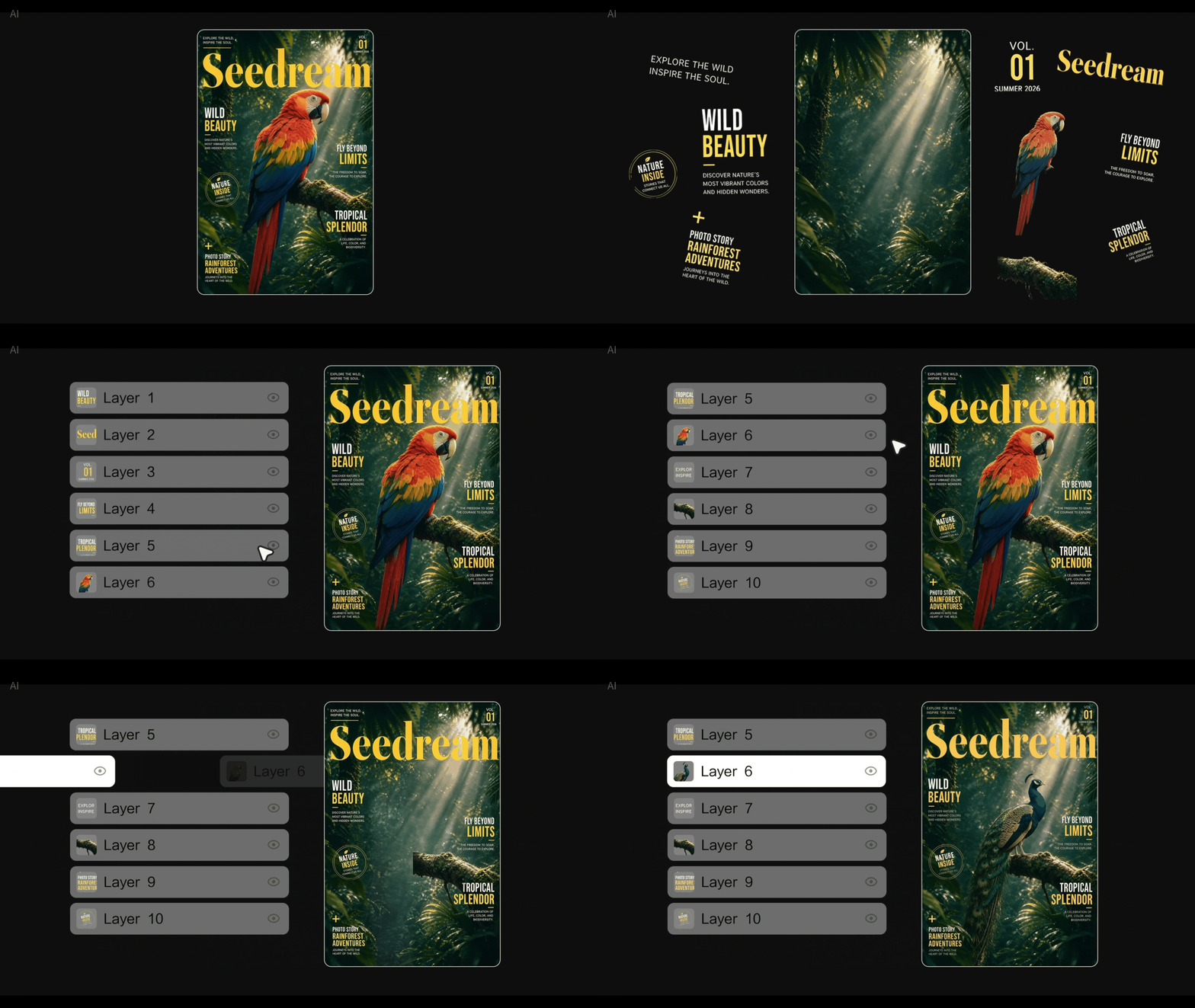 |
|原生多语种生成 |新增支持俄语、阿拉伯语、菲律宾语、泰语、土耳其语、韩语、马来语、西班牙语、葡萄牙语、印尼语、法语、德语、越南语、日语等 14 种语言的原生文字生成能力。 | |
# 能力概述
Seedream 5.0 pro 与 Seedream 5.0 flash 均支持通过坐标、框选、箭头等多种方式指定编辑位置来精准编辑图片;支持将单张图片拆分为 1 张底图和最多 16 个独立图层;支持原生多语种生成等特色能力。两款模型的定位区别如下:
* **Seedream 5.0 pro**:**生图质量更高**,适合对画质要求更高的场景。
* **Seedream 5.0 flash**:**生图速度更快、价格更低**,适合对时延与成本敏感的场景。
|模型名称 ||[Seedream 5.0 pro](https://ark.volcengine.com/region:cn-beijing/model/detail?Id=doubao-seedream-5-0-pro) |[Seedream 5.0 flash](https://ark.volcengine.com/region:cn-beijing/model/detail?Id=doubao-seedream-5-0-flash) |
|---|---|---|---|
|模型 ID (Model ID) ||doubao-seedream-5-0-pro-260628 |doubao-seedream-5-0-flash-260915 |
|[文生图](/docs/seedream-4-0-5-0#9695d195) ||✓ |✓ |
|[单 / 多图生图](/docs/seedream-4-0-5-0#8bc49063) ||✓ |✓ |
|[交互编辑](/docs/seedream-5-0-pro#interactive_edit) ||✓ |✓ |
|[图层拆分](/docs/seedream-5-0-pro#layer_decomposition) ||✓ |✓ |
|原生多语种生成 ||✓ |✓ |
|模型参数 |分辨率 |1K, 1.5K, 2K |1K, 1.5K, 2K |
|^^| | | | \
| |输出格式 |png, jpeg |png, jpeg |
|^^| | | | \
| |提示词优化模式 |标准模式, 极速模式 |标准模式 |
|^^| | | | \
| |生成数量限制 |支持生成单图/
多张图层( 1张底图+16张图层) |支持生成单图/
多张图层( 1张底图+16张图层) |
|限流 IPM(张 / 分钟) ||500 |500 |
# 基础使用
Seedream 5.0 pro / flash 的基础使用方式(文生图、图文生图、多图融合)与其他 Seedream 模型一致,只需将 `model` 参数替换为对应的 Model ID:
* Seedream 5.0 pro:`doubao-seedream-5-0-pro-260628`
* Seedream 5.0 flash:`doubao-seedream-5-0-flash-260915`
详细代码示例和说明请参考:
* [文生图](/docs/seedream-4-0-5-0#9695d195)
* [图文生图](/docs/seedream-4-0-5-0#8bc49063)
* [多图融合](/docs/seedream-4-0-5-0#4a35e28f)
# 交互编辑
Seedream 5.0 pro 与 Seedream 5.0 flash 支持通过**框选、点位、箭头、标注框、坐标**等方式指定编辑位置,实现对局部区域的精准生成或修改。详细操作说明请参考 [Seedream 5.0 pro / flash 交互编辑指南](/docs/seedream-5-0-pro-editing-guide)。
> **说明**
>
> Java 示例中的 `CreateImageGenerationRequestImage` 需要 `com.volcengine:ark-runtime` 0.6.0 或更高版本。如果 IDE 提示找不到该类型或 `image` 参数类型不匹配,请升级到 [Maven Central](https://central.sonatype.com/artifact/com.volcengine/ark-runtime) 提供的最新稳定版本,并重新加载项目依赖。
## 使用示例-任意标记
在参考图上通过手绘草图、涂鸦、圈选等任意标记指定编辑区域,模型将识别标记范围并在其中生成或替换内容,同时自然融入原有场景。
|提示词 |输入图 |输出 |
|---|---|---|
|根据手绘草图对图像进行编辑。在左下角标记区域添加一叠真实的杂志或艺术画册,并在右侧标记区域添加一个带杯碟的陶瓷杯咖啡。移除所有草图线条。保持构图不变。让新添加的物体自然融入原有场景中。 |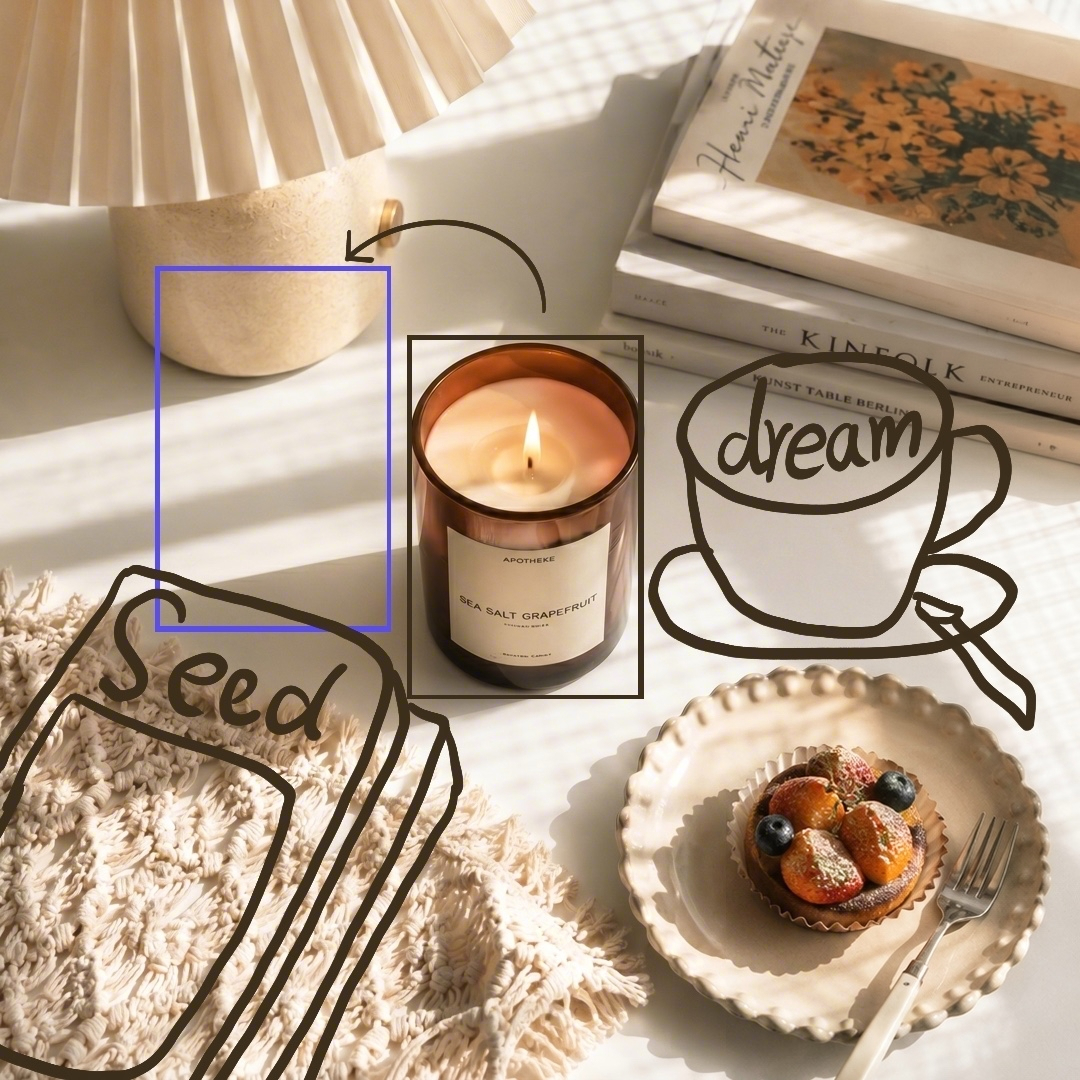 | |
**选项:Curl**
```Bash
curl https://ark.cn-beijing.volces.com/api/v3/images/generations \
-H "Content-Type: application/json" \
-H "Authorization: Bearer $ARK_API_KEY" \
-d '{
"model": "doubao-seedream-5-0-pro-260628",
"prompt": "根据手绘草图对图像进行编辑。在左下角标记区域添加一叠真实的杂志或艺术画册,并在右侧标记区域添加一个带杯碟的陶瓷杯咖啡。移除所有草图线条。保持构图不变。让新添加的物体自然融入原有场景中。",
"image": "https://arkdocs.tos-cn-beijing.volces.com/images/image-generation/seedream_50_pro_input2.png",
"size": "2K",
"output_format": "png",
"watermark": true
}'
```
* 您可按需替换 Model ID。Model ID 查询见 [模型列表](/docs/model-list)。
**选项:Python**
```Python
import os
# Install SDK: python -m pip install --upgrade arkruntime
from arkruntime import Ark
client = Ark(
# The base URL for model invocation
base_url="https://ark.cn-beijing.volces.com/api/v3",
# Get API Key: https://ark.volcengine.com/region:cn-beijing/apikey
api_key=os.getenv("ARK_API_KEY"),
)
imagesResponse = client.images.generate(
# Replace with Model ID
model="doubao-seedream-5-0-pro-260628",
prompt="根据手绘草图对图像进行编辑。在左下角标记区域添加一叠真实的杂志或艺术画册,并在右侧标记区域添加一个带杯碟的陶瓷杯咖啡。移除所有草图线条。保持构图不变。让新添加的物体自然融入原有场景中。",
image="https://arkdocs.tos-cn-beijing.volces.com/images/image-generation/seedream_50_pro_input2.png",
size="2K",
output_format="png",
response_format="url",
watermark=True,
)
print(imagesResponse.data[0].url)
```
**选项:Java**
```Java
package com.ark.sample;
import com.volcengine.ark.runtime.models.images.*;
import com.volcengine.ark.runtime.service.ArkService;
import okhttp3.ConnectionPool;
import okhttp3.Dispatcher;
import java.util.concurrent.TimeUnit;
public class ImageGenerationsExample {
public static void main(String[] args) {
String apiKey = System.getenv("ARK_API_KEY");
ConnectionPool connectionPool = new ConnectionPool(5, 1, TimeUnit.SECONDS);
Dispatcher dispatcher = new Dispatcher();
ArkService service = ArkService.builder()
.baseUrl("https://ark.cn-beijing.volces.com/api/v3")
// The base URL for model invocation
.dispatcher(dispatcher)
.connectionPool(connectionPool)
.apiKey(apiKey)
.build();
// CreateImageGenerationRequestImage requires ark-runtime 0.6.0 or later.
CreateImageGenerationRequest generateRequest = CreateImageGenerationRequest.builder()
.model("doubao-seedream-5-0-pro-260628") // Replace with Model ID
.prompt("根据手绘草图对图像进行编辑。在左下角标记区域添加一叠真实的杂志或艺术画册,并在右侧标记区域添加一个带杯碟的陶瓷杯咖啡。移除所有草图线条。保持构图不变。让新添加的物体自然融入原有场景中。")
.image(CreateImageGenerationRequestImage.ofString("https://arkdocs.tos-cn-beijing.volces.com/images/image-generation/seedream_50_pro_input2.png"))
.size("2K")
.outputFormat(OutputFormat.PNG)
.responseFormat(ResponseFormat.URL)
.watermark(true)
.build();
ImageGenerationResponse imagesResponse = service.generateImages(generateRequest);
System.out.println(imagesResponse.getData().get(0).getUrl());
service.shutdownExecutor();
}
}
```
**选项:Go**
```Go
package main
import (
"context"
"fmt"
"os"
"github.com/volcengine/ark-runtime-go/arkruntime"
model "github.com/volcengine/ark-runtime-go/arkruntime/model/images"
)
func main() {
client := arkruntime.NewClientWithApiKey(
os.Getenv("ARK_API_KEY"),
// The base URL for model invocation
arkruntime.WithBaseUrl("https://ark.cn-beijing.volces.com/api/v3"),
)
ctx := context.Background()
outputFormat := model.OutputFormatPNG
generateReq := &model.CreateImageGenerationRequest{
Model: "doubao-seedream-5-0-pro-260628",
Prompt: model.NewOptString("根据手绘草图对图像进行编辑。在左下角标记区域添加一叠真实的杂志或艺术画册,并在右侧标记区域添加一个带杯碟的陶瓷杯咖啡。移除所有草图线条。保持构图不变。让新添加的物体自然融入原有场景中。"),
Image: model.NewOptCreateImageGenerationRequestImage(model.NewStringArrayCreateImageGenerationRequestImage([]string{"https://arkdocs.tos-cn-beijing.volces.com/images/image-generation/seedream_50_pro_input2.png"})),
Size: model.NewOptString("2K"),
OutputFormat: model.NewOptOutputFormat(outputFormat),
ResponseFormat: model.NewOptResponseFormat(model.ResponseFormatURL),
Watermark: model.NewOptBool(true),
}
imagesResponse, err := client.GenerateImages(ctx, generateReq)
if err != nil {
fmt.Printf("generate images error: %v\n", err)
return
}
fmt.Printf("%s\n", imagesResponse.Data[0].URL.Or(""))
}
```
**选项:OpenAI**
```Python
import os
from openai import OpenAI
client = OpenAI(
# The base URL for model invocation
base_url="https://ark.cn-beijing.volces.com/api/v3",
# Get API Key: https://ark.volcengine.com/region:cn-beijing/apikey
api_key=os.getenv("ARK_API_KEY"),
)
imagesResponse = client.images.generate(
model="doubao-seedream-5-0-pro-260628",
prompt="根据手绘草图对图像进行编辑。在左下角标记区域添加一叠真实的杂志或艺术画册,并在右侧标记区域添加一个带杯碟的陶瓷杯咖啡。移除所有草图线条。保持构图不变。让新添加的物体自然融入原有场景中。",
size="2K",
output_format="png",
response_format="url",
extra_body={
"image": "https://arkdocs.tos-cn-beijing.volces.com/images/image-generation/seedream_50_pro_input2.png",
"watermark": True,
},
)
print(imagesResponse.data[0].url)
```
## 使用示例-坐标定位
通过在 prompt 中加入 `` 或 `` 坐标标签,精确指定跨图的编辑区域,实现主体元素的定位放置。完整调用步骤和参数说明请参考 [Seedream 5.0 pro / flash 交互编辑指南](/docs/seedream-5-0-pro-editing-guide)。
|提示词 |输入图 |输出 |
|---|---|---|
|将图 1 ` 179 283 796 986 `的主体放到图 2 ` 118 331 933 871` 位置。 |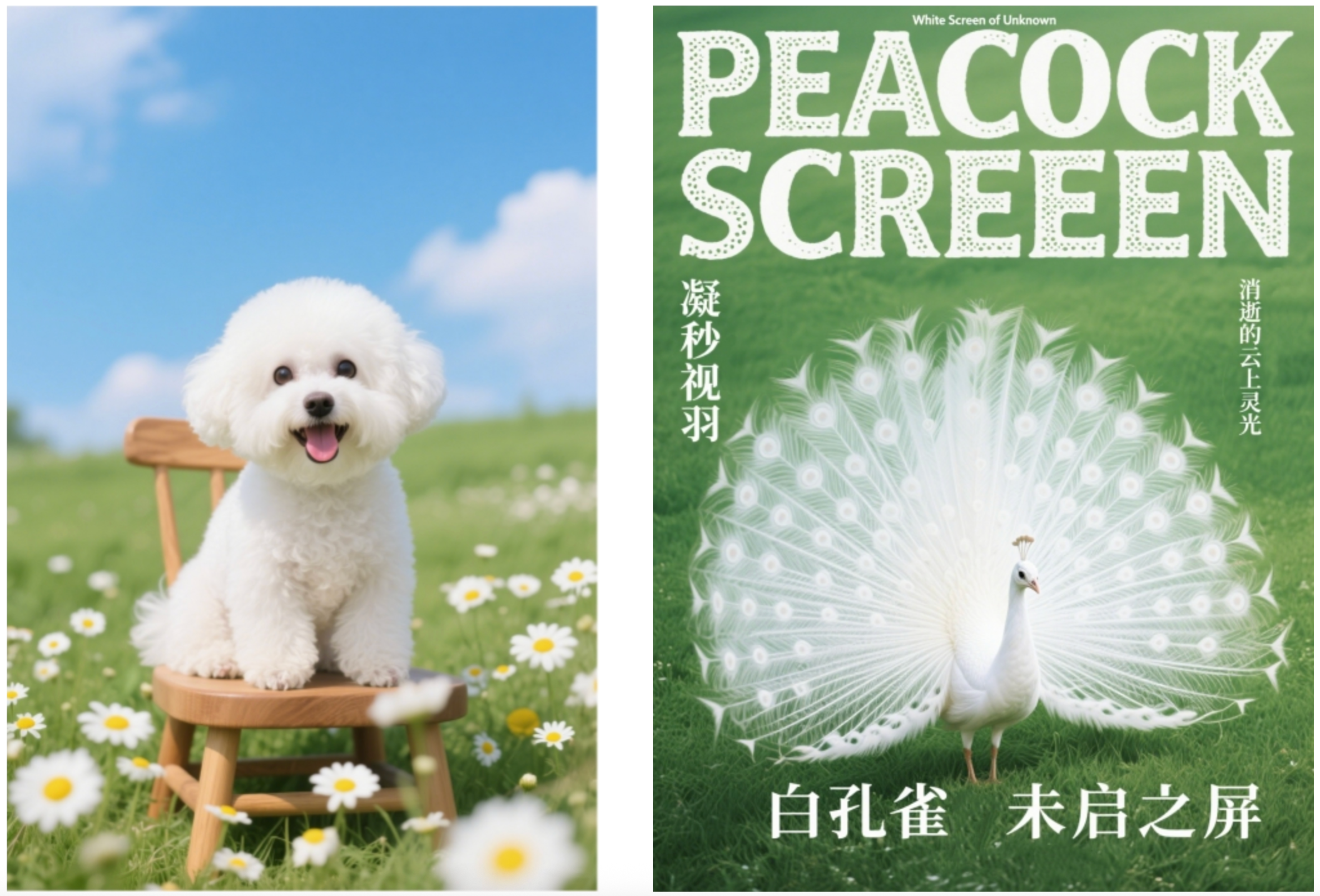 |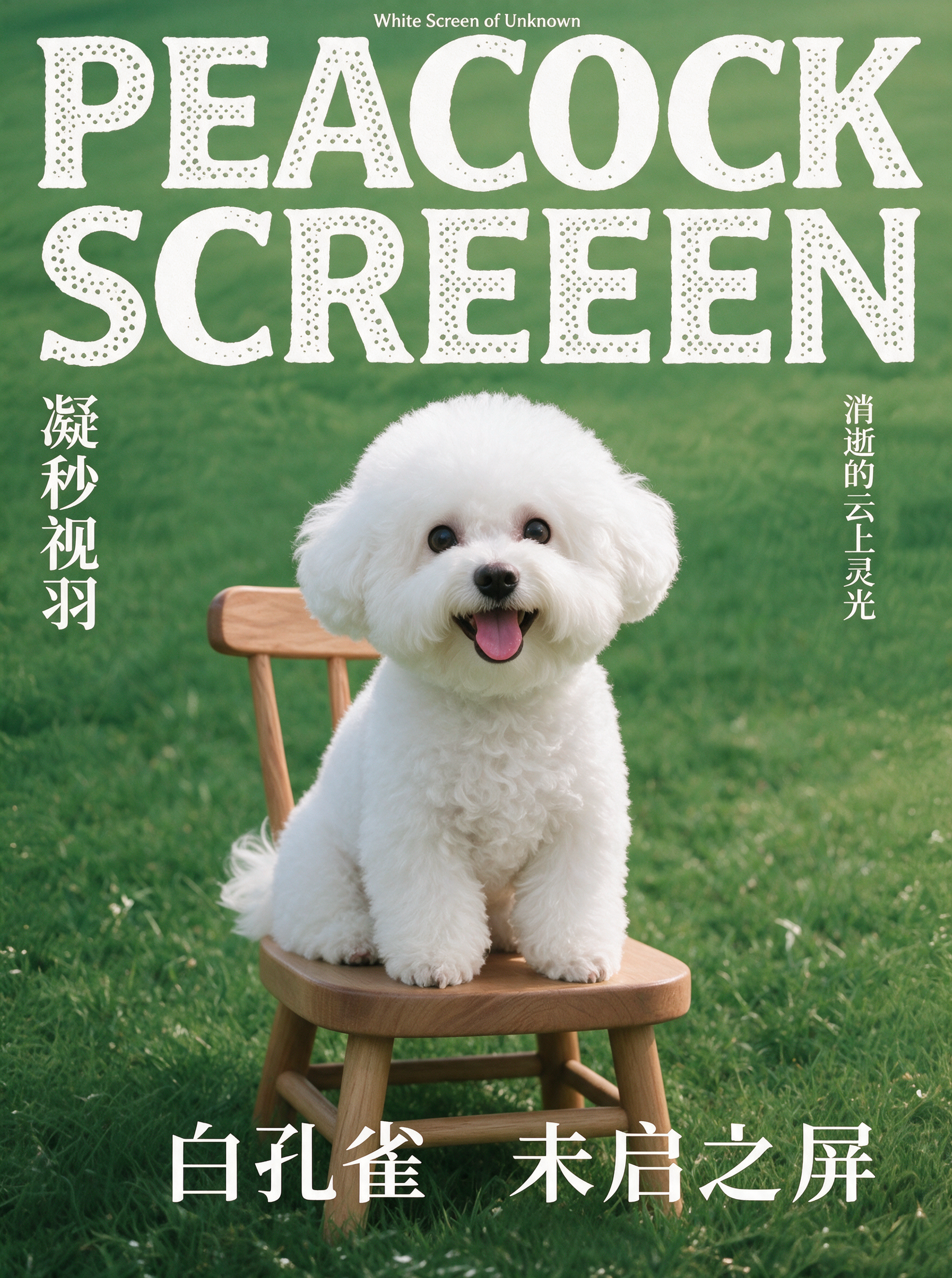 |
## 使用说明
交互编辑需要准备以下输入要素:**待编辑图片** 和 **prompt**(包含定位信息 + 编辑指令)。根据定位方式不同,分为以下两种形式:
|形式 1:任意标记 + 自然语言定位 |形式 2:坐标精准定位 |
|---|---|
|在待编辑图片上通过手绘草图、涂鸦、圈选等方式标记编辑区域,然后在 prompt 中用自然语言描述标记位置和编辑意图。 |使用工具框定待编辑内容的坐标(坐标获取方式详见 [Seedream 5.0 pro / flash 交互编辑指南](/docs/seedream-5-0-pro-editing-guide)),在 prompt 中通过 `` 或 `` 坐标标签精确指定位置。 | \
|```JSON |```JSON | \
|{ |{ | \
|"prompt": "在蓝色框内添加一个电视机" |"prompt": "将图1179 283 796 986的主体放到图2118 331 933 871位置"| \
|} |} | \
|``` |``` |
准备好输入要素后,将 **待编辑图片** 和 **prompt** 一起传入 API 接口即可生成图片编辑结果。
# 图层拆分
Seedream 5.0 pro 与 Seedream 5.0 flash 均支持将单张输入图片中的主体、背景、文字、装饰元素等内容自动拆解为 1 张底图和最多 16 个可独立编辑的图层。每个图层均为带透明通道的 PNG 图片,模型还会返回图层的坐标、层级顺序和内容说明,便于在设计工具、前端画布中继续移动、缩放、替换、调色和重新组合。
## 使用链路
图层拆分功能的使用链路如下:

## 拆分单张图片
配置参数 `layer_decomposition` 为 `true` 即可开启图层拆分模式。开启后,`image` 为必选参数,且仅支持传入 1 张待拆分图片;`prompt` 为可选参数,用于描述要拆分哪些元素。
### 提示词输入方式
使用图层拆分功能,推荐采用以下三种输入方式:
|使用目标 |`prompt` 写法 |
|---|---|
|自动拆出主要元素 |不传入 `prompt`。模型自动识别图片中的主体、文字、背景、装饰元素等主要内容,并逐一拆分为独立图层。 |
|指定拆分对象 |在 `prompt` 中用自然语言描述待拆分的元素,例如“拆出人物、标题文字和右下角装饰图标”。可配合在输入图上标记(涂鸦、圈选等)辅助定位。 |
|精准指定区域 |在 `prompt` 中通过 `` 坐标标签指定待拆分元素的位置。坐标采用归一化坐标,获取方式详见 [Seedream 5.0 pro / flash 交互编辑指南](/docs/seedream-5-0-pro-editing-guide#key-steps)。 |
### 使用示例-自动全拆
如需让模型自动识别并拆分图片中的主要元素,可不传入 `prompt`,只传入待拆分图片并设置`layer_decomposition=true`。
|1 张输入图(不传 `prompt`) |输出底图 |输出图层 |||
|---|---|---|---|---|
| | | | | |
|^^ |^^ | | | |
|^^ |^^ | | | |
|^^ |^^ | | | |
**选项:Curl**
```Bash
curl https://ark.cn-beijing.volces.com/api/v3/images/generations \
-H "Content-Type: application/json" \
-H "Authorization: Bearer $ARK_API_KEY" \
-d '{
"model": "doubao-seedream-5-0-pro-260628",
"image": "https://arkdocs.tos-cn-beijing.volces.com/images/image-generation/layer_auto.png",
"size": "2K",
"layer_decomposition": true,
"watermark": true
}'
```
* 您可按需替换 Model ID。Model ID 查询见 [模型列表](/docs/model-list)。
**选项:Python**
```Python
import os
# Install SDK: python -m pip install --upgrade arkruntime
from arkruntime import Ark
client = Ark(
# The base URL for model invocation
base_url="https://ark.cn-beijing.volces.com/api/v3",
# Get API Key: https://ark.volcengine.com/region:cn-beijing/apikey
api_key=os.getenv("ARK_API_KEY"),
)
imagesResponse = client.images.generate(
# Replace with Model ID
model="doubao-seedream-5-0-pro-260628",
image="https://arkdocs.tos-cn-beijing.volces.com/images/image-generation/layer_auto.png",
size="2K",
layer_decomposition=True,
response_format="url",
watermark=True,
)
for item in imagesResponse.data:
print(item)
```
**选项:Java**
```Java
package com.ark.sample;
import com.volcengine.ark.runtime.models.images.*;
import com.volcengine.ark.runtime.service.ArkService;
import okhttp3.ConnectionPool;
import okhttp3.Dispatcher;
import java.util.concurrent.TimeUnit;
public class ImageGenerationsExample {
public static void main(String[] args) {
String apiKey = System.getenv("ARK_API_KEY");
ConnectionPool connectionPool = new ConnectionPool(5, 1, TimeUnit.SECONDS);
Dispatcher dispatcher = new Dispatcher();
ArkService service = ArkService.builder()
.baseUrl("https://ark.cn-beijing.volces.com/api/v3")
// The base URL for model invocation
.dispatcher(dispatcher)
.connectionPool(connectionPool)
.apiKey(apiKey)
.build();
// CreateImageGenerationRequestImage requires ark-runtime 0.6.0 or later.
CreateImageGenerationRequest generateRequest = CreateImageGenerationRequest.builder()
.model("doubao-seedream-5-0-pro-260628") // Replace with Model ID
.image(CreateImageGenerationRequestImage.ofString("https://arkdocs.tos-cn-beijing.volces.com/images/image-generation/layer_auto.png"))
.size("2K")
.layerDecomposition(true)
.responseFormat(ResponseFormat.URL)
.watermark(true)
.build();
ImageGenerationResponse imagesResponse = service.generateImages(generateRequest);
imagesResponse.getData().forEach(item -> System.out.println(item));
service.shutdownExecutor();
}
}
```
**选项:Go**
```Go
package main
import (
"context"
"fmt"
"os"
"github.com/volcengine/ark-runtime-go/arkruntime"
model "github.com/volcengine/ark-runtime-go/arkruntime/model/images"
)
func main() {
client := arkruntime.NewClientWithApiKey(
os.Getenv("ARK_API_KEY"),
// The base URL for model invocation
arkruntime.WithBaseUrl("https://ark.cn-beijing.volces.com/api/v3"),
)
ctx := context.Background()
generateReq := &model.CreateImageGenerationRequest{
Model: "doubao-seedream-5-0-pro-260628",
Image: model.NewOptCreateImageGenerationRequestImage(model.NewStringArrayCreateImageGenerationRequestImage([]string{"https://arkdocs.tos-cn-beijing.volces.com/images/image-generation/layer_auto.png"})),
Size: model.NewOptString("2K"),
LayerDecomposition: model.NewOptBool(true),
ResponseFormat: model.NewOptResponseFormat(model.ResponseFormatURL),
Watermark: model.NewOptBool(true),
}
imagesResponse, err := client.GenerateImages(ctx, generateReq)
if err != nil {
fmt.Printf("generate images error: %v\n", err)
return
}
for _, item := range imagesResponse.Data {
fmt.Printf("%+v\n", item)
}
}
```
**选项:OpenAI**
```Python
import os
from openai import OpenAI
client = OpenAI(
# The base URL for model invocation
base_url="https://ark.cn-beijing.volces.com/api/v3",
# Get API Key: https://ark.volcengine.com/region:cn-beijing/apikey
api_key=os.getenv("ARK_API_KEY"),
)
imagesResponse = client.images.generate(
model="doubao-seedream-5-0-pro-260628",
size="2K",
response_format="url",
extra_body={
"image": "https://arkdocs.tos-cn-beijing.volces.com/images/image-generation/layer_auto.png",
"layer_decomposition": True,
"watermark": True,
},
)
for item in imagesResponse.data:
print(item)
```
### 使用示例-精准指定拆分区域
如需精准指定拆分区域,推荐采用归一化的 `` 坐标指定需要拆分的元素。
|1 张输入图 + 提示词(归一化坐标指定拆分元素) |输出底图 |输出图层 ||
|---|---|---|---|
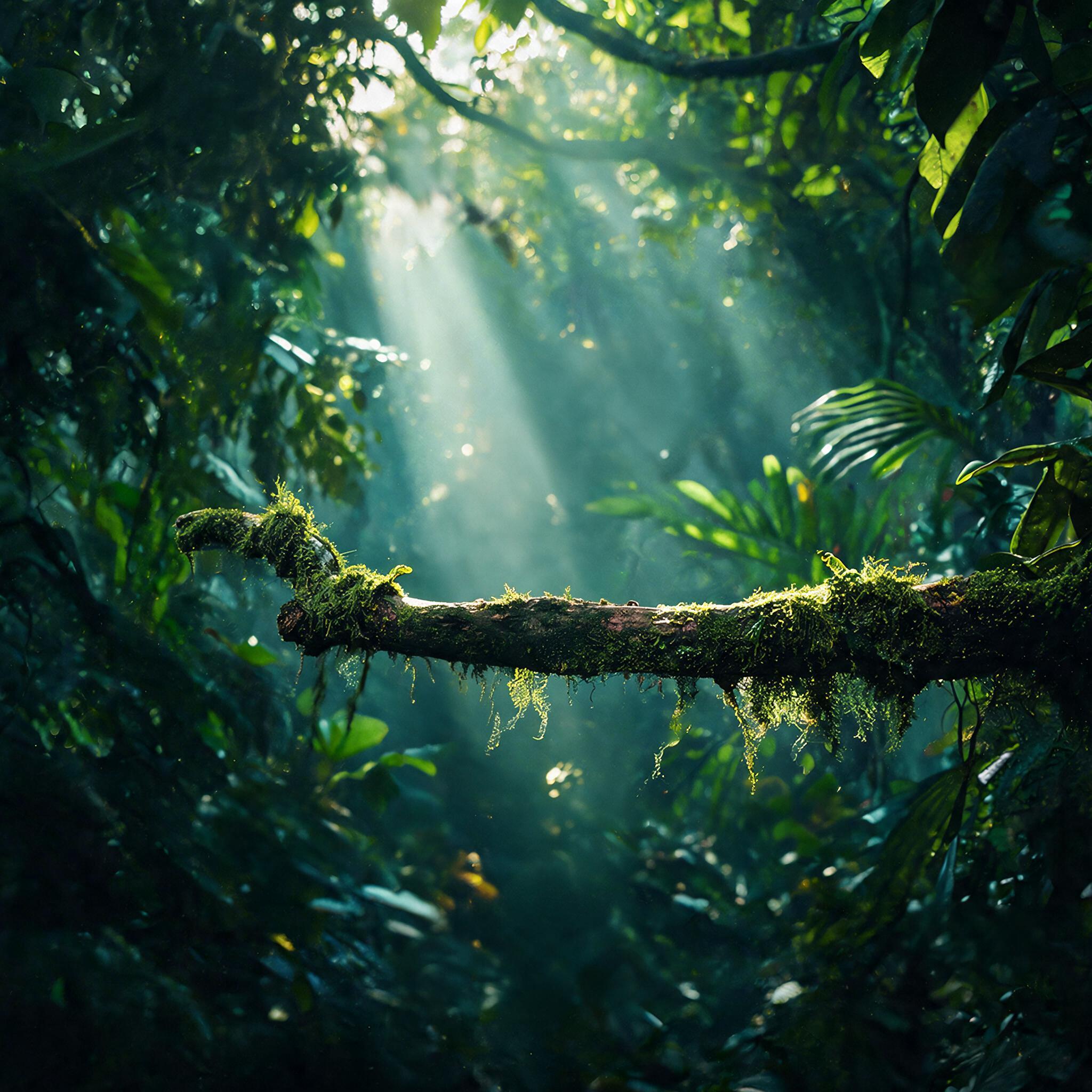
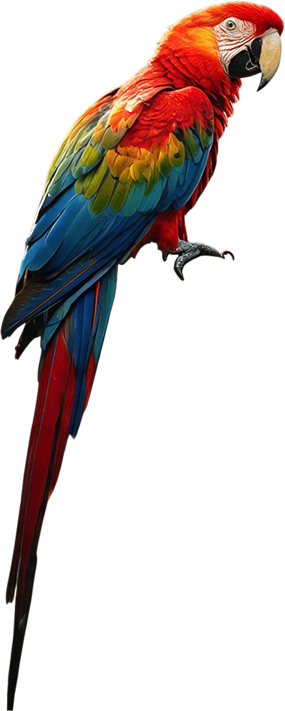
|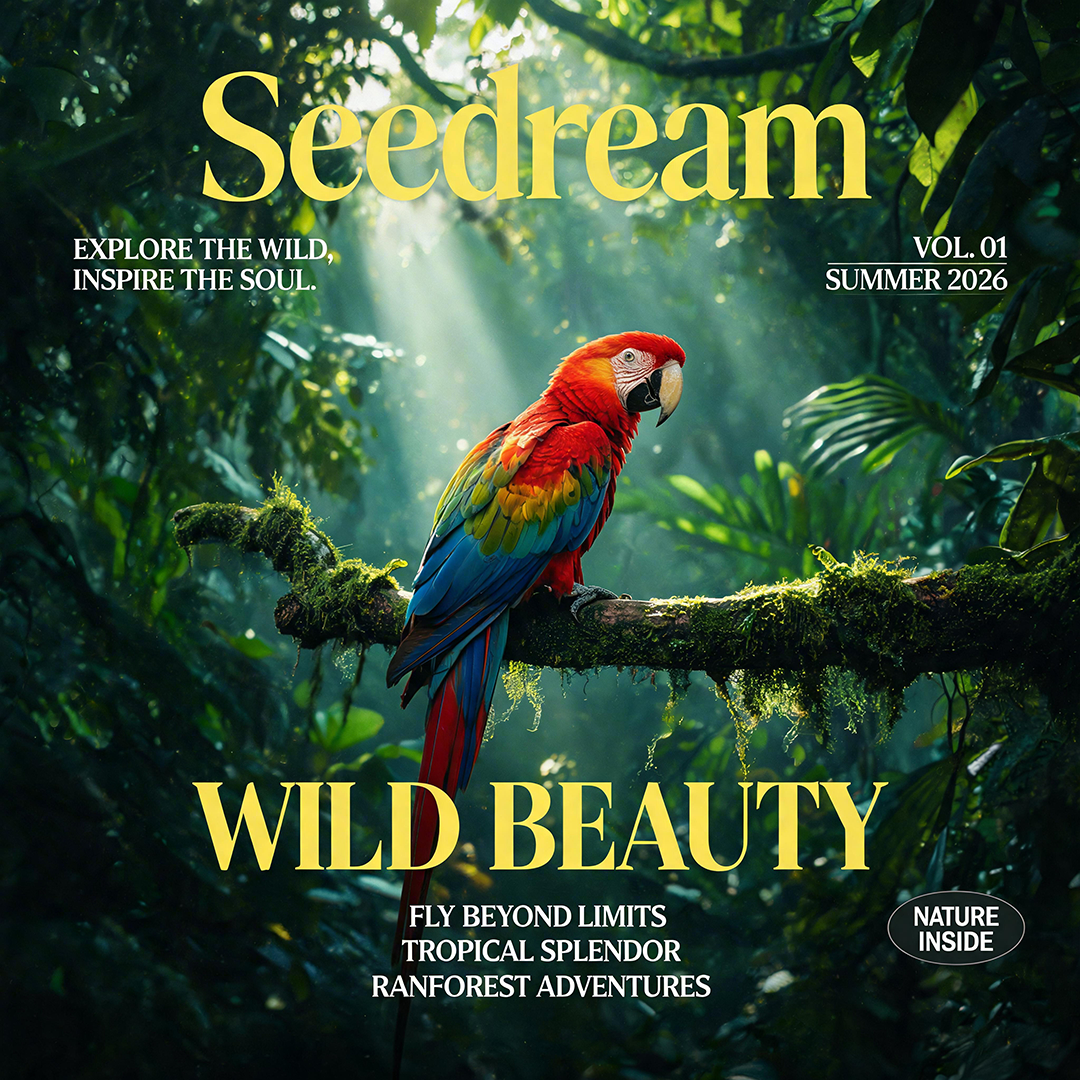
将图片中的内容拆成 7 个图层,包括 6 组文字:
`180 64 812 198`、`757 210 939 280`、`63 212 320 282`、`178 714 826 810`、`814 819 949 894`、`326 824 669 930`;
1 只鹦鹉:`347 305 642 997`。
| | | |
|^^ |^^ | |^^ |
|^^ |^^ | |^^ |
|^^ |^^ | |^^ |
|^^ |^^ | |^^ |
|^^ |^^ | |^^ |
**选项:Curl**
```Bash
curl https://ark.cn-beijing.volces.com/api/v3/images/generations \
-H "Content-Type: application/json" \
-H "Authorization: Bearer $ARK_API_KEY" \
-d '{
"model": "doubao-seedream-5-0-pro-260628",
"prompt": "将图片进行精确图层分离,需分离的文字坐标为180 64 812 198、757 210 939 280、63 212 320 282、178 714 826 810、814 819 949 894、326 824 669 930;鹦鹉的坐标为347 305 642 997。",
"image": "https://arkdocs.tos-cn-beijing.volces.com/images/image-generation/seedream_50_pro_layer_input.png",
"layer_decomposition": true,
"size": "2K",
"output_format": "jpeg",
"response_format": "url",
"watermark": true
}'
```
* 您可按需替换 Model ID。Model ID 查询见 [模型列表](/docs/model-list)。
**选项:Python**
```Python
import os
# Install SDK: python -m pip install --upgrade arkruntime
from arkruntime import Ark
client = Ark(
# The base URL for model invocation
base_url="https://ark.cn-beijing.volces.com/api/v3",
# Get API Key: https://ark.volcengine.com/region:cn-beijing/apikey
api_key=os.getenv("ARK_API_KEY"),
)
imagesResponse = client.images.generate(
# Replace with Model ID
model="doubao-seedream-5-0-pro-260628",
prompt="将图片进行精确图层分离,需分离的文字坐标为180 64 812 198、757 210 939 280、63 212 320 282、178 714 826 810、814 819 949 894、326 824 669 930;鹦鹉的坐标为347 305 642 997。",
image="https://arkdocs.tos-cn-beijing.volces.com/images/image-generation/seedream_50_pro_layer_input.png",
layer_decomposition=True,
size="2K",
output_format="jpeg",
response_format="url",
watermark=True,
)
for item in imagesResponse.data:
print(item)
```
**选项:Java**
```Java
package com.ark.sample;
import com.volcengine.ark.runtime.models.images.*;
import com.volcengine.ark.runtime.service.ArkService;
import okhttp3.ConnectionPool;
import okhttp3.Dispatcher;
import java.util.concurrent.TimeUnit;
public class ImageGenerationsExample {
public static void main(String[] args) {
String apiKey = System.getenv("ARK_API_KEY");
ConnectionPool connectionPool = new ConnectionPool(5, 1, TimeUnit.SECONDS);
Dispatcher dispatcher = new Dispatcher();
ArkService service = ArkService.builder()
.baseUrl("https://ark.cn-beijing.volces.com/api/v3")
// The base URL for model invocation
.dispatcher(dispatcher)
.connectionPool(connectionPool)
.apiKey(apiKey)
.build();
// CreateImageGenerationRequestImage requires ark-runtime 0.6.0 or later.
CreateImageGenerationRequest generateRequest = CreateImageGenerationRequest.builder()
.model("doubao-seedream-5-0-pro-260628") // Replace with Model ID
.prompt("将图片进行精确图层分离,需分离的文字坐标为180 64 812 198、757 210 939 280、63 212 320 282、178 714 826 810、814 819 949 894、326 824 669 930;鹦鹉的坐标为347 305 642 997。")
.image(CreateImageGenerationRequestImage.ofString("https://arkdocs.tos-cn-beijing.volces.com/images/image-generation/seedream_50_pro_layer_input.png"))
.layerDecomposition(true)
.size("2K")
.outputFormat(OutputFormat.JPEG)
.responseFormat(ResponseFormat.URL)
.watermark(true)
.build();
ImageGenerationResponse imagesResponse = service.generateImages(generateRequest);
imagesResponse.getData().forEach(item -> System.out.println(item));
service.shutdownExecutor();
}
}
```
**选项:Go**
```Go
package main
import (
"context"
"fmt"
"os"
"github.com/volcengine/ark-runtime-go/arkruntime"
model "github.com/volcengine/ark-runtime-go/arkruntime/model/images"
)
func main() {
client := arkruntime.NewClientWithApiKey(
os.Getenv("ARK_API_KEY"),
// The base URL for model invocation
arkruntime.WithBaseUrl("https://ark.cn-beijing.volces.com/api/v3"),
)
ctx := context.Background()
outputFormat := model.OutputFormatJpeg
generateReq := &model.CreateImageGenerationRequest{
Model: "doubao-seedream-5-0-pro-260628",
Prompt: model.NewOptString("将图片进行精确图层分离,需分离的文字坐标为180 64 812 198、757 210 939 280、63 212 320 282、178 714 826 810、814 819 949 894、326 824 669 930;鹦鹉的坐标为347 305 642 997。"),
Image: model.NewOptCreateImageGenerationRequestImage(model.NewStringArrayCreateImageGenerationRequestImage([]string{"https://arkdocs.tos-cn-beijing.volces.com/images/image-generation/seedream_50_pro_layer_input.png"})),
LayerDecomposition: model.NewOptBool(true),
Size: model.NewOptString("2K"),
OutputFormat: model.NewOptOutputFormat(outputFormat),
ResponseFormat: model.NewOptResponseFormat(model.ResponseFormatURL),
Watermark: model.NewOptBool(true),
}
imagesResponse, err := client.GenerateImages(ctx, generateReq)
if err != nil {
fmt.Printf("generate images error: %v\n", err)
return
}
for _, item := range imagesResponse.Data {
fmt.Printf("%+v\n", item)
}
}
```
**选项:OpenAI**
```Python
import os
from openai import OpenAI
client = OpenAI(
# The base URL for model invocation
base_url="https://ark.cn-beijing.volces.com/api/v3",
# Get API Key: https://ark.volcengine.com/region:cn-beijing/apikey
api_key=os.getenv("ARK_API_KEY"),
)
imagesResponse = client.images.generate(
model="doubao-seedream-5-0-pro-260628",
prompt="将图片进行精确图层分离,需分离的文字坐标为180 64 812 198、757 210 939 280、63 212 320 282、178 714 826 810、814 819 949 894、326 824 669 930;鹦鹉的坐标为347 305 642 997。",
size="2K",
output_format="jpeg",
response_format="url",
extra_body={
"image": "https://arkdocs.tos-cn-beijing.volces.com/images/image-generation/seedream_50_pro_layer_input.png",
"layer_decomposition": True,
"watermark": True,
},
)
for item in imagesResponse.data:
print(item)
```
### 响应结果说明
图层拆分模式下,响应参数 `data` 数组会同时返回底图和所有图层。您可通过`url`下载所有输出图,并根据图层叠放顺序(`z_index`)区分底图和图层。利用图层的边界框坐标信息(`bounding_box`) 和图层叠放顺序(`z_index`)可还原、编辑或重组图层。
|字段 |返回对象 |含义 |
|---|---|---|
|`url` |底图、图层 |底图或图层的下载链接。图片 URL 仅保留 24 小时。 |
|`z_index` |底图、图层 |图层叠放顺序。底图 `z_index=0` 固定为`0`,各图层按 `z_index` 递增排序。 |
|`bounding_box.absolute` |图层 |图层在输出底图坐标系中的绝对像素位置,适用于将图层还原到输出底图的原始位置。 |
|`bounding_box.normalized` |图层 |图层在输出底图坐标系中的归一化位置,适用于将图层还原到任意尺寸的自定义画布。 |
|`name`、`description` |图层 |图层名称和内容描述。 |
**返回结构示例:**
```JSON
{
"model": "doubao-seedream-5-0-pro-260628",
"created": 1784696685,
"data": [
{
"url": "https://...",
"size": "2048x2048",
"output_format": "jpeg",
"z_index": 0
},
{
"url": "https://...",
"size": "1273x265",
"output_format": "png",
"z_index": 1,
"bounding_box": {
"absolute": [383, 120, 1655, 384],
"normalized": [187, 59, 808, 188]
},
"name": "Seedream标题文字",
"description": "黄色大号衬线字体的Seedream标题文字"
},
{
"url": "https://...",
"size": "492x98",
"output_format": "png",
"z_index": 2,
"bounding_box": {
"absolute": [140, 451, 631, 548],
"normalized": [68, 220, 308, 268]
},
"name": "左上角标语文字",
"description": "白色两行文字内容为EXPLORE THE WILD, INSPIRE THE SOUL."
}
],
"usage": {
"input_images": 1,
"generated_images": 8,
"output_tokens": 23107,
"total_tokens": 23107
}
}
```
## 使用拆分后的图层
获取底图和图层后,可以直接按原位置还原图层,也可以调整图层位置、大小和叠放顺序;如果需要修改某个元素的颜色、风格或细节,也可以单独编辑该图层。
### 还原与重组图层
还原或重组图层时,可按以下顺序处理响应结果:
1. 将 `data` 数组中 `z_index` 为 `0` 的对象作为画布背景。
2. 提取 `z_index` 大于 `0` 的图层对象,并按 `z_index` 从小到大排序。
3. 下载图层 PNG,并根据 `bounding_box` 将图层放置到输出底图或目标画布。
4. 根据业务需求调整图层坐标、尺寸或叠放顺序,生成新的组合结果。
**还原图层到输出底图**
如需将图层还原到输出底图中的原始位置,建议使用 `bounding_box.absolute`。该字段为图层在输出底图坐标系中的绝对像素坐标,格式为 `[left, top, right, bottom]`:
* `left`、`top`:图层左上角相对于输出底图左上角的位置;
* `right`、`bottom`:图层右下角相对于输出底图左上角的位置。
可按以下方式计算图层在底图中的位置和尺寸,其中 `x`、`y` 表示图层左上角在底图中的放置位置,`w`、`h` 表示图层在底图中的展示宽高:
```text
x = left
y = top
w = right - left
h = bottom - top
```
将图层缩放至 `w × h`,再放置到底图的 `(x, y)` 位置。多个图层需要组合时,按 `z_index` 从小到大依次叠放。
**还原到任意画布**
如需将图层还原到不同尺寸的前端画布、设计工具画布中,建议使用 `bounding_box.normalized`。该字段为图层在输出底图坐标系中的归一化坐标,表示图层边界在输出底图宽高方向上的相对位置,格式为 `[left, top, right, bottom]`:
* `left`、`right`:图层左右边界在底图宽度方向上的相对位置;
* `top`、`bottom`:图层上下边界在底图高度方向上的相对位置。
设目标画布宽高为 `W × H`,可按以下方式计算图层在目标画布中的位置和尺寸,其中 `x`、`y` 表示图层左上角在目标画布中的放置位置,`w`、`h` 表示图层在目标画布中的展示宽高:
```text
x = left / 1000 × W
y = top / 1000 × H
w = (right - left) / 1000 × W
h = (bottom - top) / 1000 × H
```
将图层缩放至 `w × h`,再放置到目标画布的 `(x, y)` 位置。由于归一化坐标为整数,换算到目标画布时可能存在取整误差。
`bounding_box` 字段的完整定义和坐标示例参见 [图片生成 API](/docs/image-generation-api)。
### 编辑单个透明图层
图层拆分返回的图层为带透明通道的 PNG 图片。您可以将输出图层作为输入图再次调用 Seedream 模型,对其进行单独编辑,例如换色、风格变换、添加细节等。
> **注意**
>
> 如果希望编辑后的图层继续保留透明背景,可在请求中配置 `background=transparent`、`output_format=png`。透明背景模式的使用限制请参见 [透明通道设置](/docs/seedream-5-0-pro#transparent-channel)。
|提示词 |输入图层 |输出 |
|---|---|---|
|将图片中的鹦鹉改为孔雀 | |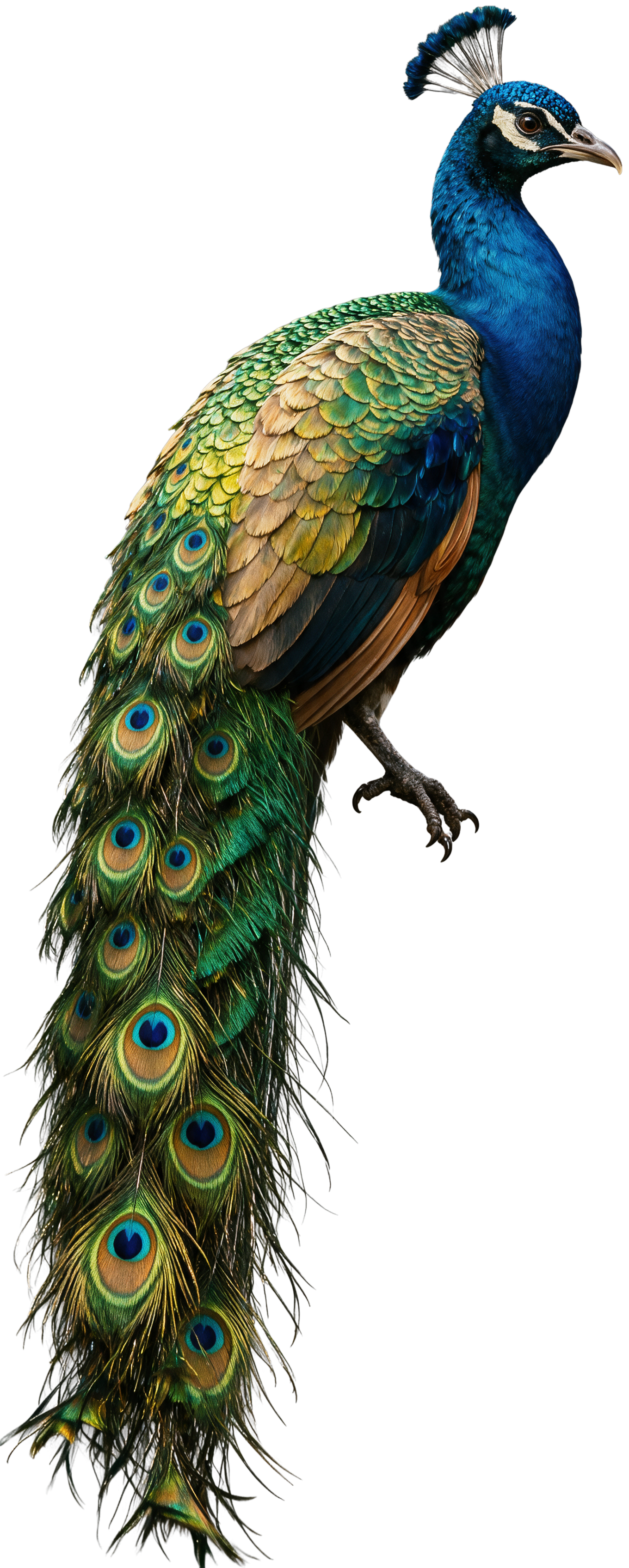 |
**选项:Curl**
```Bash
curl https://ark.cn-beijing.volces.com/api/v3/images/generations \
-H "Content-Type: application/json" \
-H "Authorization: Bearer $ARK_API_KEY" \
-d '{
"model": "doubao-seedream-5-0-pro-260628",
"prompt": "将图片中的鹦鹉改为孔雀",
"image": "https://arkdocs.tos-cn-beijing.volces.com/images/image-generation/Seedream50_layer_4.png",
"size": "2K",
"background": "transparent",
"watermark": true
}'
```
* 您可按需替换 Model ID。Model ID 查询见 [模型列表](/docs/model-list)。
**选项:Python**
```Python
import os
# Install SDK: python -m pip install --upgrade arkruntime
from arkruntime import Ark
client = Ark(
# The base URL for model invocation
base_url="https://ark.cn-beijing.volces.com/api/v3",
# Get API Key: https://ark.volcengine.com/region:cn-beijing/apikey
api_key=os.getenv("ARK_API_KEY"),
)
imagesResponse = client.images.generate(
# Replace with Model ID
model="doubao-seedream-5-0-pro-260628",
prompt="将图片中的鹦鹉改为孔雀",
image="https://arkdocs.tos-cn-beijing.volces.com/images/image-generation/Seedream50_layer_4.png",
size="2K",
background="transparent",
response_format="url",
watermark=True,
)
print(imagesResponse.data[0].url)
```
**选项:Go**
```Go
package main
import (
"context"
"fmt"
"os"
"github.com/volcengine/ark-runtime-go/arkruntime"
model "github.com/volcengine/ark-runtime-go/arkruntime/model/images"
)
func main() {
client := arkruntime.NewClientWithApiKey(
os.Getenv("ARK_API_KEY"),
// The base URL for model invocation
arkruntime.WithBaseUrl("https://ark.cn-beijing.volces.com/api/v3"),
)
ctx := context.Background()
generateReq := &model.CreateImageGenerationRequest{
Model: "doubao-seedream-5-0-pro-260628",
Prompt: model.NewOptString("将图片中的鹦鹉改为孔雀"),
Image: model.NewOptCreateImageGenerationRequestImage(model.NewStringArrayCreateImageGenerationRequestImage([]string{"https://arkdocs.tos-cn-beijing.volces.com/images/image-generation/Seedream50_layer_4.png"})),
Size: model.NewOptString("2K"),
ResponseFormat: model.NewOptResponseFormat(model.ResponseFormatURL),
Background: model.NewOptBackground(model.BackgroundTransparent),
Watermark: model.NewOptBool(true),
}
imagesResponse, err := client.GenerateImages(ctx, generateReq)
if err != nil {
fmt.Printf("generate images error: %v\n", err)
return
}
fmt.Printf("%s\n", imagesResponse.Data[0].URL.Or(""))
}
```
**选项:Java**
```Java
package com.ark.sample;
import com.volcengine.ark.runtime.models.images.*;
import com.volcengine.ark.runtime.service.ArkService;
import okhttp3.ConnectionPool;
import okhttp3.Dispatcher;
import java.util.concurrent.TimeUnit;
public class ImageGenerationsExample {
public static void main(String[] args) {
String apiKey = System.getenv("ARK_API_KEY");
ConnectionPool connectionPool = new ConnectionPool(5, 1, TimeUnit.SECONDS);
Dispatcher dispatcher = new Dispatcher();
ArkService service = ArkService.builder()
.baseUrl("https://ark.cn-beijing.volces.com/api/v3") // The base URL for model invocation
.dispatcher(dispatcher)
.connectionPool(connectionPool)
.apiKey(apiKey)
.build();
// CreateImageGenerationRequestImage requires ark-runtime 0.6.0 or later.
CreateImageGenerationRequest generateRequest = CreateImageGenerationRequest.builder()
.model("doubao-seedream-5-0-pro-260628") // Replace with Model ID
.prompt("将图片中的鹦鹉改为孔雀")
.image(CreateImageGenerationRequestImage.ofString(
"https://arkdocs.tos-cn-beijing.volces.com/images/image-generation/Seedream50_layer_4.png"))
.size("2K")
.background(Background.TRANSPARENT)
.responseFormat(ResponseFormat.URL)
.watermark(true)
.build();
ImageGenerationResponse imagesResponse = service.generateImages(generateRequest);
System.out.println(imagesResponse.getData().get(0).getUrl());
service.shutdownExecutor();
}
}
```
# 提升图片生成速度配置
如果您希望**提升图片生成速度**,可以通过 `optimize_prompt_options.mode` 参数选择更快的提示词优化模式。**对于时延敏感的业务,建议您使用 Seedream 5.0 pro 的 `fast` 模式或直接使用 Seedream 5.0 flash 以获得更快的生成速度**。
* `standard`(默认值):标准模式,生成图片的质量较 `fast` 模式更优,但耗时更长。
* `fast`:极速模式,生成图片的耗时较 `standard` 模式更短。**仅 Seedream 5.0 pro 支持**。
```JSON
{
"optimize_prompt_options": {
"mode": "fast"
}
}
```
# 自定义图片输出规格
您可以配置以下参数来控制图片输出规格:
* **size**:指定输出图像的尺寸大小。
* **response_format**:指定生成图像的返回格式。
* **output_format**:指定生成图像的文件格式。
* **background**:控制是否生成带透明通道的图片。
* **watermark** :指定是否为输出图片添加水印。
## 图像输出尺寸
`size` 参数在**图片生成场景**和**图层拆分场景**下的可选值与默认值不同,请根据实际场景选择:
### 图片生成场景
支持以下两种方式,不可混用。
**方式 1:指定分辨率档位(推荐)**
在 prompt 中用自然语言描述图片宽高比、图片形状或图片用途,最终由模型判断生成图片的大小。
* 默认值:`2K`
* 可选值:`1K`、`1.5K`、`2K`
> **说明**
>
> `1.5K` 与 `1K` 价格相同,且图片生成效果更优。
使用方式 1 并在 prompt 中描述特定宽高比时,模型实际映射的宽高像素参考值(不限于以下标准值,仅列常见):
| 分辨率 | 宽高比 | 宽高像素值 |
| --- | --- | --- |
| 1K | 1:1 | 1024x1024 |
|^^| 4:3 | 1152x864 |
|^^| 3:4 | 864x1152 |
|^^| 16:9 | 1424x800 |
|^^| 9:16 | 800x1424 |
|^^| 3:2 | 1248x832 |
|^^| 2:3 | 832x1248 |
|^^| 21:9 | 1568x672 |
| 1.5K | 1:1 | 1536x1536 |
|^^| 4:3 | 1792x1344 |
|^^| 3:4 | 1344x1792 |
|^^| 16:9 | 2048x1152 |
|^^| 9:16 | 1152x2048 |
|^^| 3:2 | 1872x1248 |
|^^| 2:3 | 1248x1872 |
|^^| 21:9 | 2352x1008 |
| 2K | 1:1 | 2048x2048 |
|^^| 4:3 | 2368x1776 |
|^^| 3:4 | 1776x2368 |
|^^| 16:9 | 2816x1584 |
|^^| 9:16 | 1584x2816 |
|^^| 3:2 | 2496x1664 |
|^^| 2:3 | 1664x2496 |
|^^| 21:9 | 3136x1344 |
**方式 2:指定宽高像素值(`宽x高`)**
* 总像素取值范围:[`1280x720`(921600), `2048x2048x1.1025`(4624220)]
* 宽高比取值范围:[1/16, 16]
> **说明:宽高像素值使用示例**
>
> 采用方式 2 时,需同时满足总像素取值范围和宽高比取值范围。其中,总像素是对单张图宽度和高度的像素乘积限制,而不是对宽度或高度的单独值进行限制。
> * **有效示例**:`2048x1024`
> 总像素值 2048x1024=2097152,符合 [921600, 4624220] 的区间要求;宽高比 2048/1024=2,符合 [1/16, 16] 的区间要求,故该示例值有效。
> * **无效示例**:`512x512`
> 总像素值 512x512=262144,未达到 921600 的最低要求,故该示例值无效。
|方式1 |方式2 |
|---|---|
|```JSON |```JSON | \
|{ |{ | \
|"prompt": "生成一组共4张连贯插画,宽高比为3:2,核心为同一庭院一角的四季变迁,以统一风格展现四季独特色彩、元素与氛围", |"prompt": "生成一组共4张连贯插画,核心为同一庭院一角的四季变迁,以统一风格展现四季独特色彩、元素与氛围",| \
|"size": "2K" |"size": "2048x2048" | \
|} |} | \
|``` |``` |
### 图层拆分场景
仅支持通过指定分辨率档位的方式进行设置。输出图的分辨率规则如下:
* **底图**:输出底图的分辨率和 `size` 指定的分辨率一致;输出底图和原待拆分图的宽高比一致。
* **各图层**:输出图层的分辨率和 `size` 指定的分辨率接近;每个输出图层和其在原图中的宽高比一致。
`size` 的默认值与可选值:
* 默认值:`auto`
* 可选值:`1K`、`1.5K`、`2K`、`auto`(根据输入图的尺寸和宽高比进行输出)
> **说明**
>
> `1.5K` 与 `1K` 价格相同,且图片生成效果更优。
> **说明:auto 适配规则**
>
> auto 模式下,模型将根据输入图片的尺寸,判断输出底图与每个图层的尺寸:
>
> * 若输入图片尺寸在 [`1280x720`(921600), `2048x2048x1.1025`(4624220)] 之间,按输入图片原尺寸输出底图与每个图层;且各自保持其在原图中的宽高比。
> * 若输入图片小于 1K,按 1K 输出底图与每个图层,且各自保持其在原图中的宽高比。
> * 若输入图片大于 2K,按 2K 输出底图与每个图层,且各自保持其在原图中的宽高比。
模型实际映射的宽高像素参考值同 [图片生成场景的分辨率映射表](/docs/seedream-5-0-pro#pro_output_spec)
## 图像输出方式
设置 `response_format` 参数,可以指定生成图像的返回方式:
* `url`:返回图片下载链接。
* `b64_json`:以 Base64 编码字符串的 JSON 格式返回图像数据。
```JSON
{
"response_format": "url"
}
```
## 图像文件格式
设置 `output_format` 参数,指定生成图像文件的格式:
* `png`
* `jpeg`
```JSON
{
"output_format": "png"
}
```
> **注意**
>
> 图层拆分场景下,`output_format` 仅控制底图的输出格式,图层始终以 `png` 格式输出。
## 透明通道设置
设置 `background` 参数,控制是否生成带透明通道的图片:
* `transparent`:透明背景模式,输出带有透明背景的图。
* `opaque`(默认):不透明背景模式,生成常规的实体背景图。
```JSON
{
"background": "transparent"
}
```
> **注意:使用限制**
>
> * 仅支持图生图场景,且只支持输入 **1 张带透明通道**的图片;
> * 透明背景模式下,输出图片默认为 `png` 格式,若同时配置 `output_format` 为 `jpeg`,将触发报错;
> * 若传入了不支持透明通道的文件格式(如 `jpeg`),将触发报错。
## 图像中添加水印
设置 `watermark` 参数,来控制是否在生成的图片中添加水印。
* `false`:不添加水印。
* `true`:在图片右下角添加"AI生成"字样的水印标识。
```JSON
{
"watermark": true
}
```
# 使用限制
**SDK 版本升级**
为保证模型功能的正常使用,请务必升级至最新 SDK 版本。相关步骤可参考 [安装及升级 SDK](/docs/install-and-upgrade-sdk)。
**图片传入限制**
图片传入方式(两种场景通用):
* 图片 URL:请确保图片 URL 可被访问。
示例:`https://arkdocs.tos-cn-beijing.volces.com/images/image-generation/seedream4_5_imageToimage.png`
* Base64 编码:请遵循格式`data:image/<图片格式>;base64,`。注意:`<图片格式>` 必须采用小写字母,例如 `data:image/png;base64,`。
如需获得图片的 Base64 编码,可使用第三方工具,例如 https://base64.guru/converter/encode/image。
不同场景对输入图的约束不同,详见下表:
| 约束项 | 图片生成场景 | 图层拆分场景 |
| --- | --- | --- |
| 图片格式 | jpeg、png、webp、bmp、tiff、gif、heic、heif | png、jpeg |
| 总像素(宽×高) | [196, `6000×6000`(3600万)] | [`512×512`(262144), `6000×6000`(3600万)] |
| 宽高长度(px) | 大于14 | — |
| 宽高比(宽/高) | [1/16, 16] | [1/16, 16] |
| 大小 | 不超过 30 MB | 不超过 30 MB |
| 传入张数 | 最多传入 10 张参考图 | 仅支持传入单张图 |
> **说明**
>
> 总像素是对单张图宽度和高度的**像素乘积**限制,而不是对宽度或高度的单独值进行限制。
**保存时间**
图片URL仅保留24小时,超时后会被自动清除。请您务必及时保存生成的图片。
**限流说明**
* IPM 限流:账号下同模型(区分模型版本)每分钟生成图片数量上限。若超过该限制,生成图片时会报错。
* 图层拆分场景下,每次请求预扣减 17 IPM(即按最大输出张数 17 张预留配额);图片全部生成后,按实际生成数量返还多扣减的额度。
* 不同模型的限制值不同,详见 [图片生成能力](/docs/model-list#9df4d9fd)。