# Doubao Seedance 便利创作含肖像视频
> 全部文档的索引见 [llms.txt](https://ark.volcengine.com/llms.txt);在任一文档页面地址后追加 `.md` 可获取该页的 Markdown 版本。
Seedance 2.5、Seedance 2.0 系列模型不支持直接上传含有真人人脸的参考图/视频。为便利创作者使用肖像素材进行视频生成,平台提供以下解决方案。
|方案 |介绍 |
|---|---|
|[信任模型产物作为输入素材](/docs/seedance-portrait-asset-guide#trust-model-output) | 本账号下部分模型生成的含人脸原始产物可作为输入素材,再次调用 Seedance 2.5、Seedance 2.0 系列模型进行二次创作,不会触发输入审核拦截。 |
|[使用预置虚拟人像](/docs/seedance-portrait-asset-guide#preset-avatar) |平台预置虚拟人像库,为创作者提供免费、合规、丰富多样的肖像素材。适用于需真人风格人脸但无需指定具体人物,追求零合规风险、快速创作的场景。 |
|[使用已授权真人素材](/docs/seedance-portrait-asset-guide#authorized-real-person) |支持使用已获得授权的真人肖像素材进行视频生成。 |
# 信任模型产物作为输入素材
Seedance 2.5、Seedance 2.0 系列模型不支持直接上传含有真人人脸的参考图/视频。为了便利创作者在含人脸场景的二次创作需求,方舟平台信任以下模型生成的含人脸产物,您可使用**本账号下近 30 天内由以下模型生成的含人脸原始产物**,作为输入素材,再次调用 Seedance 2.5、Seedance 2.0 系列模型进行二次创作。
## 信任范围与有效期
|信任产物范围 |生效时间 |有效期 | \
| |> 信任该时间之后生成的产物 |> 从产物生成时间开始计算 |
|---|---|---|
|Seedance 2.5、Seedance 2.0 系列生成的含人脸视频 |2026年03月11日起 |30天 |
|Seedance 2.5、Seedance 2.0 系列生成的含人脸视频对应的尾帧图片 |2026年04月16日起 |30天 |
|[Seedream 5.0 lite/pro/flash 文生图](/docs/seedream-4-0-5-0#9695d195) 得到的含人脸图片 |2026年04月16日起 |30天 |
## 注意事项
> **注意**
>
> * 仅信任方舟平台的产物,不支持跨平台使用。
> * 仅信任同账号下的产物,不支持跨账号使用。
> * 仅信任模型原始产物,二次剪辑或超过有效期后均不可使用。
> * 压缩或转发文件易引发信任失效,建议直接将模型原始产物转存至 TOS 使用。
> * 仅对输入的产物进行信任,输出依然有可能因命中方舟安全审核策略而失败,详情参见 [错误码](/docs/error-codes)。
> * 信任仅对命中人脸审核生效,对于不含人脸场景,模型产物不存在受信问题,支持自由剪辑后进行二次创作。
## 代码示例
|输入:同账号生成的视频 |输出 |
|---|---|
|[视频](https://p9-arcosite.byteimg.com/obj/tos-cn-i-goo7wpa0wc/24e27818aeb644b6942c2cbc949ddc86) |[视频](https://p9-arcosite.byteimg.com/obj/tos-cn-i-goo7wpa0wc/44d52b9f0768460c8c86b81d2df40350) | \
| | | \
|> [使用预置虚拟人像](/docs/seedance-portrait-asset-guide#preset-avatar) 示例生成的视频 |> 输入:将面霜的颜色修改为白色。 | \
| |> ratio 修改为16:9 |
**选项:Python**
1. 首次生视频,并获取视频 URL。此处直接用 [使用预置虚拟人像](/docs/seedance-portrait-asset-guide#preset-avatar) 示例生成的视频。
2. 对 Seedance 2.5、Seedance 2.0 系列生成的视频进行再次编辑。视频原始 URL 的有效期仅 24 小时,本示例将原始视频转存至 TOS 使用。
> **说明**
>
> 视频原始 URL 的有效期仅 24 小时,实际使用时,建议您提前转存视频文件。推荐配置火山引擎 TOS 提供的数据订阅功能,将您的视频产物自动转存到自己的 TOS 桶中,便于长期备份或二次加工。详细介绍请参见 [TOS 数据订阅](https://docs.volcengine.com/docs/TorchObjectStorage/Datasubscription-5?lang=zh)。
```Python
import os
import time
# Install SDK: python -m pip install --upgrade arkruntime
from arkruntime import Ark
client = Ark(
# The base URL for model invocation
base_url='https://ark.cn-beijing.volces.com/api/v3',
# Get API Key:https://ark.volcengine.com/region:cn-beijing/apikey
api_key=os.environ.get("ARK_API_KEY"),
)
if __name__ == "__main__":
print("----- create request -----")
create_result = client.content_generation.tasks.create(
model="doubao-seedance-2-0-260128", # Replace with Model ID
content=[
{
"type": "text",
"text": "将面霜的颜色修改为白色。"
},
{
"type": "video_url",
"video_url": {
"url": "https://arkdocs.tos-cn-beijing.volces.com/videos/advanced-usage/video_by_sd2-zh.mp4"
},
"role": "reference_video"
},
],
generate_audio=True,
ratio="16:9",
duration=11,
watermark=True,
)
print(create_result)
print("----- polling task status -----")
task_id = create_result.id
while True:
get_result = client.content_generation.tasks.get(task_id=task_id)
status = get_result.status
if status == "succeeded":
print("----- task succeeded -----")
print(get_result)
break
elif status == "failed":
print("----- task failed -----")
print(f"Error: {get_result.error}")
break
else:
print(f"Current status: {status}, Retrying after 30 seconds...")
time.sleep(30)
```
**选项:Java**
1. 首次生视频,并获取视频 URL。此处直接用 [使用预置虚拟人像](/docs/seedance-portrait-asset-guide#preset-avatar) 示例生成的视频。
2. 对 Seedance 2.5、Seedance 2.0 系列生成的视频进行再次编辑。视频原始 URL 的有效期仅 24 小时,本示例将原始视频转存至 TOS 使用。
> **说明**
>
> 视频原始 URL 的有效期仅 24 小时,实际使用时,建议您提前转存视频文件。推荐配置火山引擎 TOS 提供的数据订阅功能,将您的视频产物自动转存到自己的 TOS 桶中,便于长期备份或二次加工。详细介绍请参见 [TOS 数据订阅](https://docs.volcengine.com/docs/TorchObjectStorage/Datasubscription-5?lang=zh)。
```Java
package com.ark.sample;
import com.volcengine.ark.runtime.models.content_generation.*;
import com.volcengine.ark.runtime.service.ArkService;
import okhttp3.ConnectionPool;
import okhttp3.Dispatcher;
import java.util.ArrayList;
import java.util.List;
import java.util.concurrent.TimeUnit;
public class ContentGenerationTaskExample {
// Client initialization
static String apiKey = System.getenv("ARK_API_KEY");
static ConnectionPool connectionPool = new ConnectionPool(5, 1, TimeUnit.SECONDS);
static Dispatcher dispatcher = new Dispatcher();
static ArkService service = ArkService.builder()
.baseUrl("https://ark.cn-beijing.volces.com/api/v3") // The base URL for model invocation
.dispatcher(dispatcher)
.connectionPool(connectionPool)
.apiKey(apiKey)
.build();
public static void main(String[] args) {
// Model ID
final String modelId = "doubao-seedance-2-0-260128";
// Text prompt
final String prompt = "将面霜的颜色修改为白色。";
// Example resource URLs
final String refVideo = "https://arkdocs.tos-cn-beijing.volces.com/videos/advanced-usage/video_by_sd2-zh.mp4";
// Output video parameters
final boolean generateAudio = true;
final String videoRatio = "16:9";
final long videoDuration = 11L;
final boolean showWatermark = true;
System.out.println("----- create request -----");
// Build request content
List contents = new ArrayList<>();
// 1. Text prompt
contents.add(ContentItem.builder()
.type(ContentType.TEXT)
.text(prompt)
.build());
// 2. Reference video
contents.add(ContentItem.builder()
.type(ContentType.VIDEO_URL)
.videoUrl(VideoURL.builder()
.url(refVideo)
.build())
.role("reference_video")
.build());
// Create video generation task
CreateContentGenerationTaskRequest createRequest = CreateContentGenerationTaskRequest.builder()
.generateAudio(generateAudio)
.model(modelId)
.content(contents)
.ratio(videoRatio)
.duration(videoDuration)
.watermark(showWatermark)
.build();
CreateContentGenerationTaskResponse createResult = service.createContentGenerationTask(createRequest);
System.out.println("Task Created: " + createResult);
// Get task details and poll status
String taskId = createResult.getId();
pollTaskStatus(taskId);
}
/**
* Poll task status
* @param taskId Task ID
*/
private static void pollTaskStatus(String taskId) {
String getRequest = taskId;
System.out.println("----- polling task status -----");
try {
while (true) {
ContentGenerationTask getResponse = service.getContentGenerationTask(getRequest);
String status = getResponse.getStatus().toString();
if ("succeeded".equalsIgnoreCase(status)) {
System.out.println("----- task succeeded -----");
System.out.println(getResponse);
break;
} else if ("failed".equalsIgnoreCase(status)) {
System.out.println("----- task failed -----");
if (getResponse.getError() != null) {
System.out.println("Error: " + getResponse.getError().getMessage());
}
break;
} else {
System.out.printf("Current status: %s, Retrying in 10 seconds...%n", status);
TimeUnit.SECONDS.sleep(10);
}
}
} catch (InterruptedException ie) {
Thread.currentThread().interrupt();
System.err.println("Polling interrupted");
} catch (Exception e) {
System.err.println("Error occurred: " + e.getMessage());
} finally {
service.shutdownExecutor();
}
}
}
```
**选项:Go**
1. 首次生视频,并获取视频 URL。此处直接用 [使用预置虚拟人像](/docs/seedance-portrait-asset-guide#preset-avatar) 示例生成的视频。
2. 对 Seedance 2.5、Seedance 2.0 系列生成的视频进行再次编辑。视频原始 URL 的有效期仅 24 小时,本示例将原始视频转存至 TOS 使用。
> **说明**
>
> 视频原始 URL 的有效期仅 24 小时,实际使用时,建议您提前转存视频文件。推荐配置火山引擎 TOS 提供的数据订阅功能,将您的视频产物自动转存到自己的 TOS 桶中,便于长期备份或二次加工。详细介绍请参见 [TOS 数据订阅](https://docs.volcengine.com/docs/TorchObjectStorage/Datasubscription-5?lang=zh)。
```Go
package main
import (
"context"
"fmt"
"os"
"time"
"github.com/volcengine/ark-runtime-go/arkruntime"
model "github.com/volcengine/ark-runtime-go/arkruntime/model/contentgeneration"
)
func main() {
// Initialize Ark client
client := arkruntime.NewClientWithApiKey(
os.Getenv("ARK_API_KEY"),
// The base URL for model invocation
arkruntime.WithBaseUrl("https://ark.cn-beijing.volces.com/api/v3"),
)
ctx := context.Background()
// Model ID
modelID := "doubao-seedance-2-0-260128"
// Text prompt
prompt := "将面霜的颜色修改为白色。"
// Example resource URLs
refVideo1 := "https://arkdocs.tos-cn-beijing.volces.com/videos/advanced-usage/video_by_sd2-zh.mp4"
// Output video parameters
generateAudio := true
videoRatio := "16:9"
videoDuration := int64(11)
showWatermark := true
// 1. Create video generation task
fmt.Println("----- create request -----")
createReq := &model.CreateContentGenerationTaskRequest{
Model: modelID,
GenerateAudio: model.NewOptBool(generateAudio),
Ratio: model.NewOptString(videoRatio),
Duration: model.NewOptInt64(videoDuration),
Watermark: model.NewOptBool(showWatermark),
Content: []model.ContentItem{
{
Type: model.ContentTypeText,
Text: model.NewOptString(prompt),
},
{
Type: model.ContentTypeVideoURL,
VideoURL: model.NewOptVideoURL(model.VideoURL{
URL: refVideo1,
}),
Role: model.NewOptString("reference_video"),
},
},
}
createResp, err := client.CreateContentGenerationTask(ctx, createReq)
if err != nil {
fmt.Printf("create content generation error: %v\n", err)
return
}
taskID := createResp.ID
fmt.Printf("Task Created with ID: %s\n", taskID)
// 2. Poll task status
pollTaskStatus(ctx, client, taskID)
}
// poll task status
func pollTaskStatus(ctx context.Context, client *arkruntime.Client, taskID string) {
fmt.Println("----- polling task status -----")
for {
getReq := taskID
getResp, err := client.GetContentGenerationTask(ctx, getReq)
if err != nil {
fmt.Printf("get content generation task error: %v\n", err)
return
}
status := getResp.Status
if status == "succeeded" {
fmt.Println("----- task succeeded -----")
fmt.Printf("Task ID: %s \n", getResp.ID)
fmt.Printf("Model: %s \n", getResp.Model)
fmt.Printf("Video URL: %s \n", getResp.Content.Or(model.TaskContent{}).VideoURL.Or(""))
fmt.Printf("Completion Tokens: %d \n", getResp.Usage.Or(model.TaskUsage{}).CompletionTokens)
fmt.Printf("Created At: %d, Updated At: %d\n", getResp.CreatedAt.Or(0), getResp.UpdatedAt.Or(0))
return
} else if status == "failed" {
fmt.Println("----- task failed -----")
if getResp.Error.IsSet() {
fmt.Printf("Error Code: %s, Message: %s\n", getResp.Error.Value.Code, getResp.Error.Value.Message)
}
return
} else {
fmt.Printf("Current status: %s, Retrying in 10 seconds... \n", status)
time.Sleep(10 * time.Second)
}
}
}
```
# 使用预置虚拟人像
对写实风格视频,可通过虚拟人像库预置人像来控制角色样貌。每个素材对应一个独立素材 ID (asset ID), 在 **content.<模态>_url.url** 字段中传入 `asset://` 即可生成视频。
> **说明**
>
> 开通虚拟人像库,浏览及检索虚拟人像请参见[虚拟人像库](/docs/avatar-library)。
|输入:文本 |输入:虚拟人像、图片 |输出 |
|---|---|---|
|固定机位,近景镜头,清新自然风格。在室内自然光下,**图片1**中美妆博主面带笑容,向镜头介绍**图片2**中的面霜。博主将手里的面霜展示给镜头,开心地说"挖到本命面霜了!";接着她一边用手指轻轻蘸取面霜展示那种软糯感,一边说"质地像云朵一样软糯,一抹就吸收";最后她把面霜涂抹在脸颊上,展示着水润透亮的皮肤,同时自信地说"熬夜急救、补水保湿全搞定"。要求画面中人物居中,完整展示人物的整个脑袋和上半身,始终对焦人脸,人脸始终清晰,纯净无任何字幕。 | |[视频](https://p9-arcosite.byteimg.com/obj/tos-cn-i-goo7wpa0wc/0bd96f702bdf48bab1a9505710d9e1f9) | \
| | | | \
| |> 虚拟人像 | | \
| | | | \
|Asset ID 仅用来向模型传入素材,提示词中仍需使用"**素材类型+序号**"格式引用素材,序号为请求体中该素材在同类素材中的排序。 |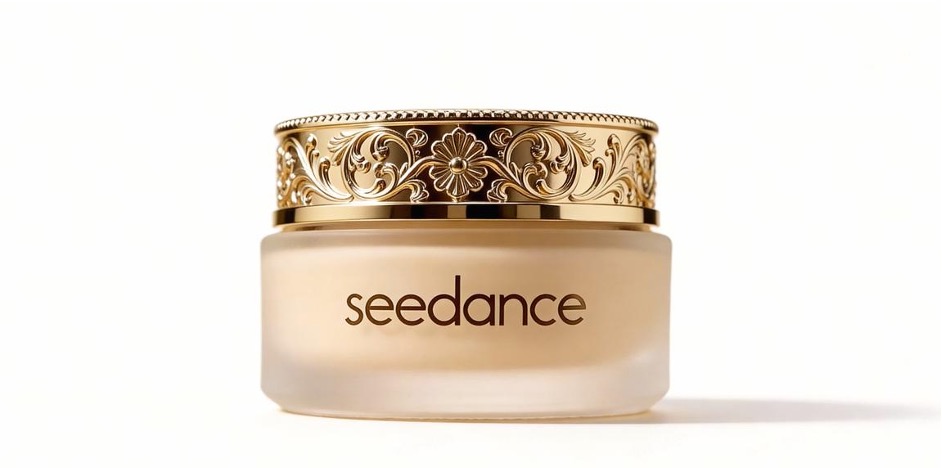 | | \
|正确用法:**图片1**中美妆博主 | | | \
|错误用法:asset-2026****是美妆博主 |> 产品图像 | | \
| | | |
**选项:Python**
```Python
import os
import time
# Install SDK: python -m pip install --upgrade arkruntime
from arkruntime import Ark
client = Ark(
# The base URL for model invocation
base_url='https://ark.cn-beijing.volces.com/api/v3',
# Get API Key:https://ark.volcengine.com/region:cn-beijing/apikey
api_key=os.environ.get("ARK_API_KEY"),
)
if __name__ == "__main__":
print("----- create request -----")
create_result = client.content_generation.tasks.create(
model="doubao-seedance-2-0-260128", # Replace with Model ID
content=[
{
"type": "text",
"text": "固定机位,近景镜头,清新自然风格。在室内自然光下,图片1中美妆博主面带笑容,向镜头介绍图片2中的面霜。博主将手里的面霜展示给镜头,开心地说“挖到本命面霜了!”;接着她一边用手指轻轻蘸取面霜展示那种软糯感,一边说“质地像云朵一样软糯,一抹就吸收”;最后她把面霜涂抹在脸颊上,展示着水润透亮的皮肤,同时自信地说“熬夜急救、补水保湿全搞定”。要求画面中人物居中,完整展示人物的整个脑袋和上半身,始终对焦人脸,人脸始终清晰,纯净无任何字幕。"
},
{
"type": "image_url",
"image_url": {
"url": "asset://asset-20260401123823-6d4x2"
},
"role": "reference_image"
},
{
"type": "image_url",
"image_url": {
"url": "https://arkdocs.tos-cn-beijing.volces.com/images/video-generation/r2v_edit_pic1.jpg"
},
"role": "reference_image"
},
],
generate_audio=True,
ratio="adaptive",
duration=11,
watermark=True,
)
print(create_result)
print("----- polling task status -----")
task_id = create_result.id
while True:
get_result = client.content_generation.tasks.get(task_id=task_id)
status = get_result.status
if status == "succeeded":
print("----- task succeeded -----")
print(get_result)
break
elif status == "failed":
print("----- task failed -----")
print(f"Error: {get_result.error}")
break
else:
print(f"Current status: {status}, Retrying after 30 seconds...")
time.sleep(30)
```
**选项:Java**
```Java
package com.ark.sample;
import com.volcengine.ark.runtime.models.content_generation.*;
import com.volcengine.ark.runtime.service.ArkService;
import okhttp3.ConnectionPool;
import okhttp3.Dispatcher;
import java.util.ArrayList;
import java.util.List;
import java.util.concurrent.TimeUnit;
public class ContentGenerationTaskExample {
// Client initialization
static String apiKey = System.getenv("ARK_API_KEY");
static ConnectionPool connectionPool = new ConnectionPool(5, 1, TimeUnit.SECONDS);
static Dispatcher dispatcher = new Dispatcher();
static ArkService service = ArkService.builder()
.baseUrl("https://ark.cn-beijing.volces.com/api/v3")
// The base URL for model invocation
.dispatcher(dispatcher)
.connectionPool(connectionPool)
.apiKey(apiKey)
.build();
public static void main(String[] args) {
// Model ID
final String modelId = "doubao-seedance-2-0-260128";
// Text prompt
final String prompt = "固定机位,近景镜头,清新自然风格。在室内自然光下,图片1中美妆博主面带笑容,向镜头介绍图片2中的面霜。博主将手里的面霜展示给镜头,开心地说“挖到本命面霜了!”;接着她一边用手指轻轻蘸取面霜展示那种软糯感,一边说“质地像云朵一样软糯,一抹就吸收”;最后她把面霜涂抹在脸颊上,展示着水润透亮的皮肤,同时自信地说“熬夜急救、补水保湿全搞定”。要求画面中人物居中,完整展示人物的整个脑袋和上半身,始终对焦人脸,人脸始终清晰,纯净无任何字幕。";
// Example resource URLs
final String refImage1 = "asset://asset-20260401123823-6d4x2";
final String refImage2 = "https://arkdocs.tos-cn-beijing.volces.com/images/video-generation/r2v_edit_pic1.jpg";
// Output video parameters
final boolean generateAudio = true;
final String videoRatio = "adaptive";
final long videoDuration = 11L;
final boolean showWatermark = true;
System.out.println("----- create request -----");
// Build request content
List contents = new ArrayList<>();
// 1. Text prompt
contents.add(ContentItem.builder()
.type(ContentType.TEXT)
.text(prompt)
.build());
// 2. Reference image 1
contents.add(ContentItem.builder()
.type(ContentType.IMAGE_URL)
.imageUrl(ImageURL.builder()
.url(refImage1)
.build())
.role("reference_image")
.build());
// 3. Reference image 2
contents.add(ContentItem.builder()
.type(ContentType.IMAGE_URL)
.imageUrl(ImageURL.builder()
.url(refImage2)
.build())
.role("reference_image")
.build());
// Create video generation task
CreateContentGenerationTaskRequest createRequest = CreateContentGenerationTaskRequest.builder()
.generateAudio(generateAudio)
.model(modelId)
.content(contents)
.ratio(videoRatio)
.duration(videoDuration)
.watermark(showWatermark)
.build();
CreateContentGenerationTaskResponse createResult = service.createContentGenerationTask(createRequest);
System.out.println("Task Created: " + createResult);
// Get task details and poll status
String taskId = createResult.getId();
pollTaskStatus(taskId);
}
/**
* Poll task status
* @param taskId Task ID
*/
private static void pollTaskStatus(String taskId) {
String getRequest = taskId;
System.out.println("----- polling task status -----");
try {
while (true) {
ContentGenerationTask getResponse = service.getContentGenerationTask(getRequest);
String status = getResponse.getStatus().toString();
if ("succeeded".equalsIgnoreCase(status)) {
System.out.println("----- task succeeded -----");
System.out.println(getResponse);
break;
} else if ("failed".equalsIgnoreCase(status)) {
System.out.println("----- task failed -----");
if (getResponse.getError() != null) {
System.out.println("Error: " + getResponse.getError().getMessage());
}
break;
} else {
System.out.printf("Current status: %s, Retrying in 10 seconds...%n", status);
TimeUnit.SECONDS.sleep(10);
}
}
} catch (InterruptedException ie) {
Thread.currentThread().interrupt();
System.err.println("Polling interrupted");
} catch (Exception e) {
System.err.println("Error occurred: " + e.getMessage());
} finally {
service.shutdownExecutor();
}
}
}
```
**选项:Go**
```Go
package main
import (
"context"
"fmt"
"os"
"time"
"github.com/volcengine/ark-runtime-go/arkruntime"
model "github.com/volcengine/ark-runtime-go/arkruntime/model/contentgeneration"
)
func main() {
// Initialize Ark client
client := arkruntime.NewClientWithApiKey(
os.Getenv("ARK_API_KEY"),
// The base URL for model invocation
arkruntime.WithBaseUrl("https://ark.cn-beijing.volces.com/api/v3"),
)
ctx := context.Background()
// Model ID
modelID := "doubao-seedance-2-0-260128"
// Text prompt
prompt := "固定机位,近景镜头,清新自然风格。在室内自然光下,图片1中美妆博主面带笑容,向镜头介绍图片2中的面霜。博主将手里的面霜展示给镜头,开心地说“挖到本命面霜了!”;接着她一边用手指轻轻蘸取面霜展示那种软糯感,一边说“质地像云朵一样软糯,一抹就吸收”;最后她把面霜涂抹在脸颊上,展示着水润透亮的皮肤,同时自信地说“熬夜急救、补水保湿全搞定”。要求画面中人物居中,完整展示人物的整个脑袋和上半身,始终对焦人脸,人脸始终清晰,纯净无任何字幕。"
// Example resource URLs
refImage1 := "asset://asset-20260401123823-6d4x2"
refImage2 := "https://arkdocs.tos-cn-beijing.volces.com/images/video-generation/r2v_edit_pic1.jpg"
// Output video parameters
generateAudio := true
videoRatio := "adaptive"
videoDuration := int64(11)
showWatermark := true
// 1. Create video generation task
fmt.Println("----- create request -----")
createReq := &model.CreateContentGenerationTaskRequest{
Model: modelID,
GenerateAudio: model.NewOptBool(generateAudio),
Ratio: model.NewOptString(videoRatio),
Duration: model.NewOptInt64(videoDuration),
Watermark: model.NewOptBool(showWatermark),
Content: []model.ContentItem{
{
Type: model.ContentTypeText,
Text: model.NewOptString(prompt),
},
{
Type: model.ContentTypeImageURL,
ImageURL: model.NewOptImageURL(model.ImageURL{
URL: refImage1,
}),
Role: model.NewOptString("reference_image"),
},
{
Type: model.ContentTypeImageURL,
ImageURL: model.NewOptImageURL(model.ImageURL{
URL: refImage2,
}),
Role: model.NewOptString("reference_image"),
},
},
}
createResp, err := client.CreateContentGenerationTask(ctx, createReq)
if err != nil {
fmt.Printf("create content generation error: %v\n", err)
return
}
taskID := createResp.ID
fmt.Printf("Task Created with ID: %s\n", taskID)
// 2. Poll task status
pollTaskStatus(ctx, client, taskID)
}
// poll task status
func pollTaskStatus(ctx context.Context, client *arkruntime.Client, taskID string) {
fmt.Println("----- polling task status -----")
for {
getReq := taskID
getResp, err := client.GetContentGenerationTask(ctx, getReq)
if err != nil {
fmt.Printf("get content generation task error: %v\n", err)
return
}
status := getResp.Status
if status == "succeeded" {
fmt.Println("----- task succeeded -----")
fmt.Printf("Task ID: %s \n", getResp.ID)
fmt.Printf("Model: %s \n", getResp.Model)
fmt.Printf("Video URL: %s \n", getResp.Content.Or(model.TaskContent{}).VideoURL.Or(""))
fmt.Printf("Completion Tokens: %d \n", getResp.Usage.Or(model.TaskUsage{}).CompletionTokens)
fmt.Printf("Created At: %d, Updated At: %d\n", getResp.CreatedAt.Or(0), getResp.UpdatedAt.Or(0))
return
} else if status == "failed" {
fmt.Println("----- task failed -----")
if getResp.Error.IsSet() {
fmt.Printf("Error Code: %s, Message: %s\n", getResp.Error.Value.Code, getResp.Error.Value.Message)
}
return
} else {
fmt.Printf("Current status: %s, Retrying in 10 seconds... \n", status)
time.Sleep(10 * time.Second)
}
}
}
```
# 使用已授权真人素材
通过真人认证和本人授权后,可将该真人的相关素材(例如该真人的图片、视频、音频)上传至方舟。素材入库成功后,每个素材将获得一个独立素材 ID (asset ID), 在 **content.<模态>_url.url** 字段中传入 `asset:// `即可使用该素材生成视频。真人认证及素材入库流程请参见[录入真人形象素材](/docs/upload-real-person-portrait-assets)。
```text
...
"content": [
{
"type": "text",
"text": ""
},
{
"type": "image_url",
"image_url": {
"url": "asset://"
},
"role": "reference_image"
},
{
"type": "video_url",
"video_url": {
"url": "asset://"
},
"role": "reference_video"
},
{
"type": "audio_url",
"audio_url": {
"url": "asset://"
},
"role": "reference_audio"
}
]
...
```