# Function Calling(函数调用)
> 全部文档的索引见 [llms.txt](https://ark.volcengine.com/llms.txt);在任一文档页面地址后追加 `.md` 可获取该页的 Markdown 版本。
Function Calling(函数调用)是一种将大模型与外部工具和 API 相连的关键功能,作为自然语言与信息接口之间的“翻译官”,它能够将用户的自然语言请求智能地转化为对特定工具或 API 的调用,从而高效满足用户的特定需求。
---
# 功能概述
* **核心价值**:实现大模型与外部工具的无缝衔接,使大模型能够借助外部工具处理实时数据查询、任务执行等复杂场景,推动大模型在实际产业中的落地应用。
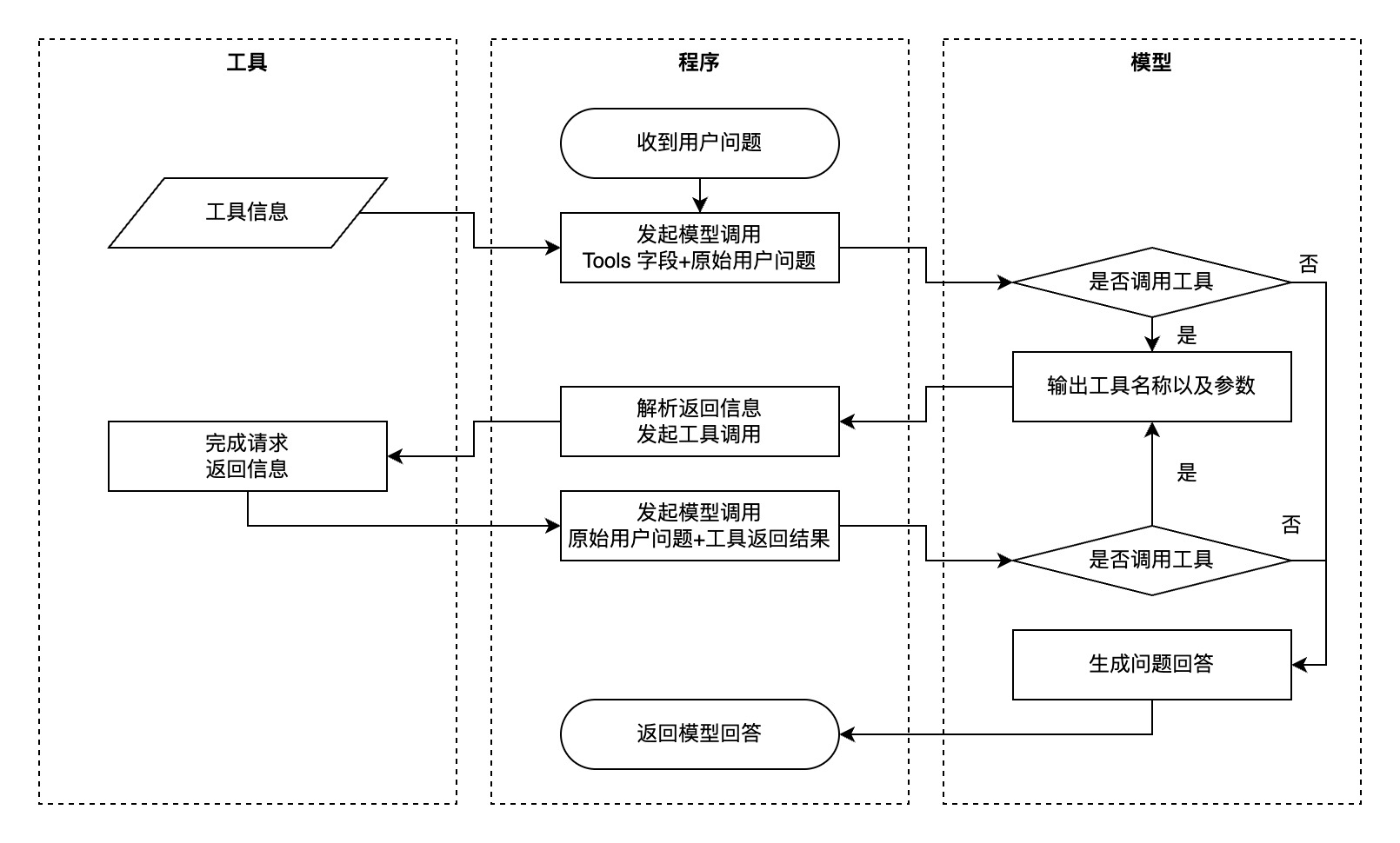
* **工作原理**:开发者通过自然语言向模型描述函数的功能和定义,模型在对话过程中自主判断是否需要调用函数。当需要调用时,模型会返回符合要求的工具函数及入参,开发者负责实际调用函数并将结果回填给模型,模型再根据结果进行总结或继续规划子任务。
# 适用场景
函数调用适用于以下需要大模型与外部工具协同的场景:
|**场景分类** |**核心特征** |**核心价值** |**典型应用** |
|---|---|---|---|
|实时数据交互场景 |需大模型与外部工具协同处理动态信息 |处理动态信息查询需求 |天气/股票/航班实时状态查询、数据库检索与 API 数据调用 |
|任务自动化场景 |单次函数调用完成操作 |提升操作效率 |邮件/消息自动发送、设备控制指令执行(如智能家居开关) |
|复杂流程编排场景 |多工具串并联调用 |跨工具参数传递、子任务依赖关系管理 |先查天气再发通知等需跨工具传递参数及管理子任务依赖的场景 |
|智能系统集成场景 |与业务系统深度耦合 |实现系统智能化联动 |智能座舱多设备联动控制、企业级 Bot 工作流(如飞书会议创建→群组管理→任务生成) |
## 工作原理图
## 典型示例
* 用户:北京今天的天气如何?适合穿什么衣服?
* 模型思考:
1. 需要调用天气查询工具获取实时数据(location=北京,unit=摄氏度)。
2. 天气信息包含温度、天气状况(晴/雨等),需结合数据给出穿衣建议。
* 函数调用结果:北京今天晴,气温 18-25℃,北风 3 级,湿度 45%。
* 模型回答:北京今天天气晴朗,气温 18-25℃,建议穿薄长袖衬衫或短袖 T 恤,搭配薄外套应对早晚温差。
---
# 支持模型
全量支持函数调用的模型,请参见[工具调用能力](/docs/model-list#f44ceef7)。
---
# 使用流程
## 支持的 API
函数调用功能支持通过 [Chat API](/docs/chat-api) / [Responses API](/docs/create-model-responses-api) 进行调用,本文以 Chat API 调用为例。更多详情请参见[迁移至 Responses API](/docs/responses-api-migration)。
## 基本使用流程
> **说明**
>
> 方舟平台的新用户?获取 API Key 及 开通模型等准备工作,请参见 [快速入门](/docs/quick-start)。
### 步骤 1:定义函数
通过 `tools` 字段向模型描述可用函数,支持 JSON 格式,包含函数名称、描述、参数定义等信息。
#### **定义工具函数**
```Python
def get_current_weather(location, unit="摄氏度"):
# 实际调用天气查询 API 的逻辑
# 此处为示例,返回模拟的天气数据
return f"{location}今天天气晴朗,温度 25 {unit}。"
```
* 代码中定义了一个名为 `get_current_weather` 的工具函数,用于获取指定地点的天气信息。
* `location`:必需的参数,表示地点。
* `unit`:可选参数,默认值为 `摄氏度`,表示温度单位。
* 函数内部目前只是返回模拟的天气数据,实际应用中需要调用真实的天气查询 API。
#### **定义 Tools**
```Python
{
"type": "function",
"function": {
"name": "get_current_weather",
"description": "获取指定地点的天气信息,支持摄氏度和华氏度两种单位",
"parameters": {
"type": "object",
"properties": {
"location": {
"type": "string",
"description": "地点的位置信息,例如北京、上海"
},
"unit": {
"type": "string",
"enum": ["摄氏度", "华氏度"],
"description": "温度单位,可选值为摄氏度或华氏度"
}
},
"required": ["location"]
}
}
}
```
更多关于函数构造相关的规范和注意事项,请参见[附 1:工具函数参数构造规范](/docs/function-calling#4d571c97)。
### 步骤 2:发起模型请求
在请求中包含用户问题和函数定义,模型会根据需求返回需要调用的函数及参数。
```Python
import os
from arkruntime import Ark
# 从环境变量中获取您的API KEY,配置方法见:https://www.volcengine.com/docs/82379/1399008
api_key = os.getenv('ARK_API_KEY')
# 初始化Ark客户端
client = Ark(
api_key = api_key,
base_url="https://ark.cn-beijing.volces.com/api/v3"
)
# 用户问题
messages = [
{"role": "user", "content": "北京今天的天气如何?"}
]
tools = [
{
"type": "function",
"function": {
"name": "get_current_weather",
"description": "查询指定城市的当前天气",
"parameters": {
"type": "object",
"properties": {
"location": {
"type": "string",
"description": "城市名称,例如北京",
}
},
"required": ["location"],
},
},
}
]
# 发起模型请求
completion = client.chat.completions.create(
model="doubao-seed-2-1-pro-260915",
messages=messages,
tools=tools
)
```
### 步骤 3:调用外部函数
根据模型返回的函数名称和参数,调用对应的外部函数或 API,获取函数执行结果。
```Python
import json
# 解析模型返回的函数调用信息
tool_call = completion.choices[0].message.tool_calls[0]
# 函数名称
tool_name = tool_call.function.name
# 如果判断需要调用查询天气函数,则运行查询天气函数
if tool_name == "get_current_weather":
# 提取的用户参数
arguments = json.loads(tool_call.function.arguments)
# 调用函数
tool_result = get_current_weather(**arguments)
```
* `tool_calls`:获取模型调用的工具列表。
* 如果工具函数名称是 `get_current_weather`,则解析函数调用的参数并调用 `get_current_weather` 函数获取工具执行结果。
### 步骤 4:回填结果并获取最终回复
将工具执行结果以 `role=tool` 的消息形式回填给模型,模型根据结果生成最终回复。
```Python
messages.append(completion.choices[0].message.model_dump())
messages.append({
"role": "tool",
"tool_call_id": tool_call.id,
"content": tool_result
})
# 再次调用模型获取最终回复
final_completion = client.chat.completions.create(
model="doubao-seed-2-1-pro-260915",
messages=messages
)
print(final_completion.choices[0].message.content)
```
## 完整代码示例
**选项:Python - Ark SDK**
**方舟基础 SDK**
```Python
from arkruntime import Ark
from arkruntime.types.chat import ChatCompletion
import json
client = Ark(
base_url="https://ark.cn-beijing.volces.com/api/v3",
)
messages = [
{"role": "user", "content": "北京和上海今天的天气如何?"}
]
# 步骤1: 定义工具
tools = [{
"type": "function",
"function": {
"name": "get_current_weather",
"description": "获取指定地点的天气信息",
"parameters": {
"type": "object",
"properties": {
"location": {
"type": "string",
"description": "地点的位置信息,例如北京、上海"
},
"unit": {
"type": "string",
"enum": ["摄氏度", "华氏度"],
"description": "温度单位"
}
},
"required": ["location"]
}
}
}]
def get_current_weather(location: str, unit="摄氏度"):
# 实际调用天气查询 API 的逻辑
# 此处为示例,返回模拟的天气数据
return f"{location}今天天气晴朗,温度 25 {unit}。"
while True:
# 步骤2: 发起模型请求,由于模型在收到工具执行结果后仍然可能有函数调用意愿,因此需要多次请求
completion: ChatCompletion = client.chat.completions.create(
model="doubao-seed-2-1-pro-260915",
messages=messages,
tools=tools
)
resp_msg = completion.choices[0].message
# 展示模型中间过程的回复内容
print(resp_msg.content)
if completion.choices[0].finish_reason != "tool_calls":
# 模型最终总结,没有调用工具意愿
break
messages.append(completion.choices[0].message.model_dump())
tool_calls = completion.choices[0].message.tool_calls
for tool_call in tool_calls:
tool_name = tool_call.function.name
if tool_name == "get_current_weather":
# 步骤 3:调用外部工具
args = json.loads(tool_call.function.arguments)
tool_result = get_current_weather(**args)
# 步骤 4:回填工具结果,并获取模型总结回复
messages.append(
{"role": "tool", "content": tool_result, "tool_call_id": tool_call.id}
)
```
**选项:Python - Arkitect SDK**
**使用方舟智能体 SDK Arkitect**
```Python
from arkitect.core.component.context.context import Context
from enum import Enum
import asyncio
from pydantic import Field
def get_current_weather(location: str = Field(description="地点的位置信息,例如北京、上海"), unit: str=Field(description="温度单位, 可选值为摄氏度或华氏度")):
"""
获取指定地点的天气信息
"""
return f"{location}今天天气晴朗,温度 25 {unit}。"
async def chat_with_tool():
ctx = Context(
model="doubao-seed-2-1-pro-260915",
tools=[
get_current_weather
], # 直接在这个list里传入你的所有python 方法作为tool,tool的描述会自动带给模型推理,tool的执行在ctx.completions.create 中会自动进行
)
await ctx.init()
completion = await ctx.completions.create(messages=[
{"role": "user", "content": "北京和上海今天的天气如何?"}
],stream =False)
return completion
completion = asyncio.run(chat_with_tool())
print(completion.choices[0].message.content)
```
**选项:Java**
```Java
package com.ark.sample;
import com.fasterxml.jackson.annotation.JsonProperty;
import com.fasterxml.jackson.core.JsonProcessingException;
import com.fasterxml.jackson.databind.ObjectMapper;
import com.volcengine.ark.runtime.models.chat.*;
import com.volcengine.ark.runtime.service.ArkService;
import java.util.*;
public class VolcEngineFunctionCallChat {
// 用于解析 get_current_weather 函数参数的类
public static class WeatherArgs {
@JsonProperty("location")
private String location;
@JsonProperty("unit")
private String unit;
// Jackson 需要默认构造函数
public WeatherArgs() {
}
public String getLocation() {
return location;
}
public void setLocation(String location) {
this.location = location;
}
public String getUnit() {
return unit;
}
public void setUnit(String unit) {
this.unit = unit;
}
}
// 用于定义工具函数参数模式的类 (类似于Python中的parameters字典结构)
public static class FunctionParameterSchema {
public String type;
public Map properties;
public List required;
public FunctionParameterSchema(String type, Map properties, List required) {
this.type = type;
this.properties = properties;
this.required = required;
}
public String getType() {
return type;
}
public Map getProperties() {
return properties;
}
public List getRequired() {
return required;
}
}
private static final ObjectMapper objectMapper = new ObjectMapper();
// 工具函数实现: get_current_weather
public static String getCurrentWeather(String location, String unit) {
// 此处应为实际调用天气查询 API 的逻辑
// 这里是示例,返回模拟的天气数据
String currentUnit = (unit == null || unit.isEmpty()) ? "摄氏度" : unit;
System.out.println(String.format("调用工具 get_current_weather: location=%s, unit=%s", location, currentUnit));
return String.format("%s今天天气晴朗,温度 25 %s。", location, currentUnit);
}
public static void main(String[] args) {
String apiKey = System.getenv("ARK_API_KEY");
if (apiKey == null || apiKey.isEmpty()) {
System.err.println("错误: ARK_API_KEY 环境变量未设置。");
return;
}
ArkService service = ArkService.builder()
.apiKey(apiKey)
.baseUrl("https://ark.cn-beijing.volces.com/api/v3")
.build();
List messages = new ArrayList<>();
messages.add(ChatCompletionRequestUserMessage.builder().role(ChatCompletionRequestMessageType.USER).content(ChatCompletionMessageContent.ofString("北京和上海今天的天气如何?")).build());
// 步骤 1: 定义工具
Map locationProperty = new HashMap<>();
locationProperty.put("type", "string");
locationProperty.put("description", "地点的位置信息,例如上海,北京");
Map unitProperty = new HashMap<>();
unitProperty.put("type", "string");
unitProperty.put("enum", Arrays.asList("摄氏度", "华氏度"));
unitProperty.put("description", "温度单位");
Map schemaProperties = new HashMap<>();
schemaProperties.put("location", locationProperty);
schemaProperties.put("unit", unitProperty);
FunctionParameterSchema functionParams = new FunctionParameterSchema(
"object",
schemaProperties,
Collections.singletonList("location") // 'location' 是必需参数
);
List tools = Collections.singletonList(
ChatCompletionTool.builder().type(ToolType.FUNCTION).function(// 工具类型
FunctionObject.builder()
.name("get_current_weather")
.description("获取指定地点的天气信息")
.parameters(objectMapper.convertValue(functionParams, Map.class)) // 工具函数的参数模式
.build()).build());
String modelId = "doubao-seed-2-1-pro-260915";
while (true) {
// 步骤 2: 发起模型请求
ChatCompletionRequest request = ChatCompletionRequest.builder()
.model(modelId)
.messages(messages)
.tools(tools)
.build();
ChatCompletionResponse completionResult;
try {
completionResult = service.createChatCompletion(request);
} catch (Exception e) {
System.err.println("调用 Ark API 时发生错误: " + e.getMessage());
e.printStackTrace();
break;
}
if (completionResult == null || completionResult.getChoices() == null
|| completionResult.getChoices().isEmpty()) {
System.err.println("从模型收到空的或无效的响应。");
break;
}
ChatCompletionResponseChoice choice = completionResult.getChoices().get(0);
ChatCompletionResponseMessage responseMessage = choice.getMessage();
// 展示模型中间过程的回复内容
System.out.println("模型回复: " + responseMessage.getContent());
// 将模型的回复(含函数调用请求)添加到消息历史中
messages.add(ChatCompletionRequestAssistantMessage.builder().role(ChatCompletionRequestMessageType.ASSISTANT).content(ChatCompletionMessageContent.ofString(responseMessage.getContent())).toolCalls(toRequestToolCalls(responseMessage.getToolCalls())).build());
if (choice.getFinishReason() == null || choice.getFinishReason() != FinishReason.TOOL_CALLS) {
// 模型最终总结,没有调用工具意愿,或者发生错误等其他终止原因
break;
}
List toolCalls = responseMessage.getToolCalls();
if (toolCalls == null || toolCalls.isEmpty()) {
// 如果 finish_reason 是 "tool_calls",但 toolCalls 为空,这可能是一个异常情况
System.err.println("警告: Finish reason 是 'tool_calls' 但未在消息中找到 tool_calls。");
break;
}
for (ChatCompletionMessageToolCall toolCall : toolCalls) {
String toolName = toolCall.getFunction().getName();
if ("get_current_weather".equals(toolName)) {
// 步骤 3:调用外部工具
String argumentsJson = toolCall.getFunction().getArguments();
WeatherArgs tool_args;
try {
tool_args = objectMapper.readValue(argumentsJson, WeatherArgs.class);
} catch (JsonProcessingException e) {
System.err.println("解析 get_current_weather 参数时出错: " + argumentsJson + " - " + e.getMessage());
// 将错误信息作为工具结果回填
messages.add(ChatCompletionRequestToolMessage.builder()
.role(ChatCompletionRequestMessageType.TOOL)
.content(ChatCompletionMessageContent.ofString("解析参数时出错: " + e.getMessage()))
.toolCallId(toolCall.getId())
.build());
continue;
}
String toolResult = getCurrentWeather(tool_args.getLocation(), tool_args.getUnit());
System.out.println("工具执行结果 (" + toolCall.getId() + "): " + toolResult);
// 步骤 4:回填工具结果,并获取模型总结回复
messages.add(ChatCompletionRequestToolMessage.builder()
.role(ChatCompletionRequestMessageType.TOOL)
.content(ChatCompletionMessageContent.ofString(toolResult))
.toolCallId(toolCall.getId()) // 关联函数调用 ID
.build());
}
}
}
service.shutdownExecutor();
System.out.println("会话结束。");
}
private static java.util.List toRequestToolCalls(
java.util.List toolCalls) {
if (toolCalls == null) {
return java.util.Collections.emptyList();
}
java.util.List requestToolCalls =
new java.util.ArrayList<>();
for (ChatCompletionMessageToolCall toolCall : toolCalls) {
requestToolCalls.add(
ChatCompletionRequestMessageToolCall.builder()
.id(toolCall.getId())
.type(toolCall.getType())
.function(
ChatCompletionRequestMessageToolCallFunction.builder()
.name(toolCall.getFunction().getName())
.arguments(toolCall.getFunction().getArguments())
.build())
.build());
}
return requestToolCalls;
}
}
```
**选项:Golang**
```Go
package main
import (
"context"
"encoding/json"
"fmt"
"os"
"github.com/volcengine/ark-runtime-go/arkruntime"
"github.com/volcengine/ark-runtime-go/arkruntime/model/chat"
)
type WeatherArgs struct {
Location string `json:"location"`
Unit string `json:"unit,omitempty"` // omitempty 允许 unit 为可选
}
// 目标工具
func getCurrentWeather(location string, unit string) string {
if unit == "" {
unit = "摄氏度" // 默认单位
}
// 此处为示例,返回模拟的天气数据
return fmt.Sprintf("%s今天天气晴朗,温度 25 %s。", location, unit)
}
func main() {
// 从环境变量中获取 API Key,请确保已设置 ARK_API_KEY
apiKey := os.Getenv("ARK_API_KEY")
if apiKey == "" {
fmt.Println("错误:请设置 ARK_API_KEY 环境变量。")
return
}
client := arkruntime.NewClientWithApiKey(
apiKey,
arkruntime.WithBaseUrl("https://ark.cn-beijing.volces.com/api/v3"),
)
ctx := context.Background()
// 初始化消息列表
messages := []chat.ChatCompletionRequestMessage{
userMessage("北京和上海今天的天气如何?"),
}
// 步骤 1: 定义工具
tools := []chat.ChatCompletionTool{
{
Type: chat.ToolTypeFunction,
Function: chat.FunctionObject{
Name: "get_current_weather",
Description: chat.NewOptString("获取指定地点的天气信息"),
Parameters: functionParameters(map[string]interface{}{
"type": "object",
"properties": map[string]interface{}{
"location": map[string]interface{}{
"type": "string",
"description": "地点的位置信息,例如北京、上海",
},
"unit": map[string]interface{}{
"type": "string",
"enum": []string{
"摄氏度",
"华氏度",
},
"description": "温度单位",
},
},
"required": []string{"location"},
}),
},
},
}
for {
// 步骤 2: 发起模型请求
req := &chat.ChatCompletionRequest{
Model: "doubao-seed-2-1-pro-260915", // 与 Python 版本一致的模型
Messages: messages,
Tools: tools,
}
resp, err := client.CreateChatCompletion(ctx, req)
if err != nil {
fmt.Printf("模型请求错误: %v\n", err)
return
}
if len(resp.Choices) == 0 {
fmt.Println("模型未返回任何 choice。")
return
}
respMsg := resp.Choices[0].Message
// 展示模型中间过程的回复内容 (如果存在)
if respMsg.Content != "" {
fmt.Println("模型回复:", respMsg.Content)
}
if resp.Choices[0].FinishReason != chat.FinishReasonToolCalls || len(respMsg.ToolCalls) == 0 {
break
}
// 将模型的回复(包含函数调用请求)添加到消息历史中
messages = append(messages, assistantToolCallMessage(respMsg))
for _, toolCall := range respMsg.ToolCalls {
fmt.Printf("模型尝试调用工具: %s, ID: %s\n", toolCall.Function.Name, toolCall.ID)
fmt.Println(" 参数:", toolCall.Function.Arguments)
var toolResult string
if toolCall.Function.Name == "get_current_weather" {
// 步骤 3:调用外部工具
var args WeatherArgs
err := json.Unmarshal([]byte(toolCall.Function.Arguments), &args)
if err != nil {
fmt.Printf("解析工具参数错误 (%s): %v\n", toolCall.Function.Name, err)
toolResult = fmt.Sprintf("解析参数失败: %v", err)
} else {
toolResult = getCurrentWeather(args.Location, args.Unit)
fmt.Println(" 工具执行结果:", toolResult)
}
// 步骤 4:回填工具结果
messages = append(messages, toolMessage(toolCall.ID, toolResult))
}
}
fmt.Println("--- 下一轮对话 ---")
}
}
func toolMessage(toolCallID, content string) chat.ChatCompletionRequestMessage {
return chat.ChatCompletionRequestMessage{
OneOf: chat.NewChatCompletionRequestToolMessageChatCompletionRequestMessageSum(
chat.ChatCompletionRequestToolMessage{
Role: chat.ChatCompletionRequestToolMessageRoleTool,
ToolCallID: chat.NewOptNilString(toolCallID),
Content: chat.NewOptNilChatCompletionMessageContent(chat.NewStringChatCompletionMessageContent(content)),
},
),
}
}
func userMessage(content string) chat.ChatCompletionRequestMessage {
return chat.ChatCompletionRequestMessage{
OneOf: chat.NewChatCompletionRequestUserMessageChatCompletionRequestMessageSum(
chat.ChatCompletionRequestUserMessage{
Role: chat.ChatCompletionRequestUserMessageRoleUser,
Content: chat.NewOptNilChatCompletionMessageContent(chat.NewStringChatCompletionMessageContent(content)),
},
),
}
}
func functionParameters(value map[string]interface{}) chat.OptFunctionObjectParameters {
encoded, err := json.Marshal(value)
if err != nil {
panic(err)
}
var parameters chat.FunctionObjectParameters
if err := json.Unmarshal(encoded, ¶meters); err != nil {
panic(err)
}
return chat.NewOptFunctionObjectParameters(parameters)
}
func assistantToolCallMessage(message chat.ChatCompletionResponseMessage) chat.ChatCompletionRequestMessage {
return chat.ChatCompletionRequestMessage{
OneOf: chat.NewChatCompletionRequestAssistantMessageChatCompletionRequestMessageSum(
chat.ChatCompletionRequestAssistantMessage{
Role: chat.ChatCompletionRequestAssistantMessageRoleAssistant,
Content: chat.NewOptNilChatCompletionMessageContent(chat.NewStringChatCompletionMessageContent(message.Content)),
ToolCalls: toRequestToolCalls(message.ToolCalls),
},
),
}
}
func toRequestToolCalls(
toolCalls []chat.ChatCompletionMessageToolCall,
) []chat.ChatCompletionRequestMessageToolCall {
requestToolCalls := make([]chat.ChatCompletionRequestMessageToolCall, 0, len(toolCalls))
for _, toolCall := range toolCalls {
requestToolCalls = append(requestToolCalls, chat.ChatCompletionRequestMessageToolCall{
ID: chat.NewOptNilString(toolCall.ID),
Type: toolCall.Type,
Function: chat.ChatCompletionRequestMessageToolCallFunction{
Name: toolCall.Function.Name,
Arguments: chat.NewOptString(toolCall.Function.Arguments),
},
})
}
return requestToolCalls
}
```
---
# 推荐配置与优化
## 新业务接入
1. 推荐优选 Seed 2.0 系列模型。
1. 函数调用场景下,关闭 thinking 会提高效率,具体操作请参见[开启/关闭深度思考](/docs/deep-thinking#fa3f44fa)。
2. 对速度有较高要求,可以选择 `doubao-seed-2-0-mini`系列模型。
2. 准备评测集,在函数调用模型上开展测试,观察准确率是否达到业务预期的上线准确率。
3. 常规调优手段:
* 准确填写函数的 `params`、`description` 等字段。系统提示词中不用再重复介绍函数,(可选)可以描述在何种情况下调用某函数。
* 优化函数、参数的描述,明确不同函数的边界情况;避免歧义;增加示例等。
* 对模型进行 sft(建议至少 50 条数据,模型越多、参数越多、情况越多,则所需要的数据越多),见[效果优化](/docs/function-calling#f118e5a2)。
4. 速度优化:对于简单无歧义的函数或参数,适当精简输入输出内容。
## 并行工具调用
您可以根据需求,通过 `parallel_tool_calls` 参数控制模型是否可以并行调用多个工具。
* `parallel_tool_calls: true` **(默认值)**:模型在单次请求中可以返回多个待调用的工具。
* `parallel_tool_calls: false`:对于支持并行工具调用控制的模型,此设置会限制模型最多返回一个待调用的工具。
## 提示词最佳实践
在设计提示词时,请遵循以下核心原则,为模型提供清晰、直接且无歧义的指令:
1. **优先使用代码处理确定性任务**:如果一个任务能通过传统编程高效解决,就应避免调用大模型,以提升系统效率并降低成本。
2. **保持输入信息专注**:仅向模型提供与当前任务直接相关的信息,避免无关内容干扰模型的判断。
|类别 |问题 |错误示例 |改正后示例 |
|---|---|---|---|
|函数 |命名不规范、描述不规范 |```JSON |```JSON | \
| | |{ |{ | \
| | | "type": "function", | "type": "function", | \
| | | "function": { | "function": { | \
| | | "name": "GPT1", | "name": "CreateEvent", | \
| | | "description": "新建日程" | "description": "当需要为用户新建日程时,此工具将创建日程,并返回日程ID" | \
| | | } | } | \
| | |} |} | \
| | |``` |``` |
|参数 |避免不必要的复杂格式(或嵌套) |```JSON |```JSON | \
| | |{ |{ | \
| | | "time": { | "time": { | \
| | | "type": "object", | "type": "string", | \
| | | "description": "事件时间", | "description": "事件时间" | \
| | | "properties": { | } | \
| | | "timestamp": { |} | \
| | | "description": "事件时间" |``` | \
| | | } | | \
| | | } | | \
| | | } | | \
| | |} | | \
| | |``` | |
|^^ |避免固定值 |```JSON |既然参数值固定,删去该参数,由代码处理。 | \
| | |{ | | \
| | | "time": { | | \
| | | "type": "object", | | \
| | | "description": "事件时间", | | \
| | | "properties": { | | \
| | | "timestamp": { | | \
| | | "description": "固定传2024-01-01即可" | | \
| | | } | | \
| | | } | | \
| | | } | | \
| | |} | | \
| | |``` | |
|业务流程 |尽量缩短 LLM 调用轮次 |System prompt: |System prompt: | \
| | | | | \
| | |```Go |```Go | \
| | |你正在与用户Alan沟通,你需要先查询用户ID,再通过ID创建日程…… |你正在与用户Alan(ID=abc123)沟通,你可以通过ID创建日程…… | \
| | |``` |``` |
|| | | | \
|^^ |歧义消解 |System prompt: |System prompt: | \
| | | | | \
| | |```Go |```Go | \
| | |可以通过ID查找用户,并获得用户的日程ID |每个用户具有唯一的用户ID;每个日程有对应的日程ID,两者独立的ID。 | \
| | |``` |可以通过用户ID查找用户,并获得用户的所有日程ID | \
| | | |``` | \
| | |这里两个 ID 未明确,模型可能会混用 | |
## 函数调用异常处理
JSON 格式容错机制:对于轻微不合法的 JSON 格式,可尝试使用 `json-repair` 库进行容错修复。
```Python
import json_repair
invalid_json = '{"location": "北京", "unit": "摄氏度"}'
valid_json = json_repair.loads(invalid_json)
```
## 需求澄清
需求澄清(需求确认)不依赖于函数调用,可独立使用。
可在系统提示词中加入:
```Python
如果用户没有提供足够的信息来调用函数,请继续提问以确保收集到了足够的信息。
在调用函数之前,你必须总结用户的描述并向用户提供总结,询问他们是否需要进行任何修改。
......
```
在函数的 `description` 中加入:
```Python
函数参数除了提取a和b, 还应要求用户提供c、d、e、f和其他相关细节。
```
或在系统提示中加入参数校验逻辑,当模型生成的参数缺失时,引导模型重新生成完整的参数。
```Python
如果用户提供的信息缺少工具所需要的必填参数,你需要进一步追问让用户提供更多信息。
```
## 流式输出
从 Doubao 1.5 系列模型开始支持流式输出,逐步获取函数调用信息,提升响应效率。
```Python
import os
from arkruntime import Ark
# 从环境变量中读取方舟API Key
client = Ark(
api_key=os.environ.get("ARK_API_KEY"),
base_url="https://ark.cn-beijing.volces.com/api/v3",
)
stream = client.chat.completions.create(
model="doubao-seed-2-1-pro-260915",
messages=[
{
"role": "user",
"content": "给我讲个故事,然后告诉我北京今天的天气",
}
],
tools=[
# 您要调用的工具信息
{
"type": "function",
"function": {
"name": "get_current_weather",
"description": "查询指定城市的当前天气",
"parameters": {
"type": "object",
"properties": {
"location": {
"type": "string",
"description": "城市名称,例如北京",
}
},
"required": ["location"],
},
},
}
],
stream=True,
)
final_tool_calls = {}
for chunk in stream:
if not chunk.choices:
continue
print(chunk.choices[0].delta.content, end="")
# 使用新版Function Call能力返回信息代码适配,将流式返回的信息拼装后返回
for tool_call in chunk.choices[0].delta.tool_calls or []:
index = tool_call.index
if index not in final_tool_calls:
final_tool_calls[index] = tool_call
final_tool_calls[index].function.arguments += tool_call.function.arguments
print("Tools: ", final_tool_calls)
```
## Strict 模式
将 `strict` 参数设置为 `true` 可启用严格模式。该模式能确保模型严格遵循您定义的函数 Schema 生成调用参数。为了保证函数调用的准确性和可预测性,我们建议您始终启用严格模式。
启用严格模式需要满足以下前提条件(参见[结构化输出(beta)](/docs/structured-output-beta)):
1. 在 `properties` 中定义的所有字段,都必须在 `required` 数组中进行声明。
2. 在函数的 `parameters` 定义中,推荐设置 `"additionalProperties": false`。
如果您需要将某个字段设为可选,可以在其 `type` 定义中加入 `null`。例如:`{"type": ["string", "null"]}`。
**选项:启用 Strict 模式**
```JSON
{
"type": "function",
"function": {
"name": "get_current_weather",
"description": "获取指定地点的天气信息,支持摄氏度和华氏度两种单位",
"strict": true, // 开启 strict 模式
"parameters": {
"type": "object",
"properties": {
"location": {
"type": "string",
"description": "地点的位置信息,例如北京、上海"
},
"unit": {
"type": ["string", "null"], //与不启用有差异
"enum": ["摄氏度", "华氏度"],
"description": "温度单位,可选值为摄氏度或华氏度"
}
},
"required": ["location", "unit"], //与不启用有差异
"additionalProperties": false
}
}
}
```
**选项:不启用 Strict 模式**
```JSON
{
"type": "function",
"function": {
"name": "get_current_weather",
"description": "获取指定地点的天气信息,支持摄氏度和华氏度两种单位",
"parameters": {
"type": "object",
"properties": {
"location": {
"type": "string",
"description": "地点的位置信息,例如北京、上海"
},
"unit": {
"type": "string",
"enum": ["摄氏度", "华氏度"],
"description": "温度单位,可选值为摄氏度或华氏度"
}
},
"required": ["location"]
}
}
}
```
## 多轮函数调用
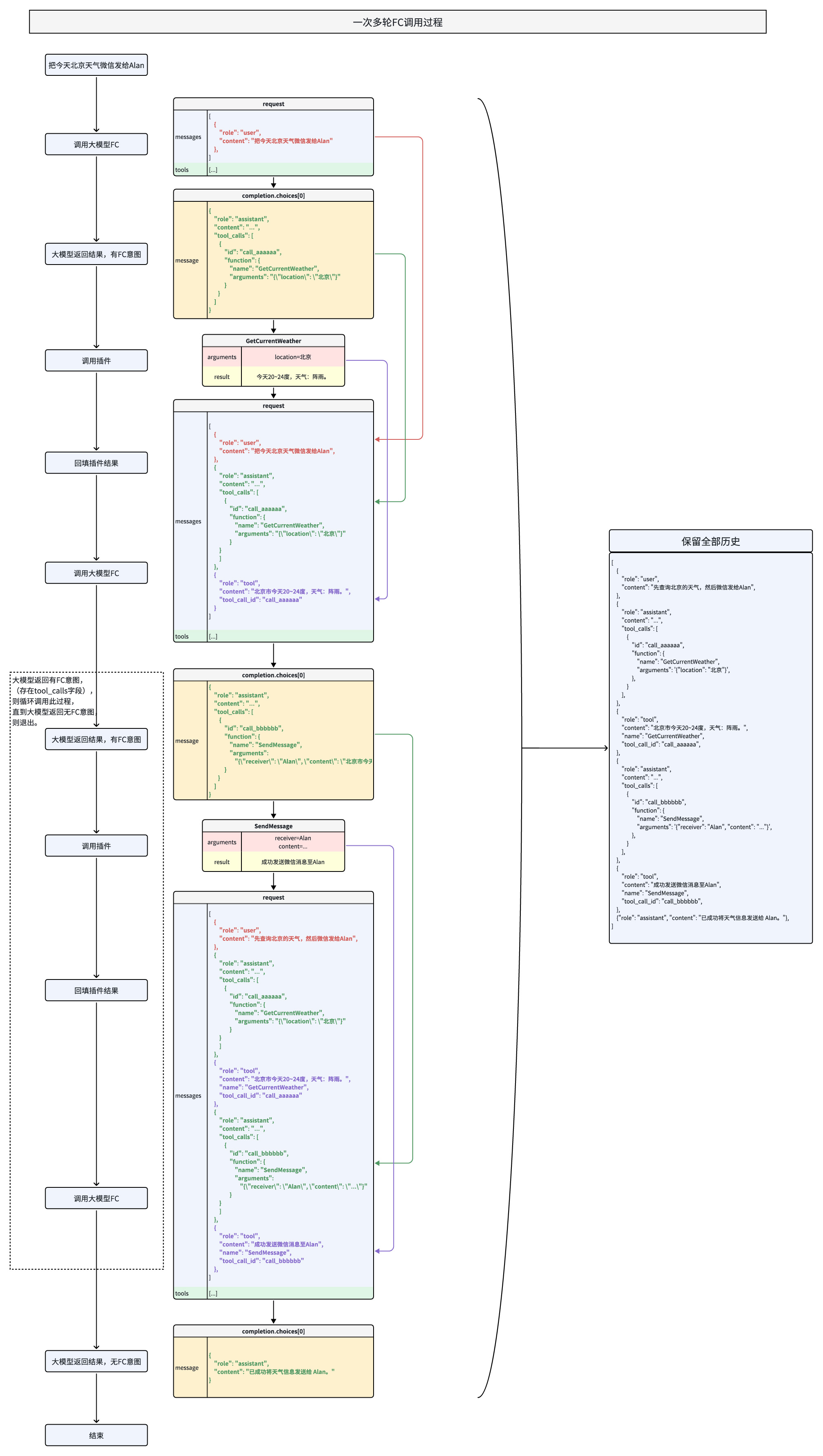
当用户需求需要多次调用工具函数时,维护对话历史上下文,逐轮处理函数调用和结果回填。
### 示例流程
1. 用户提问:“查询北京的天气,并将结果发送给张三”。
2. 第一轮:模型调用 `get_current_weather` 工具获取北京天气。
3. 第二轮:模型调用 `send_message` 工具将天气结果发送给张三。
4. 第三轮:模型总结任务完成情况,返回最终回复。
### 代码示例
> **说明**
>
> 多轮函数调用:指用户 query 需要多次调用工具函数和大模型才能完成的情况,是多轮对话的子集。
调用 Response 细节图:
**选项:Golang**
```Go
package main
import (
"context"
"encoding/json"
"fmt"
"os"
"strings"
"github.com/volcengine/ark-runtime-go/arkruntime"
"github.com/volcengine/ark-runtime-go/arkruntime/model/chat"
)
func main() {
client := arkruntime.NewClientWithApiKey(
os.Getenv("ARK_API_KEY"),
arkruntime.WithBaseUrl("https://ark.cn-beijing.volces.com/api/v3"),
)
fmt.Println("----- function call multiple rounds request -----")
ctx := context.Background()
// Step 1: send the conversation and available functions to the model
req := &chat.ChatCompletionRequest{
Model: "doubao-seed-2-1-pro-260915", // Replace with Model ID
Messages: []chat.ChatCompletionRequestMessage{
systemMessage("你是 AI 人工智能助手"),
userMessage("上海的天气怎么样?"),
},
Tools: []chat.ChatCompletionTool{
{
Type: chat.ToolTypeFunction,
Function: chat.FunctionObject{
Name: "get_current_weather",
Description: chat.NewOptString("Get the current weather in a given location"),
Parameters: functionParameters(map[string]interface{}{
"type": "object",
"properties": map[string]interface{}{
"location": map[string]interface{}{
"type": "string",
"description": "The city and state, e.g. Beijing",
},
"unit": map[string]interface{}{
"type": "string",
"description": "枚举值有celsius、fahrenheit",
},
},
"required": []string{
"location",
},
}),
},
},
},
}
resp, err := client.CreateChatCompletion(ctx, req)
if err != nil {
fmt.Printf("chat error: %v\n", err)
return
}
// extend conversation with assistant's reply
req.Messages = append(req.Messages, assistantToolCallMessage(resp.Choices[0].Message))
// Step 2: check if the model wanted to call a function.
// The model can choose to call one or more functions; if so,
// the content will be a stringified JSON object adhering to
// your custom schema (note: the model may hallucinate parameters).
for _, toolCall := range resp.Choices[0].Message.ToolCalls {
fmt.Println("calling function")
fmt.Println(" id:", toolCall.ID)
fmt.Println(" name:", toolCall.Function.Name)
fmt.Println(" argument:", toolCall.Function.Arguments)
functionResponse, err := CallAvailableFunctions(toolCall.Function.Name, toolCall.Function.Arguments)
if err != nil {
functionResponse = err.Error()
}
// extend conversation with function response
req.Messages = append(req.Messages,
toolMessage(toolCall.ID, functionResponse),
)
}
// get a new response from the model where it can see the function response
secondResp, err := client.CreateChatCompletion(ctx, req)
if err != nil {
fmt.Printf("second chat error: %v\n", err)
return
}
fmt.Println("conversation", MustMarshal(req.Messages))
fmt.Println("new message", MustMarshal(secondResp.Choices[0].Message))
}
func CallAvailableFunctions(name, arguments string) (string, error) {
if name == "get_current_weather" {
params := struct {
Location string `json:"location"`
Unit string `json:"unit"`
}{}
if err := json.Unmarshal([]byte(arguments), ¶ms); err != nil {
return "", fmt.Errorf("failed to parse function call name=%s arguments=%s", name, arguments)
}
return GetCurrentWeather(params.Location, params.Unit), nil
} else {
return "", fmt.Errorf("got unavailable function name=%s arguments=%s", name, arguments)
}
}
// GetCurrentWeather get the current weather in a given location.
// Example dummy function hard coded to return the same weather.
// In production, this could be your backend API or an external API
func GetCurrentWeather(location, unit string) string {
if unit == "" {
unit = "celsius"
}
switch strings.ToLower(location) {
case "beijing":
return `{"location": "Beijing", "temperature": "10", "unit": unit}`
case "北京":
return `{"location": "Beijing", "temperature": "10", "unit": unit}`
case "shanghai":
return `{"location": "Shanghai", "temperature": "23", "unit": unit}`
case "上海":
return `{"location": "Shanghai", "temperature": "23", "unit": unit}`
default:
return fmt.Sprintf(`{"location": %s, "temperature": "unknown"}`, location)
}
}
func MustMarshal(v interface{}) string {
b, _ := json.Marshal(v)
return string(b)
}
func systemMessage(content string) chat.ChatCompletionRequestMessage {
return chat.ChatCompletionRequestMessage{
OneOf: chat.NewChatCompletionRequestSystemMessageChatCompletionRequestMessageSum(
chat.ChatCompletionRequestSystemMessage{
Role: chat.ChatCompletionRequestSystemMessageRoleSystem,
Content: chat.NewStringChatCompletionMessageContent(content),
},
),
}
}
func toolMessage(toolCallID, content string) chat.ChatCompletionRequestMessage {
return chat.ChatCompletionRequestMessage{
OneOf: chat.NewChatCompletionRequestToolMessageChatCompletionRequestMessageSum(
chat.ChatCompletionRequestToolMessage{
Role: chat.ChatCompletionRequestToolMessageRoleTool,
ToolCallID: chat.NewOptNilString(toolCallID),
Content: chat.NewOptNilChatCompletionMessageContent(chat.NewStringChatCompletionMessageContent(content)),
},
),
}
}
func userMessage(content string) chat.ChatCompletionRequestMessage {
return chat.ChatCompletionRequestMessage{
OneOf: chat.NewChatCompletionRequestUserMessageChatCompletionRequestMessageSum(
chat.ChatCompletionRequestUserMessage{
Role: chat.ChatCompletionRequestUserMessageRoleUser,
Content: chat.NewOptNilChatCompletionMessageContent(chat.NewStringChatCompletionMessageContent(content)),
},
),
}
}
func functionParameters(value map[string]interface{}) chat.OptFunctionObjectParameters {
encoded, err := json.Marshal(value)
if err != nil {
panic(err)
}
var parameters chat.FunctionObjectParameters
if err := json.Unmarshal(encoded, ¶meters); err != nil {
panic(err)
}
return chat.NewOptFunctionObjectParameters(parameters)
}
func assistantToolCallMessage(message chat.ChatCompletionResponseMessage) chat.ChatCompletionRequestMessage {
return chat.ChatCompletionRequestMessage{
OneOf: chat.NewChatCompletionRequestAssistantMessageChatCompletionRequestMessageSum(
chat.ChatCompletionRequestAssistantMessage{
Role: chat.ChatCompletionRequestAssistantMessageRoleAssistant,
Content: chat.NewOptNilChatCompletionMessageContent(chat.NewStringChatCompletionMessageContent(message.Content)),
ToolCalls: toRequestToolCalls(message.ToolCalls),
},
),
}
}
func toRequestToolCalls(
toolCalls []chat.ChatCompletionMessageToolCall,
) []chat.ChatCompletionRequestMessageToolCall {
requestToolCalls := make([]chat.ChatCompletionRequestMessageToolCall, 0, len(toolCalls))
for _, toolCall := range toolCalls {
requestToolCalls = append(requestToolCalls, chat.ChatCompletionRequestMessageToolCall{
ID: chat.NewOptNilString(toolCall.ID),
Type: toolCall.Type,
Function: chat.ChatCompletionRequestMessageToolCallFunction{
Name: toolCall.Function.Name,
Arguments: chat.NewOptString(toolCall.Function.Arguments),
},
})
}
return requestToolCalls
}
```
**选项:Python**
```Python
import os
import json
import time
from arkruntime import Ark
# Load API key from environment variable
api_key = os.getenv('ARK_API_KEY')
# Initialize Ark client
client = Ark(
base_url="https://ark.cn-beijing.volces.com/api/v3",
api_key=api_key,
)
print("=" * 60)
# Initial conversation history with user query
messages = [
{
"role": "user",
"content": "先查询北京的天气,如果是晴天微信发给Alan,否则发给Peter",
},
]
# Tool definitions for function calling
tools = [
{
"type": "function",
"function": {
"name": "get_current_weather",
"description": "",
"parameters": {
"type": "object",
"properties": {
"location": {
"type": "string",
"description": "地理位置,比如北京市",
},
"unit": {"type": "string", "description": "枚举值 [摄氏度,华氏度]"},
},
"required": ["location"],
},
},
},
{
"type": "function",
"function": {
"name": "SendMessage",
"description": "通过微信发送消息给指定用户",
"parameters": {
"type": "object",
"properties": {
"receiver": {
"type": "string",
"description": "接收者用户名",
},
"content": {
"type": "string",
"description": "消息内容",
},
},
"required": ["receiver", "content"],
},
},
},
]
# Mock function to simulate weather API
def mock_get_current_weather(location, unit="摄氏度"):
if unit == "华氏度":
return f"{location}今天68~75华氏度,天气:阵雨"
else:
return f"{location}今天20~24度,天气:阵雨"
# Mock function to simulate message sending
def mock_send_message(receiver, content):
return f"成功发送微信消息至{receiver}"
# Handle tool calls by dispatching to appropriate mock functions
def handle_tool_call(tool_call):
function_name = tool_call.function.name
function_args = json.loads(tool_call.function.arguments)
if function_name == "get_current_weather":
return mock_get_current_weather(**function_args)
elif function_name == "SendMessage":
return mock_send_message(**function_args)
else:
return f"未知函数: {function_name}"
round_count = 0
max_rounds = 10
user_question_printed = False
while round_count < max_rounds:
round_count += 1
print(f"\n========== Round {round_count} ==========")
if round_count == 1 and not user_question_printed:
print(f"user: {messages[0]['content']}")
user_question_printed = True
start_time = time.time()
# Call the model
response = client.chat.completions.create(
model="doubao-seed-2-1-pro-260915",
messages=messages,
tools=tools
)
elapsed_time = time.time() - start_time
assistant_message = response.choices[0].message
if assistant_message.tool_calls:
for tool_call in assistant_message.tool_calls:
print(f"assistant [FC Response]: {tool_call.function.name}, args={tool_call.function.arguments}")
messages.append(assistant_message.model_dump())
tool_result = handle_tool_call(tool_call)
print(f"tool: {tool_result}")
messages.append({
"role": "tool",
"tool_call_id": tool_call.id,
"content": tool_result,
"name": tool_call.function.name,
})
print(f"耗时: {elapsed_time:.2f} 秒")
else:
print(f"assistant [Final Answer]: {assistant_message.content}")
print(f"耗时: {elapsed_time:.2f} 秒")
break
print("\n" + "=" * 60)
```
**选项:Java**
```Java
package com.volcengine.ark.runtime;
import com.volcengine.ark.runtime.models.chat.*;
import com.volcengine.ark.runtime.service.ArkService;
import okhttp3.ConnectionPool;
import okhttp3.Dispatcher;
import java.util.*;
import java.util.concurrent.TimeUnit;
public class FunctionCallChatCompletionsExample {
static String apiKey = System.getenv("ARK_API_KEY");
static ConnectionPool connectionPool = new ConnectionPool(5, 1, TimeUnit.SECONDS);
static Dispatcher dispatcher = new Dispatcher();
static ArkService service = ArkService.builder().dispatcher(dispatcher).connectionPool(connectionPool)
.baseUrl("https://ark.cn-beijing.volces.com/api/v3")
.apiKey(apiKey).build();
public static void main(String[] args) {
System.out.println("\n----- function call multiple rounds request -----");
final List messages = new ArrayList<>();
final ChatCompletionRequestMessage userMessage = ChatCompletionRequestUserMessage.builder().role(ChatCompletionRequestMessageType.USER).content(ChatCompletionMessageContent.ofString("北京今天天气如何?")).build();
messages.add(userMessage);
final List tools = Arrays.asList(
ChatCompletionTool.builder().type(ToolType.FUNCTION).function(FunctionObject.builder()
.name("get_current_weather")
.description("获取给定地点的天气")
.parameters(new com.fasterxml.jackson.databind.ObjectMapper().convertValue(new Weather(
"object",
new HashMap() {{
put("location", new HashMap() {{
put("type", "string");
put("description", "地点的位置信息,比如北京");
}});
put("unit", new HashMap() {{
put("type", "string");
put("description", "枚举值有celsius、fahrenheit");
}});
}},
Collections.singletonList("location")
), Map.class))
.build()).build()
);
ChatCompletionRequest chatCompletionRequest = ChatCompletionRequest.builder()
.model("${YOUR_ENDPOINT_ID}")
.messages(messages)
.tools(tools)
.build();
ChatCompletionResponseChoice choice = service.createChatCompletion(chatCompletionRequest).getChoices().get(0);
messages.add(ChatCompletionRequestAssistantMessage.builder().role(ChatCompletionRequestMessageType.ASSISTANT).content(ChatCompletionMessageContent.ofString(choice.getMessage().getContent())).toolCalls(toRequestToolCalls(choice.getMessage().getToolCalls())).build());
choice.getMessage().getToolCalls().forEach(
toolCall -> {
messages.add(ChatCompletionRequestToolMessage.builder().role(ChatCompletionRequestMessageType.TOOL).toolCallId(toolCall.getId()).content(ChatCompletionMessageContent.ofString("北京天气晴,24~30度")).name(toolCall.getFunction().getName()).build());
});
ChatCompletionRequest chatCompletionRequest2 = ChatCompletionRequest.builder()
.model("${YOUR_ENDPOINT_ID}")
.messages(messages)
.build();
service.createChatCompletion(chatCompletionRequest2).getChoices().forEach(System.out::println);
// shutdown service
service.shutdownExecutor();
}
public static class Weather {
public String type;
public Map properties;
public List required;
public Weather(String type, Map properties, List required) {
this.type = type;
this.properties = properties;
this.required = required;
}
public String getType() {
return type;
}
public void setType(String type) {
this.type = type;
}
public Map getProperties() {
return properties;
}
public void setProperties(Map properties) {
this.properties = properties;
}
public List getRequired() {
return required;
}
public void setRequired(List required) {
this.required = required;
}
}
private static java.util.List toRequestToolCalls(
java.util.List toolCalls) {
if (toolCalls == null) {
return java.util.Collections.emptyList();
}
java.util.List requestToolCalls =
new java.util.ArrayList<>();
for (ChatCompletionMessageToolCall toolCall : toolCalls) {
requestToolCalls.add(
ChatCompletionRequestMessageToolCall.builder()
.id(toolCall.getId())
.type(toolCall.getType())
.function(
ChatCompletionRequestMessageToolCallFunction.builder()
.name(toolCall.getFunction().getName())
.arguments(toolCall.getFunction().getArguments())
.build())
.build());
}
return requestToolCalls;
}
}
```
### 响应示例
```Python
========== Round 1 ==========
user: 先查询北京的天气,如果是晴天微信发给Alan,否则发给Peter...
assistant [FC Response]:
name=GetCurrentWeather, args={"location": "\u5317\u4eac"}
[elapsed=2.607 s]
========== Round 2 ==========
tool: 北京今天20~24度,天气:阵雨。...
assistant [FC Response]:
name=SendMessage, args={"content": "\u4eca\u5929\u5317\u4eac\u7684\u5929\u6c14", "receiver": "Peter"}
[elapsed=3.492 s]
========== Round 3 ==========
tool: 成功发送微信消息至Peter...
assistant [Final Answer]:
好的,请问还有什么可以帮助您?
[elapsed=0.659 s]
```
### 多轮输出注意事项
#### **轮次输出顺序**
触发函数调用时,系统先输出`content`给用户,再生成`tool_calls`并结束当前输出;**当前轮次内容不可依赖工具结果**,后续指令需待工具返回`message`后执行。
#### **多轮输出响应完整性**
严格遵循`assistant(含tool_calls)→ tool(含message)→ assistant`的顺序,禁止跳过`tool message`响应直接发送新的`assistant`消息。每次`tool_calls`需对应`tool`角色的 `message`(含成功/错误结果),缺失可能因`prefill`机制触发重复调用或流程中断。
## 效果优化
如果函数调用的效果未达到您的预期,可以尝试通过以下方法进行优化:
* **更换为最新模型**:建议您选用最新的模型版本,通常能获得更好的函数调用效果。
* **进行模型精调**:通过监督微调(SFT)或强化学习,可以针对性地提升模型表现。详情请参见[模型精调概述](/docs/fine-tuning-overview)。精调主要能改善以下方面:
* **函数选择准确性**:提升模型在合适时机选择正确函数的能力。
* **参数提取能力**:优化模型解析用户意图并生成准确函数入参的能力。
* **结果总结质量**:改善模型对工具执行结果的总结,使其更自然、准确。
---
# 常见问题
## Q:函数调用& MCP 的核心区别是什么,使用时如何选型?
核心区别与典型使用场景:
|**维度** |**FC(Function Calling)** |**MCP(Model Context Protocol)** |
|---|---|---|
|**本质** |模型调用外部工具 / 函数的能力(功能扩展) |定义模型与外部系统交互时的上下文管理协议(流程规范) |
|**目标** |弥补模型自身能力不足(如计算、数据查询、操作执行) |标准化交互过程中上下文的传递、解析与状态维护 |
|**核心作用** |实现模型与外部工具的 “能力集成” |确保多轮交互中上下文(如对话历史、参数、状态)的一致性 |
|**协议标准** |厂商自定义格式(如 OpenAI 的 JSON 参数结构) |强制遵循 JSON-RPC 2.0 标准,强调协议统一性 |
|**架构** |直接集成于模型 API,用户定义函数后由模型触发调用 |客户端 - 服务器模式,分离 MCP Host(客户端)与 MCP Server(服务端) |
|**上下文管理** |单次请求 - 响应模式,上下文依赖需开发者自行处理 |支持多轮对话、历史状态维护,适用于长序列依赖任务 |
|**典型使用场景** |外部数据调用与系统操作(如天气查询、复杂运算);示例:调用天气 API 回复 “东京今日气温” |多轮对话与跨系统上下文管理(如订餐流程、客服对话);示例:连贯处理订餐菜品与配送地址 |
两者之间的关系:
* **互补而非互斥**:
* MCP 可能在流程中包含函数调用的调用逻辑(如定义何时、如何触发函数调用)。
* 函数调用的输入输出需遵循 MCP 的上下文规范(如参数格式、返回值解析规则)。
* **分层协作**:
* MCP 解决连接问题:标准化协议打通数据孤岛,提供基础设施(如整合用户订单数据)。
* 函数调用解决执行问题:在协议层之上调用具体函数完成任务(如调用库存 API 生成补货建议)。
* **架构定位**:函数调用是**能力接口**,MCP 是**交互框架**,二者常结合使用以构建复杂应用(如智能助手同时需要调用工具和管理多轮对话状态)。
参考文档:
* **MCP 官方协议规范**[Model Context Protocol Specification](https://modelcontextprotocol.io/specification/):明确协议核心架构、JSON - RPC 消息格式、状态管理机制与安全策略,是接口设计的权威参考。
* **MCP 社区与生态发展** [MCP Development Roadmap](https://modelcontextprotocol.io/development/roadmap):介绍 MCP 发展规划,涵盖远程连接支持、沙箱安全机制及多模态扩展等发展计划。
## **Q:Deepseek R1 模型是否支持并行函数调用?**
A:暂不支持 `parallel_tool_calls` 控制字段,该模型默认采用自动触发并行调用机制,开发者无需额外配置即可实现多工具并行调用。
## **Q:如何处理 Deepseek R1 的参数幻觉问题?**
A:该模型在复杂参数解析时可能出现嵌套调用异常(如 `get_weather:{city: get_location()}`),建议通过以下方式干预:
* 在 `system prompt` 中明确要求**分步调用**(如“请先调用定位函数,再调用天气查询函数”) 。
* 使用 **JSON Schema 校验**强制参数格式。
## Q:如何判断模型是否需要调用函数?
A:模型会根据用户问题和工具定义自主判断,若返回结果中包含 `tool_calls` 字段,则表示需要调用工具;若 `content` 字段有直接回复,则无需调用工具。
## Q:支持并行调用多个函数吗?
A:支持并行函数调用,通过设置 `parallel_tool_calls` 参数为 `true`,模型可同时返回多个函数调用信息,提高处理效率。
## Q:为什么模型返回的工具参数存在幻觉?
A:这是大模型常见的问题,可通过精调(SFT)优化模型的参数生成能力,或在系统提示中明确参数的格式和范围,减少幻觉现象。
部分模型(特别是 Deepseek R1)存在一些参数幻觉问题。如预期先调用 get_location 获得城市,再调用 get_weather 查询,R1 模型有概率直接返回 `get_weather:{city: **get_location()**}` 这种嵌套调用,请在系统提示词中进行干预解决,分步完成调用。
## Q:如何处理函数调用失败的情况?
A:将工具失败信息以 `role=tool` 的消息回填给模型,模型会根据错误信息生成相应的回复,例如“抱歉,函数调用失败,请稍后重试。”。
通过以上优化,开发者能够更高效地使用函数调用功能,实现大模型与外部工具的深度整合,快速构建智能应用。
---
# 附 1:工具函数参数构造规范
为确保模型正确调用工具功能,需按以下规范构造 `tools` 对象,遵循 JSON Schema 标准。
本文主要讲解如何构造函数调用工具,关于工具函数的使用请参考[基本使用流程](/docs/function-calling#db7321a0)。
## 总体结构
```JSON
{
"type": "function",
"function": {
"name": "get_current_weather",
"description": "获取指定地点的天气信息",
"parameters": {}
}
}
```
* `type`:工具的类型,这里是固定值 `function`,表示这是一个函数调用工具。
* `function`:含函数名称、描述和参数等详细配置。
## 字段解释
### `function` 字段
|**字段** |**类型** |**是否必填** |**说明** |
|---|---|---|---|
|name |string |是 |函数名称,唯一标识,建议使用小写加下划线 |
|description |string |是 |函数作用的描述 |
|parameters |object |是 |函数参数定义,需要符合 JSON Schema 格式 |
### `parameters` 字段
`parameters` 须为符合 JSON Schema 格式的对象:
```JSON
{
"type": "object",
"properties": {
"参数名": {
"type": "string | number | boolean | object | array",
"description": "参数说明"
}
},
"required": ["必填参数"]
}
```
* `type`:必须是 `"object"`。
* `properties`:列出支持的所有参数名及其类型。
* `参数``名`须为英文字符串,且不能重复。
* 参数`type`需遵循 [json 规范](https://json-schema.org/docs),支持类型包括 string、number、boolean、integer、object、array。
* `required`:指定函数中必填的参数名。
* 其它参数根据`type`的不同稍有区别,详情请参见下表。
|`type`类型 |示例 |
|---|---|
|string、integer、number、boolean |略 |
|object (对象) |* 示例 1: 查询特点用户画像(根据年龄、性别、婚姻状况等) | \
| | | \
|* `description`:简要说明 |```Python | \
|* `properties` 描述该对象所有属性 |"person": { | \
|* `required` 描述必填属性 | "type": "object", | \
| | "description": "个人特征", | \
| | "properties": { | \
| | "age": {"type": "integer", "description": "年龄"}, | \
| | "gender": {"type": "string", "description": "性别"}, | \
| | "married": {"type": "boolean", "description": "是否已婚"} | \
| | }, | \
| | "required": ["age"], | \
| |} | \
| |``` |
|array (列表) |* 示例 1:文本数组,若干个网页链接 | \
| | | \
|* `description`:简要说明 |```Bash | \
|* `"items": {"type": ITEM_TYPE}`来表达数组元素的数据类型 |"url": { | \
| | "type": "array", | \
| | "description": "需要解析网页链接,最多3个", | \
| | "items": {"type": "string"} | \
| |``` | \
| | | \
| | | \
| |* 示例 2:二维数组 | \
| | | \
| |```Go | \
| |"matrix": { | \
| | "type": "array", | \
| | "description": "需要计算的二维矩阵", | \
| | "items": {"type": "array", "items": {"type": "number"}}, | \
| |} | \
| |``` | \
| | | \
| | | \
| |* 示例 3: 通过 array 来实现多选 | \
| | | \
| |```JSON | \
| | | \
| |"grade": { | \
| | "description": "年级, 支持多选", | \
| | "type": "array", | \
| | "items": { | \
| | "type": "string", | \
| | "description": "枚举值有\n\"一年级\",\n\"二年级\",\n\"三年级\",\n\"四年级\",\n\"五年级\",\n\"六年级\"。 " | \
| | }, | \
| |} | \
| |``` |
## 完整示例
```JSON
{
"type": "function",
"function": {
"name": "get_weather",
"description": "获取指定位置的天气信息",
"parameters": {
"type": "object",
"properties": {
"location": {
"type": "string",
"description": "城市和国家,例如:北京,中国"
}
},
"required": ["location"]
}
}
}
```
## 注意事项
* **大小写敏感**:所有字段名、参数名严格区分大小写(建议统一用小写)。
* **中文处理**:字段名用英文,中文说明置于 `description` 中(如 `location` 的描述为 “城市和国家”)。
* **Schema 合规性**:`parameters` 必须是有效的 JSON Schema 对象,可通过 JSON Schema 校验工具验证。
## 最佳实践
1. 工具描述核心准则
* 详细说明工具功能、适用场景(及禁用场景)、参数含义与影响、限制条件(如输入长度限制),单工具描述建议 3-4 句。
* 优先完善功能、参数等基础描述,示例仅作为补充(推理模型需谨慎添加)。
2. 函数设计要点
* **命名与参数**:函数名直观(如`parse_product_info`),参数说明包含格式(如`city: string`)和业务含义(如“目标城市拼音全称”),明确输出定义(如“返回 JSON 格式天气数据”)。
* **系统提示**:通过提示指定调用条件(如“用户询问商品详情时触发`get_product_detail`”)。
* **工程化设计**:
* 使用枚举类型(如`StatusEnum`)避免无效参数,确保逻辑直观(最小惊讶原则)。
* 确保仅凭文档描述,人类可正确调用函数(补充潜在疑问解答)。
* **调用优化**:
* 已知参数通过火山方舟代码能力隐式传递(如`submit_order`无需重复声明`user_id`)。
* 合并固定流程函数(如`query_location`与`mark_location`整合为`query_and_mark_location`)。
3. 关于 `Parameters` 字段顺序的稳定性
尽管在标准 JSON 规范中对象的键是无序的,但在向大模型提供 tools 定义时, 建议保持 properties 内部字段顺序的固定与一致。原因在于,大模型底层将 JSON 结构视为线性的文本 Token 序列。字段顺序的改变会导致模型接收到的系统提示词发生变化,这可能会影响模型的注意力机制,进而导致模型生成的函数调用参数顺序或最终结果产生微小的差异。在进行提示词效果测试或回归测试时,请确保参数定义的顺序保持不变。