# OpenCode
> 全部文档的索引见 [llms.txt](https://ark.volcengine.com/llms.txt);在任一文档页面地址后追加 `.md` 可获取该页的 Markdown 版本。
OpenCode 是一款开源的 AI 编程代理工具,提供终端界面、桌面应用和 IDE 扩展等多种使用方式。
方舟 Coding Plan 支持在 OpenCode 中使用,可参考本文进行配置及使用。
> **说明**
>
> 需要先访问 [方舟 Coding Plan活动](https://www.volcengine.com/activity/codingplan),按需订阅套餐后再配置使用编程工具。
# 核心配置
接入工具的核心参数如下:
## **模型配置**
支持以下两种方式配置模型:
**选项:配置 Model Name (配置文件指定)**
在工具配置文件中指定 Model Name,可实时切换模型。支持配置的 Model Name:
> **注意**
>
> 配置 Model Name 时,支持使用全小写格式,同时也支持直接复制 [开通管理页面](https://ark.volcengine.com/region:cn-beijing/openManagement?LLM=%7B%7D&advancedActiveKey=subscribe) 中的模型名称。
* `doubao-seed-evolving`
* `doubao-seed-2.1-pro`
* `doubao-seed-2.1-lite`
* `doubao-seed-2.0-mini`
* `minimax-m3`
* `glm-5.3` (`glm-latest`)
* `glm-5.3-flash`
* `deepseek-v4.1-flash`
* `deepseek-v4-flash`
* `deepseek-v4-pro`
* `kimi-k2.8-preview`
* `kimi-k3`
> **说明**
>
> Model Name 不支持配置为 `Auto`,如需使用,请通过控制台切换该模式。
**选项:配置 ark-code-latest (控制台管理)**
1. 在配置文件中指定模型为`ark-code-latest`。
2. 通过 [开通管理页面](https://ark.volcengine.com/region:cn-beijing/openManagement?LLM=%7B%7D&advancedActiveKey=subscribe) 选择或切换目标模型,切换模型后 3-5 分钟即可生效。
支持 Auto 模式,通过「效果 + 速度」双维度智能算法自动选择模型。
## **Base URL**
不同的工具配置的 Base URL 根据兼容的协议会有不同:
* 兼容 Anthropic 接口协议工具:`https://ark.cn-beijing.volces.com/api/coding`
* 兼容 OpenAI 接口协议工具:`https://ark.cn-beijing.volces.com/api/coding/v3`
> **注意**
>
> 请勿使用 `https://ark.cn-beijing.volces.com/api/v3` :该 Base URL 不会消耗您的 Coding Plan 额度,而是会产生额外费用。
## **API Key**
[获取 API Key](https://ark.volcengine.com/region:cn-beijing/apikey)
# 一、安装 OpenCode
前提条件:安装 [Node.js 18 或更新版本](https://nodejs.org/en/download/)。
在命令行界面,执行以下命令安装 OpenCode。
```Bash
npm install -g opencode-ai
```
安装结束后,执行以下命令查看安装结果,若显示版本号则安装成功。
```Bash
opencode --version
```
# 二、配置 OpenCode
## 方式 1:自动化助手(推荐)
ArkCLI Helper 是一个编码工具助手,支持快速配置选择的工具接入 Coding Plan。安装并运行该助手,根据界面提示操作可自动完成工具配置,降低手动配置的时间成本和出错风险。
> **注意**
>
> * ArkCLI Helper 是基于 Ark Helper 升级演进的工具配置服务,相关能力将持续在 ArkCLI Helper 上迭代更新。建议优先使用 ArkCLI Helper 完成工具配置。
> * ArkCLI Helper 支持 macOS、Linux、Windows 系统。
1. 安装 Ark CLI。
```Bash
# 1. 通过 NPM 安装
npm install -g @volcengine/ark-cli@latest
# 2. 验证安装
arkcli --version
```
2. 登录 Ark CLI。
```Bash
arkcli auth login
```
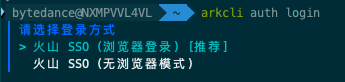
根据界面提示选择登录方式。若之前已登录过 arkcli,会沿用上次选择的配置;如需重新选择,请先执行 `arkcli config reset` 后再运行 `arkcli auth login`。首次登录时,按提示完成以下配置:
1. **选择项目(Project)**:可按需选择,或默认选择**账号全部资源**。
2. **选择消费模式(Type)**:选择 `coding-plan`。

3. 运行 ArkCLI Helper,根据界面提示完成 OpenCode 的配置。
1. 在命令行界面输入 `arkcli helper` 命令,启动 ArkCLI Helper。
2. **选择要配置的 Plan profile**:选择 `coding-plan_cn-beijing_personal (Coding Plan)`。

3. **选择默认 model**:按需选择。
4. **选择要配置的 AI Agent**:`OpenCode`。
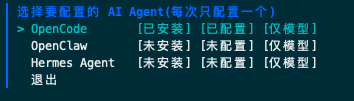
完成上述操作后,将自动完成 OpenCode 的基础配置,无需手动安装。
## 方式 2:手动配置
1. 创建并打开 OpenCode 的配置文件。文件路径因系统而异,具体操作如下:
**选项:macOS/Linux**
macOS/Linux 系统 OpenCode 配置文件路径:`~/.config/opencode/opencode.json`。
1. 如果在主目录下没有`.config/opencode`目录,执行以下命令创建目录。
```Bash
mkdir -p ~/.config/opencode
```
2. 创建并打开配置文件。
```Bash
nano ~/.config/opencode/opencode.json
```
**选项:Windows**
Windows 系统 OpenCode 配置文件路径:`%USERPROFILE%\.config\opencode\opencode.json`。以 CMD 命令行方式为例,操作如下。
1. 如果当前用户目录下没有`.config\opencode`目录,执行以下命令创建目录。
```Bash
if not exist "%USERPROFILE%\.config\opencode" mkdir "%USERPROFILE%\.config\opencode"
```
2. 创建并打开配置文件。
```Bash
notepad "%USERPROFILE%\.config\opencode\opencode.json"
```
2. 编辑 `opencode.json`,需关注的配置信息如下:
* ``:替换为您自己的 [API Key](https://ark.volcengine.com/region:cn-beijing/apikey)。
* `model`:更新为需要使用的模型信息。支持的模型信息参见 [模型配置](/docs/coding-plan-personal-ai-opencode#3a775131)。
Coding Plan 兼容 OpenAI 接口协议,支持 Responses API、Chat API。推荐使用 Responses API 的配置,推理效果更好。
支持的两类 API 仅在 npm 配置上不同:
* Responses API 配置:`"npm": "@ai-sdk/openai"`
* Chat API 配置:`"npm": "@ai-sdk/openai-compatible"`
以配置`ark-code-latest`为例,具体信息如下。
> **注意**
>
> * `glm-5.3`、`deepseek-v4-flash`、`deepseek-v4-pro`、`kimi-k2.8-preview` 支持 1M 上下文窗口用于包含大型代码库的长会话,可以通过 `limit.context` 字段显式指定窗口大小。
> * `provider.volcengine-plan.models`节点下有**两处**(对象键、`name`字段)需**替换为同一 Model Name**,切勿遗漏。
> * 若需开启模型图片理解能力,需在模型配置节点下新增如下配置项:
>
> `"modalities": {"input": ["text", "image"], "output": ["text"]}`
**选项:Responses API**
> **说明**
>
> npm 必须使用 `@ai-sdk/openai`,模型才会使用 Responses API,在 `baseURL` 的基础上自动拼接 `/responses`。
```JSON
{
"$schema": "https://opencode.ai/config.json",
"model": "volcengine-plan/ark-code-latest",
"provider": {
"volcengine-plan": {
"npm": "@ai-sdk/openai",
"name": "Volcano Engine(Responses API)",
"options": {
"baseURL": "https://ark.cn-beijing.volces.com/api/coding/v3",
"apiKey": ""
},
"models": {
"ark-code-latest": {
"name": "ark-code-latest",
"limit": {
"context": 256000,
"output": 32000
},
"modalities": {
"input": [
"text",
"image"
],
"output": [
"text"
]
}
},
"doubao-seed-2.1-pro": {
"name": "doubao-seed-2.1-pro",
"limit": {
"context": 1024000,
"output": 65536
},
"modalities": {
"input": [
"text",
"image"
],
"output": [
"text"
]
}
},
"doubao-seed-evolving": {
"name": "doubao-seed-evolving",
"limit": {
"context": 1024000,
"output": 65536
},
"modalities": {
"input": [
"text",
"image"
],
"output": [
"text"
]
}
},
"glm-5.3": {
"name": "glm-5.3",
"limit": {
"context": 1024000,
"output": 65536
},
"modalities": {
"input": [
"text"
],
"output": [
"text"
]
}
},
"glm-5.3-flash": {
"name": "glm-5.3-flash",
"limit": {
"context": 1024000,
"output": 65536
},
"modalities": {
"input": [
"text",
"image"
],
"output": [
"text"
]
}
},
"glm-latest": {
"name": "glm-latest",
"limit": {
"context": 1024000,
"output": 65536
},
"modalities": {
"input": [
"text"
],
"output": [
"text"
]
}
},
"deepseek-v4-flash": {
"name": "deepseek-v4-flash",
"limit": {
"context": 1024000,
"output": 65536
}
},
"deepseek-v4-pro": {
"name": "deepseek-v4-pro",
"limit": {
"context": 1024000,
"output": 65536
}
},
"deepseek-v4.1-flash": {
"name": "deepseek-v4.1-flash",
"limit": {
"context": 1024000,
"output": 65536
},
"modalities": {
"input": [
"text",
"image"
],
"output": [
"text"
]
}
},
"doubao-seed-2.1-lite": {
"name": "doubao-seed-2.1-lite",
"limit": {
"context": 1024000,
"output": 65536
},
"modalities": {
"input": [
"text",
"image"
],
"output": [
"text"
]
}
},
"doubao-seed-2.0-mini": {
"name": "doubao-seed-2.0-mini",
"limit": {
"context": 256000,
"output": 65536
},
"modalities": {
"input": [
"text",
"image"
],
"output": [
"text"
]
}
},
"minimax-m3": {
"name": "minimax-m3",
"limit": {
"context": 1024000,
"output": 65536
},
"modalities": {
"input": [
"text",
"image"
],
"output": [
"text"
]
}
},
"kimi-k2.8-preview": {
"name": "kimi-k2.8-preview",
"limit": {
"context": 1024000,
"output": 65536
},
"modalities": {
"input": [
"text",
"image"
],
"output": [
"text"
]
}
},
"kimi-k3": {
"name": "kimi-k3",
"limit": {
"context": 1024000,
"output": 65536
},
"modalities": {
"input": [
"text",
"image"
],
"output": [
"text"
]
}
}
}
}
}
}
```
**选项:Chat API**
> **说明**
>
> npm 必须使用 `@ai-sdk/openai-compatible`,模型才会使用 Chat API,在 `baseURL` 的基础上自动拼接 `/chat/completions`。
```JSON
{
"$schema": "https://opencode.ai/config.json",
"model": "volcengine-plan/ark-code-latest",
"provider": {
"volcengine-plan": {
"npm": "@ai-sdk/openai-compatible",
"name": "Volcano Engine(Chat API)",
"options": {
"baseURL": "https://ark.cn-beijing.volces.com/api/coding/v3",
"apiKey": ""
},
"models": {
"ark-code-latest": {
"name": "ark-code-latest",
"limit": {
"context": 256000,
"output": 32000
},
"modalities": {
"input": [
"text",
"image"
],
"output": [
"text"
]
}
},
"doubao-seed-2.1-pro": {
"name": "doubao-seed-2.1-pro",
"limit": {
"context": 1024000,
"output": 65536
},
"modalities": {
"input": [
"text",
"image"
],
"output": [
"text"
]
}
},
"doubao-seed-evolving": {
"name": "doubao-seed-evolving",
"limit": {
"context": 1024000,
"output": 65536
},
"modalities": {
"input": [
"text",
"image"
],
"output": [
"text"
]
}
},
"glm-5.3": {
"name": "glm-5.3",
"limit": {
"context": 1024000,
"output": 65536
},
"modalities": {
"input": [
"text"
],
"output": [
"text"
]
}
},
"glm-5.3-flash": {
"name": "glm-5.3-flash",
"limit": {
"context": 1024000,
"output": 65536
},
"modalities": {
"input": [
"text",
"image"
],
"output": [
"text"
]
}
},
"glm-latest": {
"name": "glm-latest",
"limit": {
"context": 1024000,
"output": 65536
},
"modalities": {
"input": [
"text"
],
"output": [
"text"
]
}
},
"deepseek-v4-flash": {
"name": "deepseek-v4-flash",
"limit": {
"context": 1024000,
"output": 65536
}
},
"deepseek-v4-pro": {
"name": "deepseek-v4-pro",
"limit": {
"context": 1024000,
"output": 65536
}
},
"deepseek-v4.1-flash": {
"name": "deepseek-v4.1-flash",
"limit": {
"context": 1024000,
"output": 65536
},
"modalities": {
"input": [
"text",
"image"
],
"output": [
"text"
]
}
},
"doubao-seed-2.1-lite": {
"name": "doubao-seed-2.1-lite",
"limit": {
"context": 1024000,
"output": 65536
},
"modalities": {
"input": [
"text",
"image"
],
"output": [
"text"
]
}
},
"doubao-seed-2.0-mini": {
"name": "doubao-seed-2.0-mini",
"limit": {
"context": 256000,
"output": 65536
},
"modalities": {
"input": [
"text",
"image"
],
"output": [
"text"
]
}
},
"minimax-m3": {
"name": "minimax-m3",
"limit": {
"context": 1024000,
"output": 65536
},
"modalities": {
"input": [
"text",
"image"
],
"output": [
"text"
]
}
},
"kimi-k3": {
"name": "kimi-k3",
"limit": {
"context": 1024000,
"output": 65536
},
"modalities": {
"input": [
"text",
"image"
],
"output": [
"text"
]
}
},
"kimi-k2.8-preview": {
"name": "kimi-k2.8-preview",
"limit": {
"context": 1024000,
"output": 65536
},
"modalities": {
"input": [
"text",
"image"
],
"output": [
"text"
]
}
}
}
}
}
}
```
# 三、使用 OpenCode
1. 启动OpenCode:
```Bash
opencode
```
2. 输入`/models`,选择配置的模型并在 OpenCode 中使用。
# 常见问题
* [OpenCode 如何开启深度思考模式?](/docs/coding-plan-personal-faq#1cfacd2b)
* [如何升级 Ark Helper?](/docs/coding-plan-personal-faq#7bdd6584)
* [如何卸载 Ark Helper?](/docs/coding-plan-personal-faq#e2f455fc)
# 错误码
在编程工具中使用 Coding Plan 套餐时可能会遇到报错,您可以根据错误信息查看对应的报错场景并定位问题,具体可参考[错误码](/docs/error-codes)。