


OpenCode 是一款开源的 AI 编程代理工具,提供终端界面、桌面应用和 IDE 扩展等多种使用方式。本文介绍如何在 OpenCode 中使用方舟 Coding Plan 企业版。
核心配置#
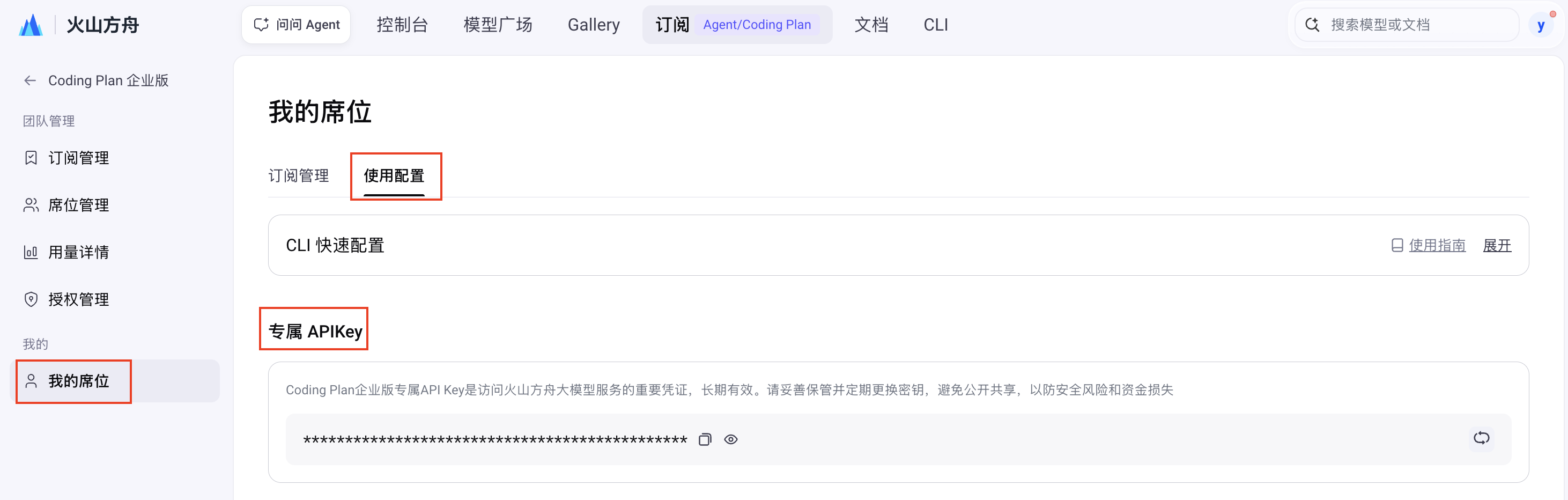
需要获取 Coding Plan 企业版支持的模型、Base URL和专属的 API Key,才能正常使用并抵扣套餐额度。
模型配置#
支持以下两种方式配置模型:
在工具配置文件中指定 Model Name,可实时切换模型。支持配置的 Model Name:
doubao-seed-evolvingdoubao-seed-2.1-prodoubao-seed-2.1-litedoubao-seed-2.0-miniglm-5.3(glm-latest)glm-5.3-flashdeepseek-v4.1-flashdeepseek-v4.1-flash-economydeepseek-v4-flashdeepseek-v4-prokimi-k2.8-previewkimi-k3.1-pro
- 在配置文件中指定模型为
ark-code-latest。 - 通过 Coding Plan 企业版页面 选择或切换目标模型,切换模型后 3-5 分钟即可生效。
支持 Auto 模式,通过「效果 + 速度」双维度智能算法自动选择模型。
专属 Base URL#
不同的工具配置的 Base URL 根据兼容的协议会有不同:
- 兼容 Anthropic 接口协议工具:
https://ark.cn-beijing.volces.com/api/coding - 兼容 OpenAI 接口协议工具:
https://ark.cn-beijing.volces.com/api/coding/v3
专属 API Key#
一、前置操作#
需由管理员账号完成以下前置操作后,子账号方可配置并使用编程工具:
- 购买方舟 Coding Plan 企业版套餐:一、购买 Coding Plan 企业版。
- 为子账号分配席位:二、分配席位。
二、安装 OpenCode#
前提条件:安装 Node.js 18 或更新版本。
在命令行界面,执行以下命令安装 OpenCode。
npm install -g opencode-ai
安装结束后,执行以下命令查看安装结果,若显示版本号则安装成功。
opencode --version
三、配置 OpenCode#
- 创建并打开 OpenCode 的配置文件。文件路径因系统而异,具体操作如下:
macOS/Linux 系统 OpenCode 配置文件路径:~/.config/opencode/opencode.json。
-
如果在主目录下没有
.config/opencode目录,执行以下命令创建目录。mkdir -p ~/.config/opencode -
创建并打开配置文件。
nano ~/.config/opencode/opencode.json
Windows 系统 OpenCode 配置文件路径:%USERPROFILE%\.config\opencode\opencode.json。以 CMD 命令行方式为例,操作如下。
-
如果当前用户目录下没有
.config\opencode目录,执行以下命令创建目录。if not exist "%USERPROFILE%\.config\opencode" mkdir "%USERPROFILE%\.config\opencode" -
创建并打开配置文件。
notepad "%USERPROFILE%\.config\opencode\opencode.json"
-
编辑
opencode.json,需关注的配置信息如下:<ARK_API_KEY>:替换为您自己的 专属 API Key。model:更新为需要使用的模型信息。支持的模型信息参见 模型配置。
Coding Plan 兼容 OpenAI 接口协议,支持 Responses API、Chat API。推荐使用 Responses API 的配置,推理效果更好。
支持的两类 API 仅在 npm 配置上不同:
- Responses API 配置:
"npm": "@ai-sdk/openai" - Chat API 配置:
"npm": "@ai-sdk/openai-compatible"
以配置
ark-code-latest为例,具体信息如下。
{
"$schema": "https://opencode.ai/config.json",
"model": "volcengine-plan/ark-code-latest",
"provider": {
"volcengine-plan": {
"npm": "@ai-sdk/openai",
"name": "Volcano Engine(Responses API)",
"options": {
"baseURL": "https://ark.cn-beijing.volces.com/api/coding/v3",
"apiKey": "<ARK_API_KEY>"
},
"models": {
"ark-code-latest": {
"name": "ark-code-latest",
"limit": {
"context": 256000,
"output": 32000
},
"modalities": {
"input": [
"text",
"image"
],
"output": [
"text"
]
}
},
"doubao-seed-2.1-pro": {
"name": "doubao-seed-2.1-pro",
"limit": {
"context": 1024000,
"output": 65536
},
"modalities": {
"input": [
"text",
"image"
],
"output": [
"text"
]
}
},
"doubao-seed-evolving": {
"name": "doubao-seed-evolving",
"limit": {
"context": 1024000,
"output": 65536
},
"modalities": {
"input": [
"text",
"image"
],
"output": [
"text"
]
}
},
"glm-5.3": {
"name": "glm-5.3",
"limit": {
"context": 1024000,
"output": 65536
},
"modalities": {
"input": [
"text"
],
"output": [
"text"
]
}
},
"glm-5.3-flash": {
"name": "glm-5.3-flash",
"limit": {
"context": 1024000,
"output": 65536
},
"modalities": {
"input": [
"text",
"image"
],
"output": [
"text"
]
}
},
"glm-latest": {
"name": "glm-latest",
"limit": {
"context": 1024000,
"output": 65536
},
"modalities": {
"input": [
"text"
],
"output": [
"text"
]
}
},
"deepseek-v4-flash": {
"name": "deepseek-v4-flash",
"limit": {
"context": 1024000,
"output": 65536
}
},
"deepseek-v4-pro": {
"name": "deepseek-v4-pro",
"limit": {
"context": 1024000,
"output": 65536
}
},
"deepseek-v4.1-flash": {
"name": "deepseek-v4.1-flash",
"limit": {
"context": 1024000,
"output": 65536
},
"modalities": {
"input": [
"text",
"image"
],
"output": [
"text"
]
}
},
"deepseek-v4.1-flash-economy": {
"name": "deepseek-v4.1-flash-economy",
"limit": {
"context": 1024000,
"output": 65536
},
"modalities": {
"input": [
"text",
"image"
],
"output": [
"text"
]
}
},
"doubao-seed-2.1-lite": {
"name": "doubao-seed-2.1-lite",
"limit": {
"context": 1024000,
"output": 65536
},
"modalities": {
"input": [
"text",
"image"
],
"output": [
"text"
]
}
},
"doubao-seed-2.0-mini": {
"name": "doubao-seed-2.0-mini",
"limit": {
"context": 256000,
"output": 65536
},
"modalities": {
"input": [
"text",
"image"
],
"output": [
"text"
]
}
},
"kimi-k2.8-preview": {
"name": "kimi-k2.8-preview",
"limit": {
"context": 1024000,
"output": 65536
},
"modalities": {
"input": [
"text",
"image"
],
"output": [
"text"
]
}
},
"kimi-k3.1-pro": {
"name": "kimi-k3.1-pro",
"limit": {
"context": 1024000,
"output": 65536
},
"modalities": {
"input": [
"text",
"image"
],
"output": [
"text"
]
}
}
}
}
}
}
{
"$schema": "https://opencode.ai/config.json",
"model": "volcengine-plan/ark-code-latest",
"provider": {
"volcengine-plan": {
"npm": "@ai-sdk/openai-compatible",
"name": "Volcano Engine(Chat API)",
"options": {
"baseURL": "https://ark.cn-beijing.volces.com/api/coding/v3",
"apiKey": "<ARK_API_KEY>"
},
"models": {
"ark-code-latest": {
"name": "ark-code-latest",
"limit": {
"context": 256000,
"output": 32000
},
"modalities": {
"input": [
"text",
"image"
],
"output": [
"text"
]
}
},
"doubao-seed-2.1-pro": {
"name": "doubao-seed-2.1-pro",
"limit": {
"context": 1024000,
"output": 65536
},
"modalities": {
"input": [
"text",
"image"
],
"output": [
"text"
]
}
},
"doubao-seed-evolving": {
"name": "doubao-seed-evolving",
"limit": {
"context": 1024000,
"output": 65536
},
"modalities": {
"input": [
"text",
"image"
],
"output": [
"text"
]
}
},
"glm-5.3": {
"name": "glm-5.3",
"limit": {
"context": 1024000,
"output": 65536
},
"modalities": {
"input": [
"text"
],
"output": [
"text"
]
}
},
"glm-5.3-flash": {
"name": "glm-5.3-flash",
"limit": {
"context": 1024000,
"output": 65536
},
"modalities": {
"input": [
"text",
"image"
],
"output": [
"text"
]
}
},
"glm-latest": {
"name": "glm-latest",
"limit": {
"context": 1024000,
"output": 65536
},
"modalities": {
"input": [
"text"
],
"output": [
"text"
]
}
},
"deepseek-v4-flash": {
"name": "deepseek-v4-flash",
"limit": {
"context": 1024000,
"output": 65536
}
},
"deepseek-v4-pro": {
"name": "deepseek-v4-pro",
"limit": {
"context": 1024000,
"output": 65536
}
},
"deepseek-v4.1-flash": {
"name": "deepseek-v4.1-flash",
"limit": {
"context": 1024000,
"output": 65536
},
"modalities": {
"input": [
"text",
"image"
],
"output": [
"text"
]
}
},
"deepseek-v4.1-flash-economy": {
"name": "deepseek-v4.1-flash-economy",
"limit": {
"context": 1024000,
"output": 65536
},
"modalities": {
"input": [
"text",
"image"
],
"output": [
"text"
]
}
},
"doubao-seed-2.1-lite": {
"name": "doubao-seed-2.1-lite",
"limit": {
"context": 1024000,
"output": 65536
},
"modalities": {
"input": [
"text",
"image"
],
"output": [
"text"
]
}
},
"doubao-seed-2.0-mini": {
"name": "doubao-seed-2.0-mini",
"limit": {
"context": 256000,
"output": 65536
},
"modalities": {
"input": [
"text",
"image"
],
"output": [
"text"
]
}
},
"kimi-k2.8-preview": {
"name": "kimi-k2.8-preview",
"limit": {
"context": 1024000,
"output": 65536
},
"modalities": {
"input": [
"text",
"image"
],
"output": [
"text"
]
}
},
"kimi-k3.1-pro": {
"name": "kimi-k3.1-pro",
"limit": {
"context": 1024000,
"output": 65536
},
"modalities": {
"input": [
"text",
"image"
],
"output": [
"text"
]
}
}
}
}
}
}
四、启动并使用 OpenCode#
-
启动 OpenCode:
opencode -
输入
/models,选择配置的模型并在 OpenCode 中使用。