# ZCode
> 全部文档的索引见 [llms.txt](https://ark.volcengine.com/llms.txt);在任一文档页面地址后追加 `.md` 可获取该页的 Markdown 版本。
ZCode 是智谱推出的桌面 AI 编程客户端(macOS / Windows / Linux),深度集成 GLM 系列模型,同时兼容自定义 OpenAI / Anthropic 协议供应商。本文介绍如何在 ZCode 中接入方舟 Agent Plan。
# 一、前提条件
* 您已按需订阅 Agent Plan 套餐。如未,请访问 [开通管理-Agent Plan](https://ark.volcengine.com/region:cn-beijing/subscription/agent-plan?agentMode=close) 页面订阅套餐。
- 访问 [ZCode 官网](https://zcode.z.ai/cn#all-downloads),下载并安装适合您操作系统的版本。安装步骤可参考 [ZCode 官方安装教程](https://zcode.net.cn/en/docs/install#setup-guide),安装完成后按提示登录。
# 二、配置 ZCode
Agent Plan 同时兼容 OpenAI 与 Anthropic 接口协议,ZCode 均支持。
## 方式 1:自动化助手(推荐)
ArkCLI Helper 是一个编码工具助手,支持快速配置选择的工具接入 Agent Plan。安装并运行该助手,根据界面提示操作可自动完成工具配置,降低手动配置的时间成本和出错风险。
> **注意**
>
> * ArkCLI Helper 是基于 Ark Helper 升级演进的工具配置服务,相关能力将持续在 ArkCLI Helper 上迭代更新。建议优先使用 ArkCLI Helper 完成工具配置。
> * ArkCLI Helper 支持 macOS、Linux、Windows 系统。
1. 安装 Ark CLI。
```Bash
# 1. 通过 NPM 安装
npm install -g @volcengine/ark-cli@latest
# 2. 验证安装
arkcli --version
```
2. 登录 Ark CLI。
```Bash
arkcli auth login
```
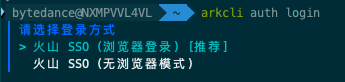
根据界面提示选择登录方式。若之前已登录过 arkcli,会沿用上次选择的配置;如需重新选择,请先执行 `arkcli config reset` 后再运行 `arkcli auth login`。首次登录时,按提示完成以下配置:
1. **选择项目(Project)**:可按需选择,或默认选择**账号全部资源**。
2. **选择消费模式(Type)**:选择 `agent-plan`。
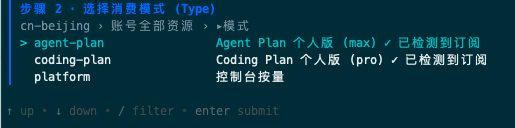
其中:
* ``:运行 ArkCLI Helper 时填写的 Agent Plan 专属 API Key。
3. 运行 ArkCLI Helper,根据界面提示完成 ZCode 的配置。
1. 在命令行界面输入 `arkcli helper` 命令,启动 ArkCLI Helper。
运行过程中会提示填写 Agent Plan 专属 API Key;如需在本地环境变量中管理,可使用 `ARK_API_KEY` 作为变量名。
2. **选择要配置的 Plan profile**:`agent-plan_cn-beijing_personal (Agent Plan)`。

3. **选择默认 model**:按需选择。
4. **选择要配置的 AI Agent**:`ZCode`。
当前支持的 Harness 包括:豆包搜索、专业数据集、Agent 记忆(OpenViking)、AI Native 应用开发底座,根据界面提示按需选择`配置`或者`跳过`。
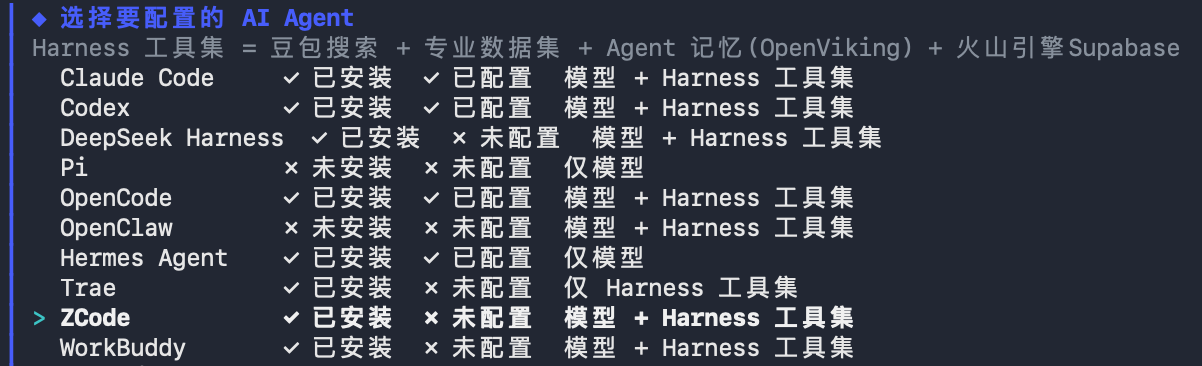
完成上述操作后,将自动完成 ZCode 的基础配置,并按选择结果自动安装对应的 Harness 工具,无需手动安装。
## 方式 2:手动配置
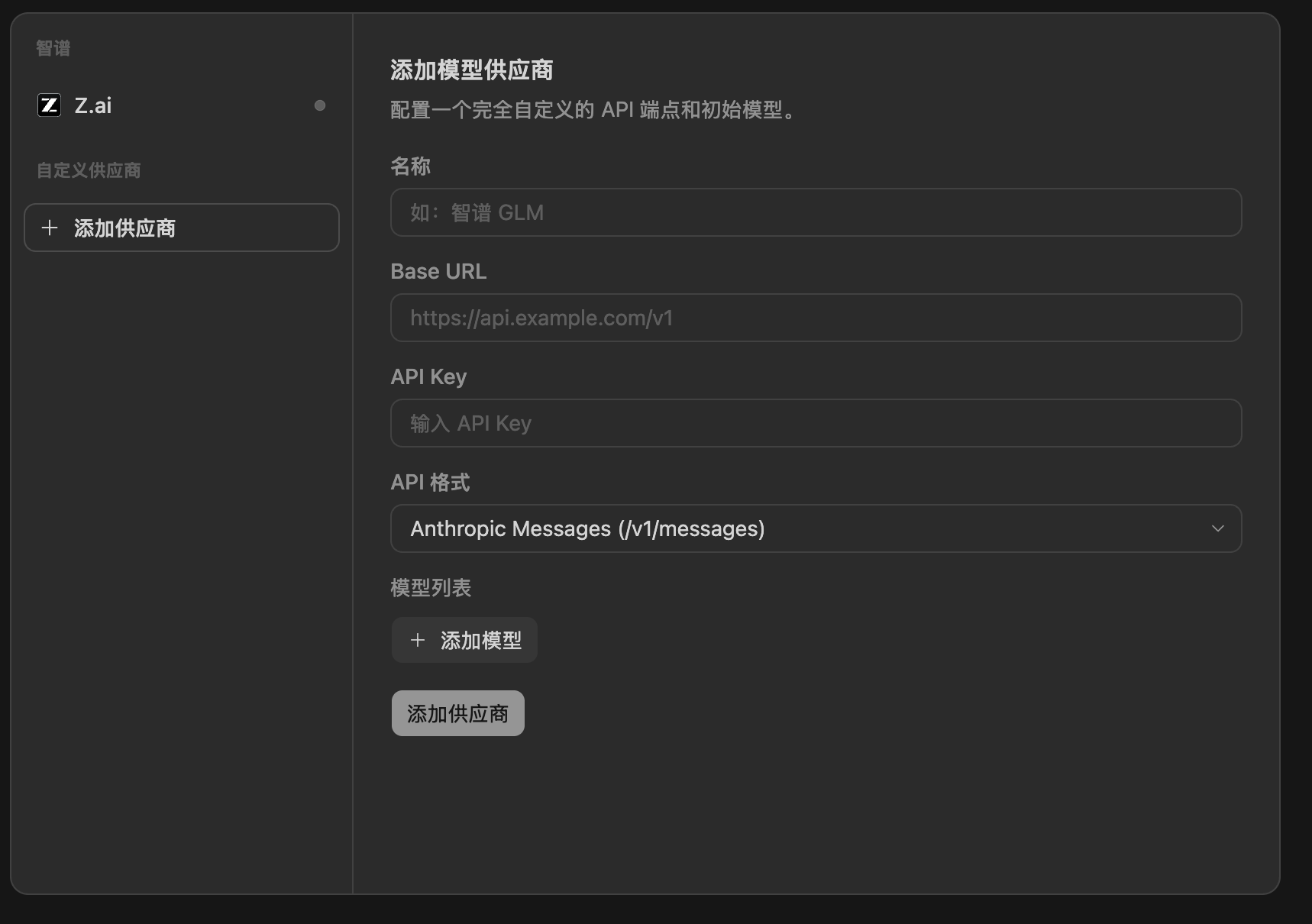
1. 打开 ZCode 客户端,单击左下角 **设置** 图标,进入 **模型设置**,单击 **添加供应商**。
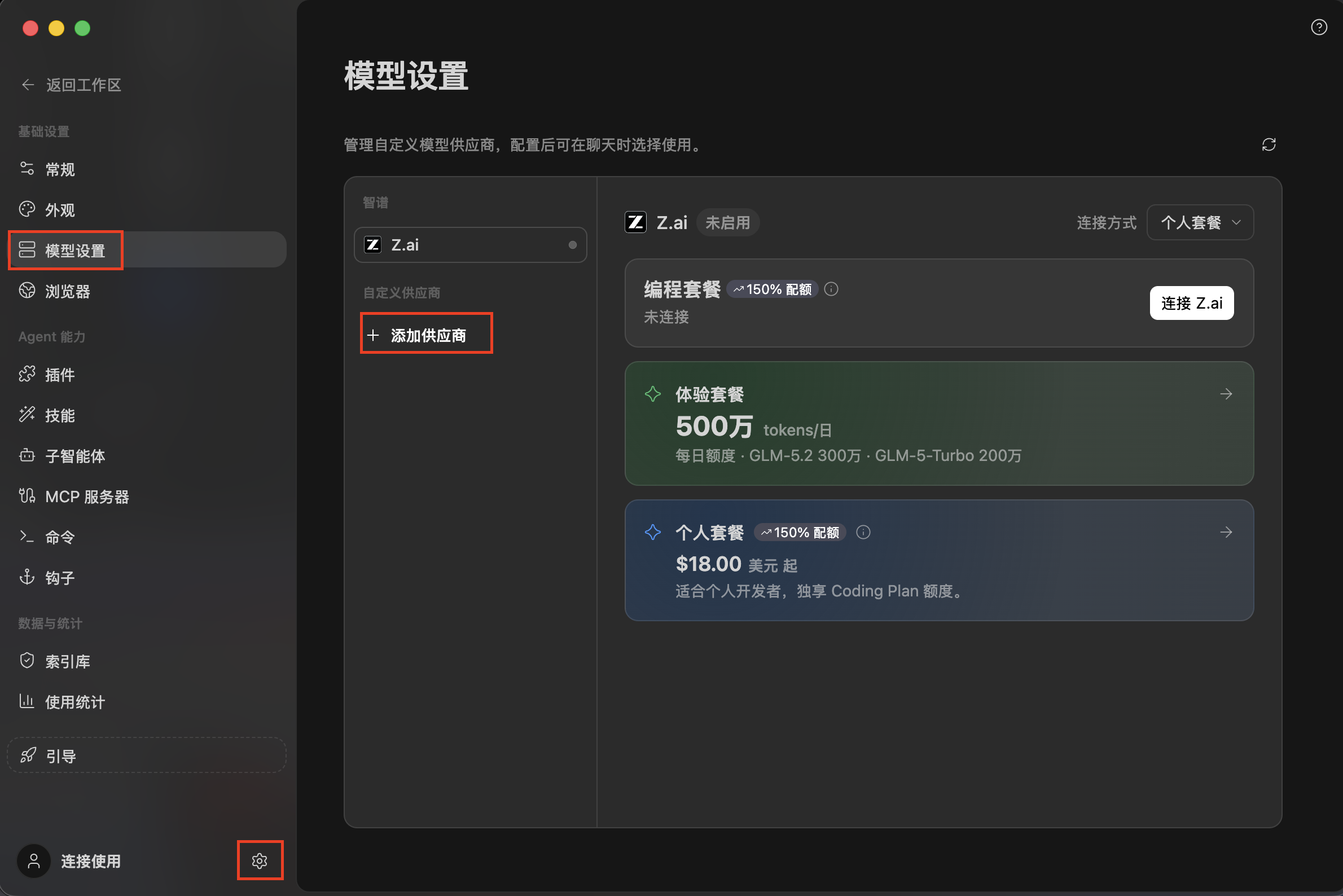
2. 在弹出的表单中填写以下字段,保存供应商。
* **名称**:自定义,便于识别,例如 `Ark Agent Plan`。
* **Base URL**:`https://ark.cn-beijing.volces.com/api/plan/v3`(OpenAI 协议);若使用 Anthropic 协议,填 `https://ark.cn-beijing.volces.com/api/plan`。
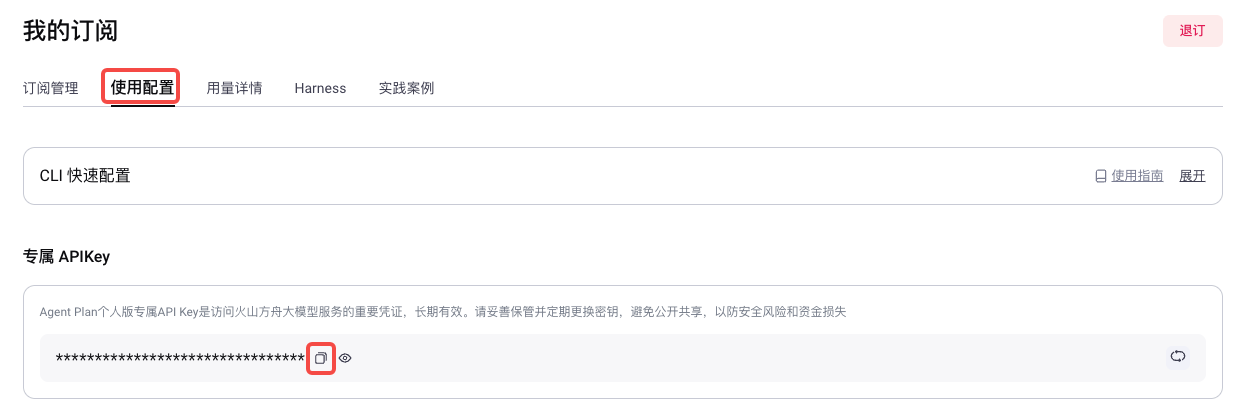
* **API Key**:填写 Agent Plan [专属 API Key](https://ark.volcengine.com/region:cn-beijing/subscription/agent-plan?agentMode=close)。请勿混用方舟平台的普通 API Key。
* **API 格式**:取决于选择的 Base URL。
|API 格式 |Base URL |
|---|---|
|Anthropic Messages |`https://ark.cn-beijing.volces.com/api/plan` |
|Chat Completions |`https://ark.cn-beijing.volces.com/api/plan/v3` |
|Responses |`https://ark.cn-beijing.volces.com/api/plan/v3` |
3. 单击 **添加模型**,在表单中填写以下字段,保存模型。可以多次点击 **添加模型**,为一个供应商添加多个模型。
* **模型 ID**:填入所选套餐支持的 Model Name,详见 [支持模型及 Harness](/docs/agent-plan-personal-plan-overview#3d801f5f),需配置文本生成模型。
* **上下文窗口**:按所选模型的最大上下文长度填写,取值参见 [支持模型及 Harness](/docs/agent-plan-personal-plan-overview#3d801f5f)。
* **最大输出 Token**(可选):按需填写,默认可留空跟随模型上限。
除了在客户端 UI 中添加供应商,也可以直接编辑本地配置文件 `~/.zcode/v2/config.json`(Windows 系统为 `%USERPROFILE%\.zcode\v2\config.json`)。首次通过 UI 完成任意配置后该文件会自动生成,已有内容时在 `provider` 对象中追加一条即可。
API 格式为**Anthropic Messages**时,`~/.zcode/v2/config.json` 示例
```JSON
{
"provider": {
...
"ark-agent-plan": {
"name": "Ark Agent Plan",
"kind": "anthropic",
"options": {
"apiKey": "",
"baseURL": "https://ark.cn-beijing.volces.com/api/plan",
"apiKeyRequired": true
},
"enabled": true,
"source": "custom",
"models": {
"ark-code-latest": {
"limit": { "context": 256000, "output": 32768 },
"modalities": { "input": ["text", "image"], "output": ["text"] }
},
"doubao-seed-evolving": {
"limit": { "context": 1024000, "output": 262144 },
"modalities": { "input": ["text", "image"], "output": ["text"] }
},
"doubao-seed-2.1-pro": {
"limit": { "context": 1024000, "output": 256000 },
"modalities": { "input": ["text", "image"], "output": ["text"] }
},
"doubao-seed-2.1-lite": {
"limit": { "context": 1024000, "output": 256000 },
"modalities": { "input": ["text", "image"], "output": ["text"] }
},
"doubao-seed-2.0-mini": {
"limit": { "context": 256000, "output": 128000 },
"modalities": { "input": ["text", "image"], "output": ["text"] }
},
"deepseek-v4.1-flash": {
"limit": { "context": 1024000, "output": 393216 },
"modalities": { "input": ["text", "image"], "output": ["text"] }
},
"deepseek-v4-flash": {
"limit": { "context": 1024000, "output": 393216 },
"modalities": { "input": ["text"], "output": ["text"] }
},
"deepseek-v4-pro": {
"limit": { "context": 1024000, "output": 393216 },
"modalities": { "input": ["text"], "output": ["text"] }
},
"glm-5.3": {
"limit": { "context": 1024000, "output": 131072 },
"modalities": { "input": ["text"], "output": ["text"] }
},
"glm-5.3-flash": {
"limit": { "context": 1024000, "output": 131072 },
"modalities": { "input": ["text", "image"], "output": ["text"] }
},
"glm-latest": {
"limit": { "context": 1024000, "output": 131072 },
"modalities": { "input": ["text"], "output": ["text"] }
},
"minimax-m3": {
"limit": { "context": 1024000, "output": 131072 },
"modalities": { "input": ["text", "image"], "output": ["text"] }
},
"kimi-k3": {
"limit": { "context": 1024000, "output": 131072 },
"modalities": { "input": ["text", "image"], "output": ["text"] }
},
"kimi-k2.8-preview": {
"limit": { "context": 1024000, "output": 1024000 },
"modalities": { "input": ["text", "image"], "output": ["text"] }
}
}
}
...
}
}
```
API 格式为**Chat Completions**时,`~/.zcode/v2/config.json` 示例
```JSON
{
"provider": {
...
"ark-agent-plan": {
"name": "Ark Agent Plan",
"kind": "openai-compatible",
"options": {
"apiKey": "",
"baseURL": "https://ark.cn-beijing.volces.com/api/plan/v3",
"apiKeyRequired": true
},
"enabled": true,
"source": "custom",
"models": {
"ark-code-latest": {
"limit": { "context": 256000, "output": 32768 },
"modalities": { "input": ["text", "image"], "output": ["text"] }
},
"doubao-seed-evolving": {
"limit": { "context": 1024000, "output": 262144 },
"modalities": { "input": ["text", "image"], "output": ["text"] }
},
"doubao-seed-2.1-pro": {
"limit": { "context": 1024000, "output": 256000 },
"modalities": { "input": ["text", "image"], "output": ["text"] }
},
"doubao-seed-2.1-lite": {
"limit": { "context": 1024000, "output": 256000 },
"modalities": { "input": ["text", "image"], "output": ["text"] }
},
"doubao-seed-2.0-mini": {
"limit": { "context": 256000, "output": 128000 },
"modalities": { "input": ["text", "image"], "output": ["text"] }
},
"deepseek-v4.1-flash": {
"limit": { "context": 1024000, "output": 393216 },
"modalities": { "input": ["text", "image"], "output": ["text"] }
},
"deepseek-v4-flash": {
"limit": { "context": 1024000, "output": 393216 },
"modalities": { "input": ["text"], "output": ["text"] }
},
"deepseek-v4-pro": {
"limit": { "context": 1024000, "output": 393216 },
"modalities": { "input": ["text"], "output": ["text"] }
},
"glm-5.3": {
"limit": { "context": 1024000, "output": 131072 },
"modalities": { "input": ["text"], "output": ["text"] }
},
"glm-5.3-flash": {
"limit": { "context": 1024000, "output": 131072 },
"modalities": { "input": ["text", "image"], "output": ["text"] }
},
"glm-latest": {
"limit": { "context": 1024000, "output": 131072 },
"modalities": { "input": ["text"], "output": ["text"] }
},
"minimax-m3": {
"limit": { "context": 1024000, "output": 131072 },
"modalities": { "input": ["text", "image"], "output": ["text"] }
},
"kimi-k3": {
"limit": { "context": 1024000, "output": 131072 },
"modalities": { "input": ["text", "image"], "output": ["text"] }
},
"kimi-k2.8-preview": {
"limit": { "context": 1024000, "output": 1024000 },
"modalities": { "input": ["text", "image"], "output": ["text"] }
}
}
}
...
}
}
```
API 格式为**Responses**时,`~/.zcode/v2/config.json` 示例
```JSON
{
"provider": {
...
"ark-agent-plan": {
"name": "Ark Agent Plan",
"kind": "openai",
"options": {
"apiKey": "",
"baseURL": "https://ark.cn-beijing.volces.com/api/plan/v3",
"apiKeyRequired": true
},
"enabled": true,
"source": "custom",
"models": {
"ark-code-latest": {
"limit": { "context": 256000, "output": 32768 },
"modalities": { "input": ["text", "image"], "output": ["text"] }
},
"doubao-seed-evolving": {
"limit": { "context": 1024000, "output": 262144 },
"modalities": { "input": ["text", "image"], "output": ["text"] }
},
"doubao-seed-2.1-pro": {
"limit": { "context": 1024000, "output": 256000 },
"modalities": { "input": ["text", "image"], "output": ["text"] }
},
"doubao-seed-2.1-lite": {
"limit": { "context": 1024000, "output": 256000 },
"modalities": { "input": ["text", "image"], "output": ["text"] }
},
"doubao-seed-2.0-mini": {
"limit": { "context": 256000, "output": 128000 },
"modalities": { "input": ["text", "image"], "output": ["text"] }
},
"deepseek-v4.1-flash": {
"limit": { "context": 1024000, "output": 393216 },
"modalities": { "input": ["text", "image"], "output": ["text"] }
},
"deepseek-v4-flash": {
"limit": { "context": 1024000, "output": 393216 },
"modalities": { "input": ["text"], "output": ["text"] }
},
"deepseek-v4-pro": {
"limit": { "context": 1024000, "output": 393216 },
"modalities": { "input": ["text"], "output": ["text"] }
},
"glm-5.3": {
"limit": { "context": 1024000, "output": 131072 },
"modalities": { "input": ["text"], "output": ["text"] }
},
"glm-5.3-flash": {
"limit": { "context": 1024000, "output": 131072 },
"modalities": { "input": ["text", "image"], "output": ["text"] }
},
"glm-latest": {
"limit": { "context": 1024000, "output": 131072 },
"modalities": { "input": ["text"], "output": ["text"] }
},
"minimax-m3": {
"limit": { "context": 1024000, "output": 131072 },
"modalities": { "input": ["text", "image"], "output": ["text"] }
},
"kimi-k3": {
"limit": { "context": 1024000, "output": 131072 },
"modalities": { "input": ["text", "image"], "output": ["text"] }
},
"kimi-k2.8-preview": {
"limit": { "context": 1024000, "output": 1024000 },
"modalities": { "input": ["text", "image"], "output": ["text"] }
}
}
}
...
}
}
```
> **注意**
>
> * `` 替换为您的 Agent Plan [专属 API Key](https://ark.volcengine.com/region:cn-beijing/subscription/agent-plan?agentMode=close),请勿混用方舟平台的普通 API Key。
> * 上述示例列出的是 Agent Plan 目前在售的文本生成模型全集。不同套餐(Small / Medium / Large / Max)支持的模型不同,请以 [支持模型及 Harness](/docs/agent-plan-personal-plan-overview#3d801f5f) 中的支持矩阵为准,删除您所选套餐不支持的条目,避免调用时收到 model not found 错误。
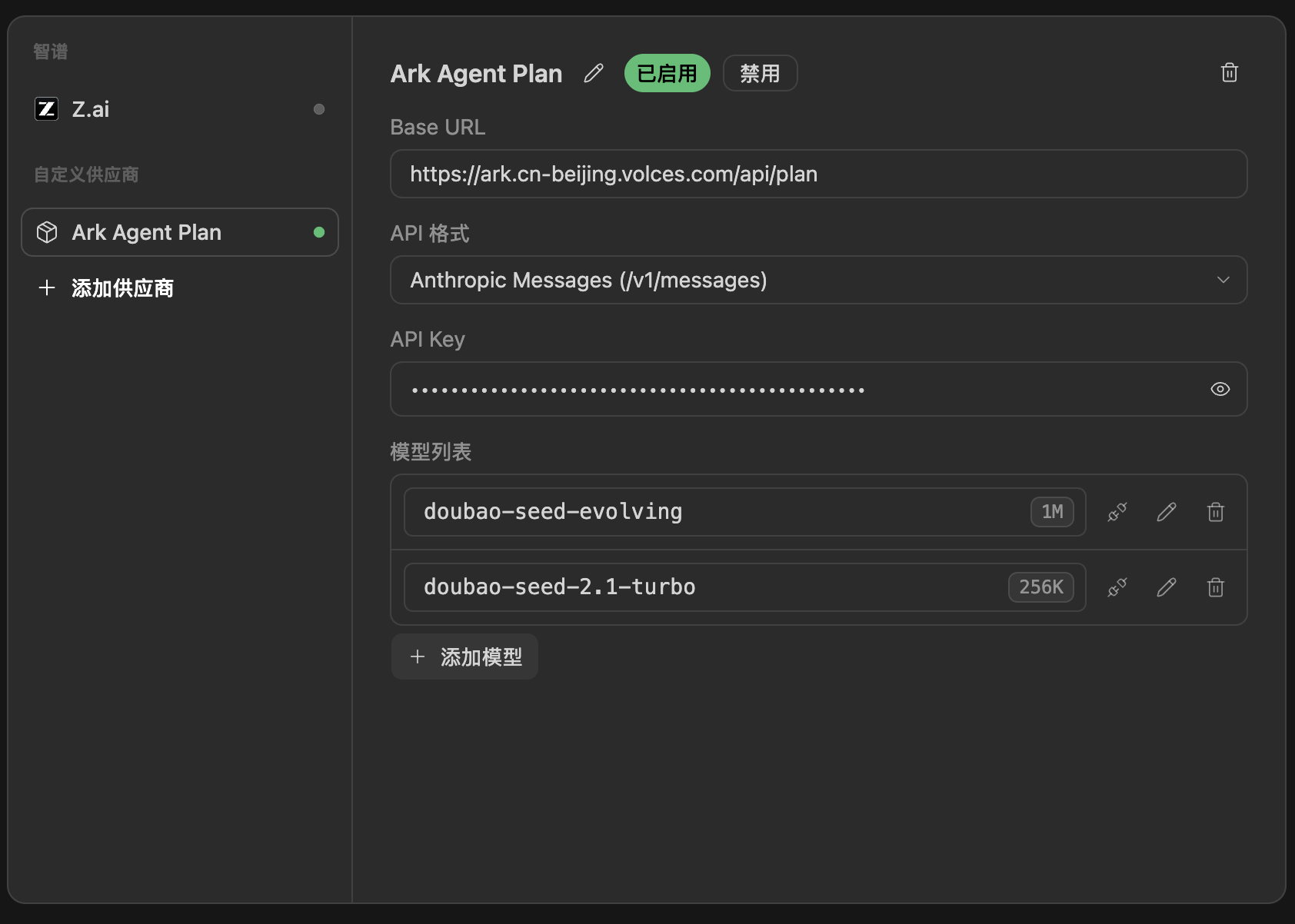
4. 保存完成后,回到 ZCode 主界面。
# 三、使用 ZCode
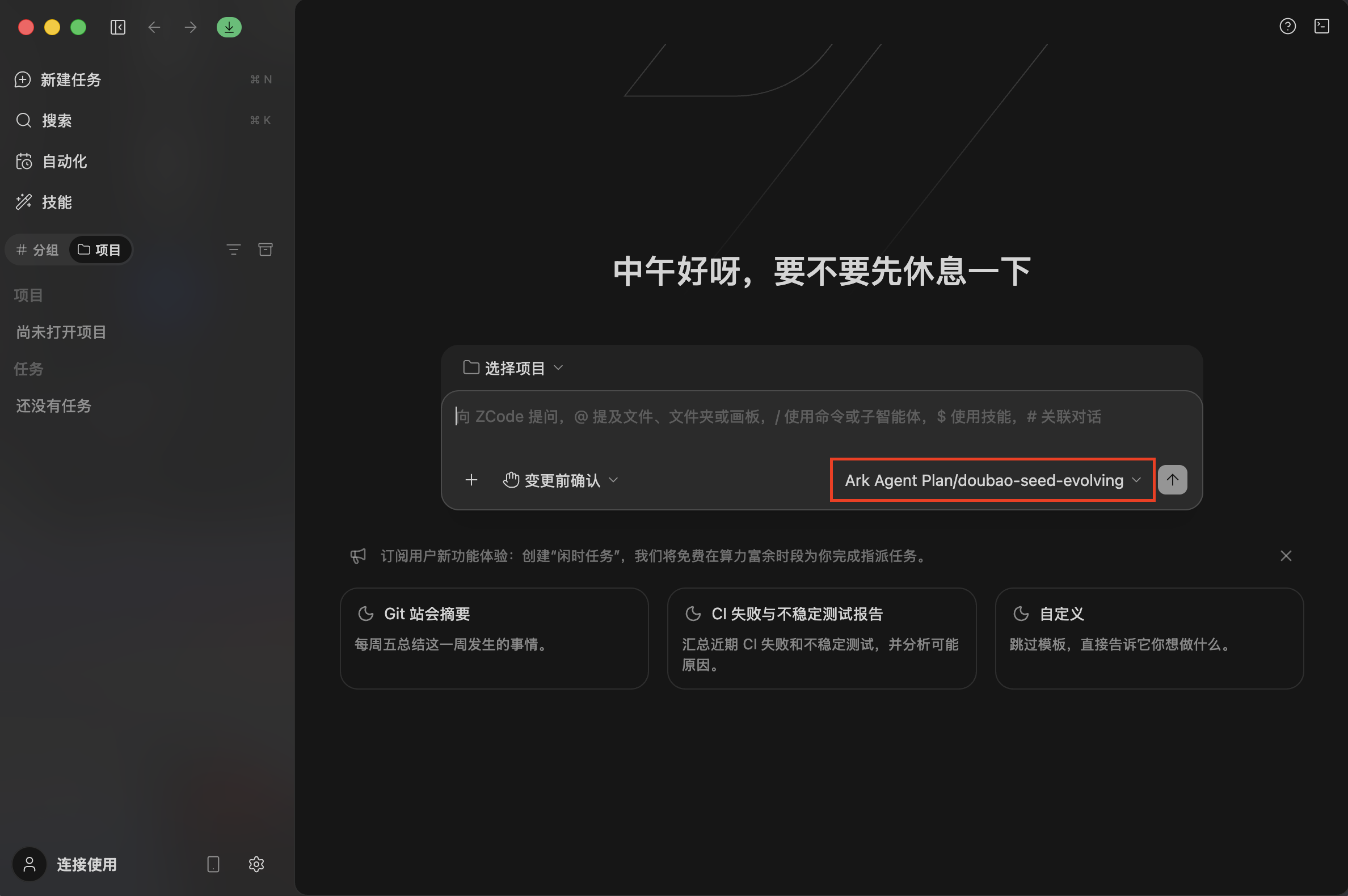
1. 在 ZCode 主界面顶部的模型下拉中,选中刚添加的模型。
2. 在对话框输入你的需求(如生成代码、修复 bug、重构、写单元测试),回车即可开始对话开发。ZCode 支持规划、编码、评审与上线等全流程研发场景。
> 更多使用技巧和高级功能参见 [ZCode 官方文档](https://zcode.net.cn/en/docs)。