# Ark CLI:Agent Plan 企业版使用指南
> 全部文档的索引见 [llms.txt](https://ark.volcengine.com/llms.txt);在任一文档页面地址后追加 `.md` 可获取该页的 Markdown 版本。
Ark CLI 是火山方舟平台官方命令行工具,可在本地终端快捷配置与管理 Agent Plan 企业版的套餐、席位、模型和 Harness 能力。
# 一、安装和登录 ArkCLI
**环境要求:** Node.js >= 16
**选项:手动安装并登录**
## 安装 Ark CLI
在终端执行以下命令:
```Bash
# 1. 通过 NPM 安装(下载最新版本)
npm install -g @volcengine/ark-cli@latest
# 2. 验证安装
arkcli --version
```
## 登录 Ark CLI
```Bash
# 登录方式
arkcli auth login
# 查看登录状态
arkcli auth status
```
**选项:通过 AI Agent 安装并登录**
将下方提示词复制给 AI Agent(Claude Code、Codex、Cursor、Trae 等),它会自动完成安装。
```Plain
根据下面命令帮我安装 Ark CLI:https://lf3-static.bytednsdoc.com/obj/eden-cn/psjryh/ljhwZthlaukjlkulzlp/intro/volc.md
```
# 二、配置 Agent Plan 企业版
> 目前支持 Claude Code、Codex、OpenCode、OpenClaw、Trae 等主流工具,更多 Agent 陆续支持中。
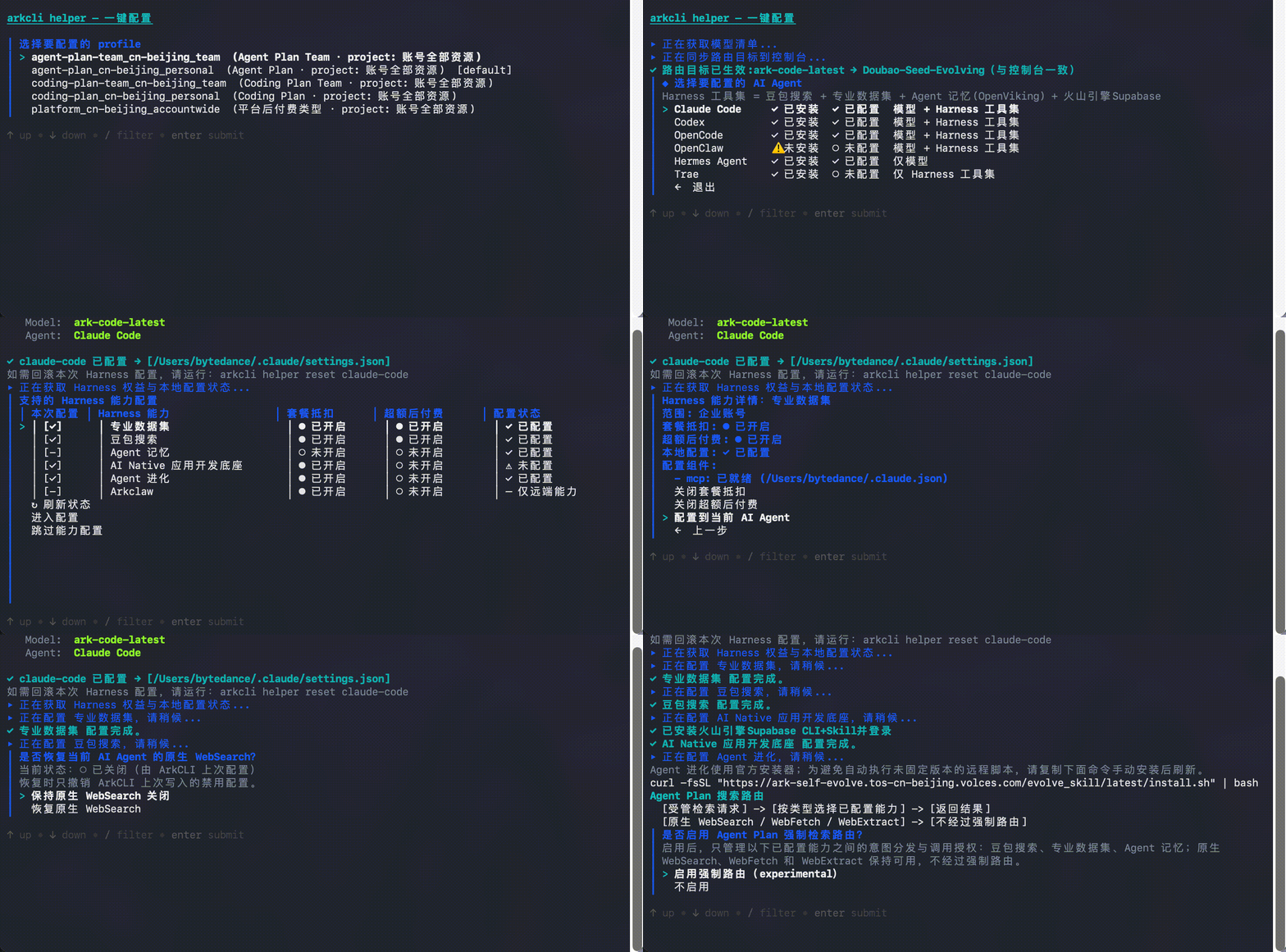
在终端中输入命令 `arkcli helper`,根据 TUI 交互引导配置套餐、模型、harness 能力。
现以Agent plan企业版配置Claude Code为例:
# 三、使用 ArkCLI
## 能力概览
ArkCLI 支持 Agent Plan 企业版相关命令,覆盖**交易、配置、用量、管理、安全、场景化使用**六大范围,更多能力见 [ArkCLI 指南](/docs/ark-cli)。
- 交易:新购、续费、查询账号下套餐状态
- 配置:配置模型/Harness 能力、查询套餐支持模型、查询配置状态
- 用量:余额查询、用量查询、具体模型/工具用量查询、席位用量查询
- 管理:分配席位、查询席位信息列表、席位用量列表
- 安全:轮换 API Key
- 场景化能力:生图/生视频、Harness 能力使用
## 交易
**选项:通过 Agent 调用**
| 功能 | 示例提示词 |
| --- | --- |
| 新购套餐 | "我想买一个 Agent Plan Team Max,5 个席位,帮我下单" |
| 续费套餐 | "帮我续费 Agent Plan 企业版的几个席位一个月" |
| 查询账号下套餐状态 | "我都订阅了哪些 Plan?是什么规格?" |
**选项:通过终端调用**
- 新购套餐:
```Bash
arkcli plans buy --plan <套餐名> --type <规格> [--duration <月数>] [--quantity <席位数>] [--yes]
```
- 续费:
```Bash
arkcli plans renew --plan <套餐名> [--duration <月数>] [--seat-ids ] [--yes]
```
- 查询账号下套餐状态:
```Bash
arkcli plans get
```
## 配置
| 功能 | 示例提示词 |
| --- | --- |
| 配置全部 Harness 能力 | "把 Agent Plan 企业版的 harness 能力都配到我本机的 Claude Code 上" |
| 仅配置单项 Harness 能力 | "帮我的 Codex 装上豆包搜索的 MCP" |
| 移除配置 | "把 claude code 上的豆包搜索 mcp 配置移除" |
| 查询配置状态 | "看看我本机哪些 AI 工具已经接了 Agent Plan 企业版,MCP 装齐了没" |
| 查询套餐支持的模型 | "Agent Plan 企业版 Team Max 支持哪些模型?" |
## 用量
| 功能 | 示例提示词 |
| --- | --- |
| 余额查询 | "我这个月 Agent Plan 企业版 还剩多少 AFP?" |
| 用量查询 | "我本周 doubao-seed-2.1-lite 用了多少 AFP?" |
| 席位用量查询 | "把我们团队每个席位这周分别用了多少显示出来" |
| Model/Harness 用量查询 | "我本周 doubao-seed-2.1-lite 用了多少 AFP?" |
## 管理
管理功能仅管理员可用。
**选项:通过 Agent 调用**
| 功能 | 示例提示词 |
| --- | --- |
| 席位列表 | "列一下我们企业版 Agent Plan 现在都有哪些席位,谁绑了哪个" |
| 分配席位 | "把 seat-abc123 席位分配给同事 zhangsan" |
| 查询某个席位绑定关系 | "seat-abc123 现在绑的是谁?" |
**选项:通过终端调用**
**列出企业版席位及绑定关系:**
```Bash
arkcli plans team seat-list --plan agent-plan-team
```
**查询指定席位的绑定关系:**
```Bash
arkcli plans team seat-list --plan agent-plan-team --seat-id seat-abc123
```
**把席位分配给员工(绑定):**
```Bash
# 将 seat-abc123 绑定给 IAM 子用户( 为子用户 ID)
arkcli plans team seat-assign --plan agent-plan-team --bind seat-abc123=
# 批量绑定(重复 --bind)
arkcli plans team seat-assign --plan agent-plan-team \
--bind seat-abc123= \
--bind seat-def456=
```
## 安全
**选项:通过 Agent 调用**
| 功能 | 示例提示词 |
| --- | --- |
| 子用户轮换 Agent Plan 企业版席位 API Key | "把企业版我的席位 API Key 轮换一下" |
| 管理员轮换 Agent Plan 企业版其他席位 API Key | "把企业版里 zhangsan 那个席位的 API Key 轮换掉" |
**选项:通过终端调用**
> **注意**
>
> 轮换命令需二次确认,执行后原 API Key 立即失效,请及时替换 harness 配置。
**子用户轮换自己的企业版席位:**
```Bash
arkcli plans team rotate-apikey
```
**管理员轮换他人的企业版席位(批量):**
```Bash
arkcli plans team rotate-apikey --seat-ids s1,s2
```
## 场景化能力
> **说明**
>
> - ArkCLI 支持配置 Agent Plan 套餐内的 Harness 能力。对于需要额外安装的 Harness,ArkCLI 可完成对应 Skill、MCP 的安装与配置。
> - 相关 Harness:
> - [专业数据集](/docs/agent-plan-personal-datapro)
> - [豆包搜索](/docs/agent-plan-personal-search)
> - [Agent 记忆](/docs/agent-plan-personal-openviking-memory)
> - [AI Native 应用开发底座](/docs/agent-plan-personal-supabase)
> - 除上述 Harness 能力外,ArkCLI 还内置生图、生视频等命令,可通过 Agent 或终端直接调用。
**选项:通过 Agent 调用**
可直接通过提示词说明生图、生视频要求,具体能力可见 [Agent Plan 企业版 支持视觉模型能力](/docs/agent-plan-personal-visual-models#7a1c4e9b)。
**生图:**
```Bash
"帮我使用 Agent Plan 企业版 生成一张 4k 大图,一只赛博朋克风格的猫咪坐在东京街头,霓虹灯反射"
```
**生视频:**
```Bash
视频生成:"生成一段 5 秒 16:9 视频:无人机航拍雪山日出,缓慢右移,同步等结果"
查询列表:"目前我都有哪些视频正在生成中?"
查询进度:"刚刚的视频生成好了吗?"
取消任务:"取消刚刚的视频生成任务"
```
**选项:通过终端调用**
**1. 生图**
```Bash
arkcli +gen "赛博朋克风格的猫咪坐在东京街头,霓虹灯反射"
```
```Bash
arkcli +gen "赛博朋克猫咪,霓虹灯反射,超写实" \
--model doubao-seedream-5.0 \
--size 1024x1024 \
--image-count 4 \
--save-to ./out
```
**图生图:**
```Bash
arkcli +gen "把这只猫改成水彩画风格" \
--input @./cat.png \
--model doubao-seedream-5.0 \
--save-to ./out
```
**2. 生视频**
```Bash
# 生成视频
# 方式一:异步
arkcli +gen "无人机航拍雪山日出,缓慢平移" --modality video --duration 5 --ratio 16:9
# 方式二:同步
arkcli +gen "无人机航拍雪山日出,缓慢平移" --modality video --duration 5 --ratio 16:9 --wait --save-to ./out
# 查单个视频任务(成功后自动下载)
arkcli gen get cgt-20260708-xxxxxxxx --save-to ./out
# 列出最近任务(分页)
arkcli gen list --page-size 10
# 删除任务
arkcli gen delete cgt-20260708-xxxxxxxx --yes
```